

In the previous article, we built a mini order system with Go, Gin, Keycloak, Temporal, MySQL, MongoDB, and gRPC to get a high-level view of how a multi-component backend works end to end. From authentication and order processing to internal service calls and asynchronous workflows, the goal of that part was to get the system running and build a solid mental model of the entire playground.
But getting everything to build and run is only the first step. In this part, I want to go deeper into the real issues that came up while building and testing the system: rejected tokens, port conflicts, workflows stuck in endless retries, inconsistent database state, and confusing Keycloak realm behavior. Those debugging moments are what really helped me understand what each component was doing, how they fit together, and which screen to open first when something went wrong.
1. Executive Summary
Here is the repository I prepared in advance: https://github.com/Keruedu/OrderPlayground
After building the playground, the part that taught me the most was not when everything was working — it was when things started breaking. This article documents how I debugged real issues: PowerShell blocking scripts, Docker and port conflicts, MySQL public key errors in the client, Keycloak realm confusion, JWT issuer mismatches, and Temporal activity retries.
- Keycloak should be treated as a place to debug identity and access, not just as a login screen.
- Temporal UI is where you inspect workflow history, activity retries, and the state of asynchronous orders.
- Database state and audit events are the evidence you use to verify how far a workflow has actually progressed.
- Good debugging is about reducing uncertainty one step at a time, not changing multiple things at once.
2. Motivation: a running system does not always mean you understand it
When the API returns 200, it is easy to feel like you understand the system. But as soon as a token gets rejected, an order stays stuck in PENDING, or a workflow keeps retrying forever, you realize that real understanding means knowing which screen to open, which signal to look at, and which part to fix.
That is why this article is not another tech stack walkthrough. Instead, I go incident by incident: what the symptom was, where I looked first, what I checked, and what mental model I took away from it.
3. Background knowledge you should know
| Term | My simple explanation | Where to look |
|---|---|---|
| Realm | An isolated space for managing users, clients, and roles. | Keycloak Admin Console |
| Client | An application that requests or uses tokens. In this case, it is gateway-api. | Keycloak > Clients |
| JWT issuer | The field that says who issued the token. If the issuer is wrong, the gateway rejects it. | Token payload + gateway config |
| Workflow | A multi-step process for handling an order. | Temporal UI |
| Activity | A specific step, for example reserving inventory. | Temporal workflow history |
| Audit event | A business log you can read to trace where an order has already gone. | MongoDB audit_events |
With Keycloak, I separate authentication from authorization: who the user is, and what the user is allowed to do. With Temporal, I separate workflows from activities: the larger process and the smaller individual steps inside it. With the database layer, I separate business state from the audit trail: the current state versus the history of what already happened.
4. Mental model: open the right screen first
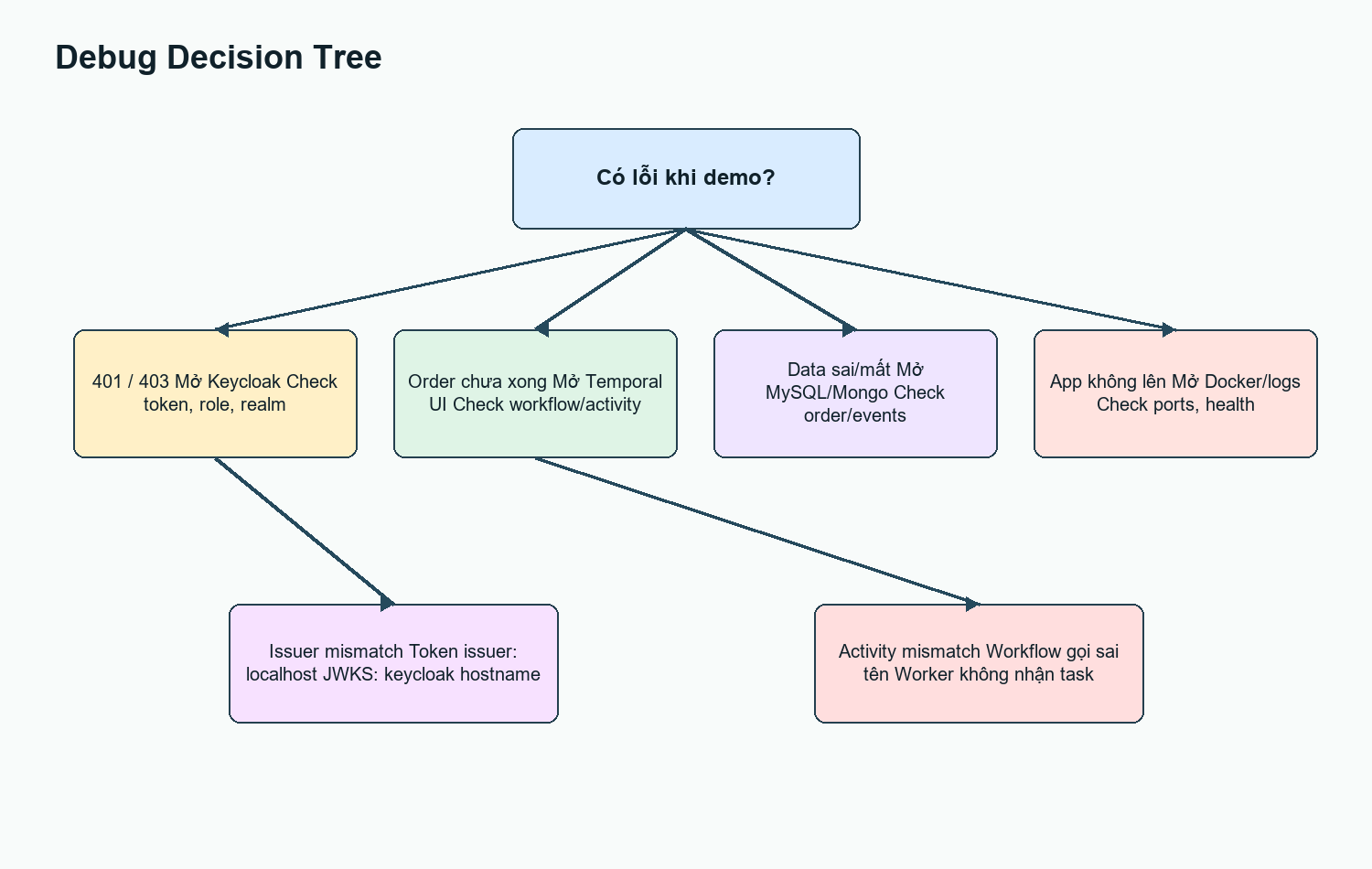
Figure 1. Debug decision tree: which screen to open first when something goes wrong.
Good debugging in this playground means validating one hypothesis at a time. If the API returns 403, I check the token and roles first. If an order is stuck in PENDING, I open Temporal history first. If the workflow is completed but the data is wrong, I check MySQL and MongoDB.
| Path | What question does it answer? | Tool I open |
|---|---|---|
| Request path | How does a request move from the user through the gateway, auth, database, and workflow startup? | API response + gateway logs |
| Control path | Has the Temporal worker received the task yet, and which activity is retrying? | Temporal UI |
| Debug path | Where is the real state right now, and does it match what I expect? | MySQL, MongoDB, Docker logs |
- Bad: changing Keycloak config, restarting Temporal, and editing the repository all at the same time.
- Good: writing down the symptom, choosing one signal, testing again, and only then fixing the right part.
5. Deep dive by incident
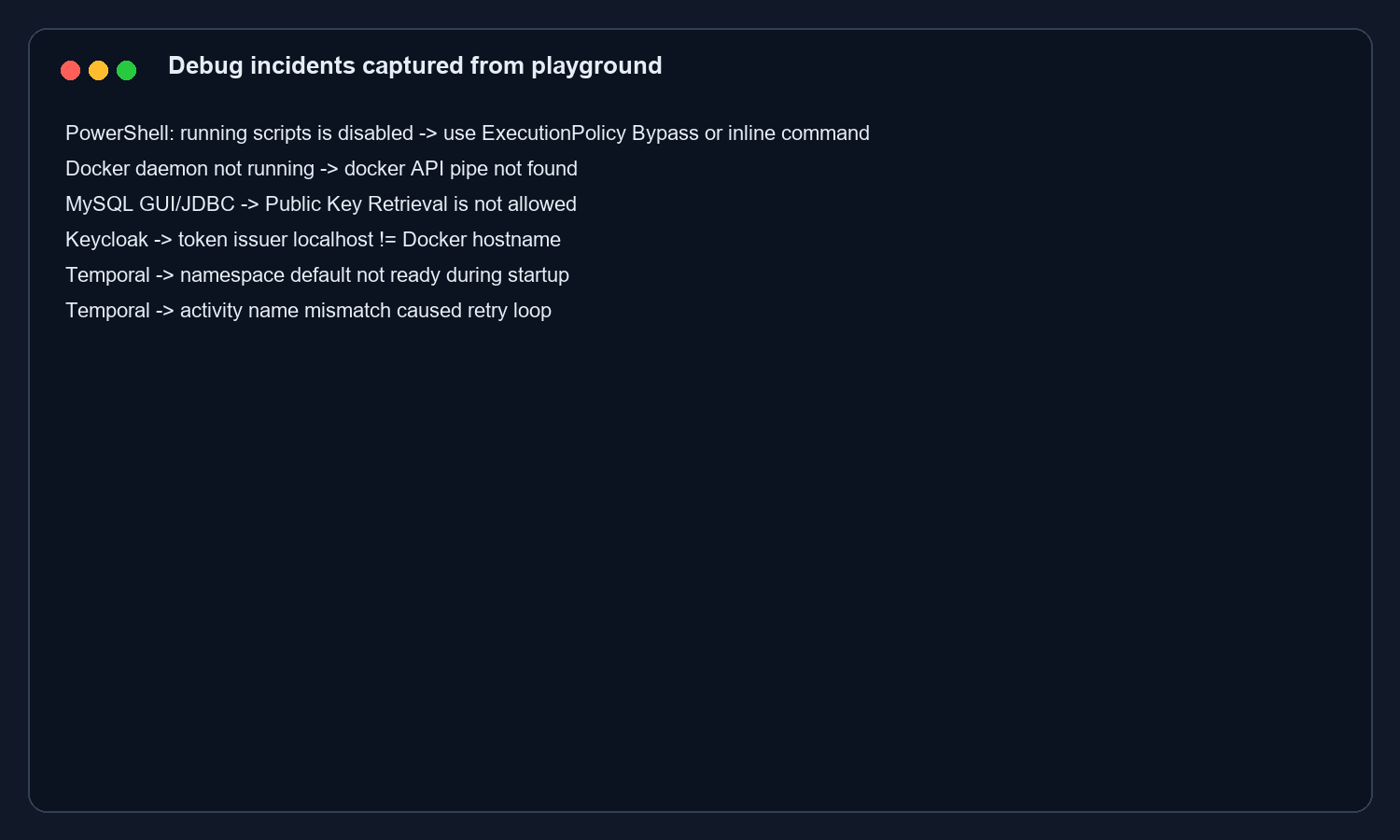
Figure 2. Real issues encountered while building the playground.
I go through each incident below using the same format: where the symptom showed up, which tool I opened first, which signal confirmed the hypothesis, and what lesson I took away from it. This structure keeps the article from turning into a random list of errors while preserving the debug -> learn flow.
5.1 PowerShell blocking .ps1 scripts
Symptom: when running the token script, PowerShell reported that running scripts is disabled. This was not a Keycloak problem. It was a Windows policy issue. The quickest fix was to run PowerShell with ExecutionPolicy Bypass or use Invoke-RestMethod inline.
5.2 Docker daemon and port conflicts
Symptom: a container would not start or reported that the port had already been allocated. In my actual test, another MongoDB instance was already using port 27017 and another Temporal instance was using 7233. The lesson here was simple: before touching the code, check docker ps and your port mappings.
5.3 MySQL Public Key Retrieval is not allowed
Symptom: the GUI or JDBC client returned Public Key Retrieval is not allowed. The MySQL container itself was not crashing. The issue was in how the client was connecting to MySQL 8. The quick fix was to add allowPublicKeyRetrieval=true&useSSL=false to the JDBC URL when using a development client.
5.4 Keycloak master vs order-playground
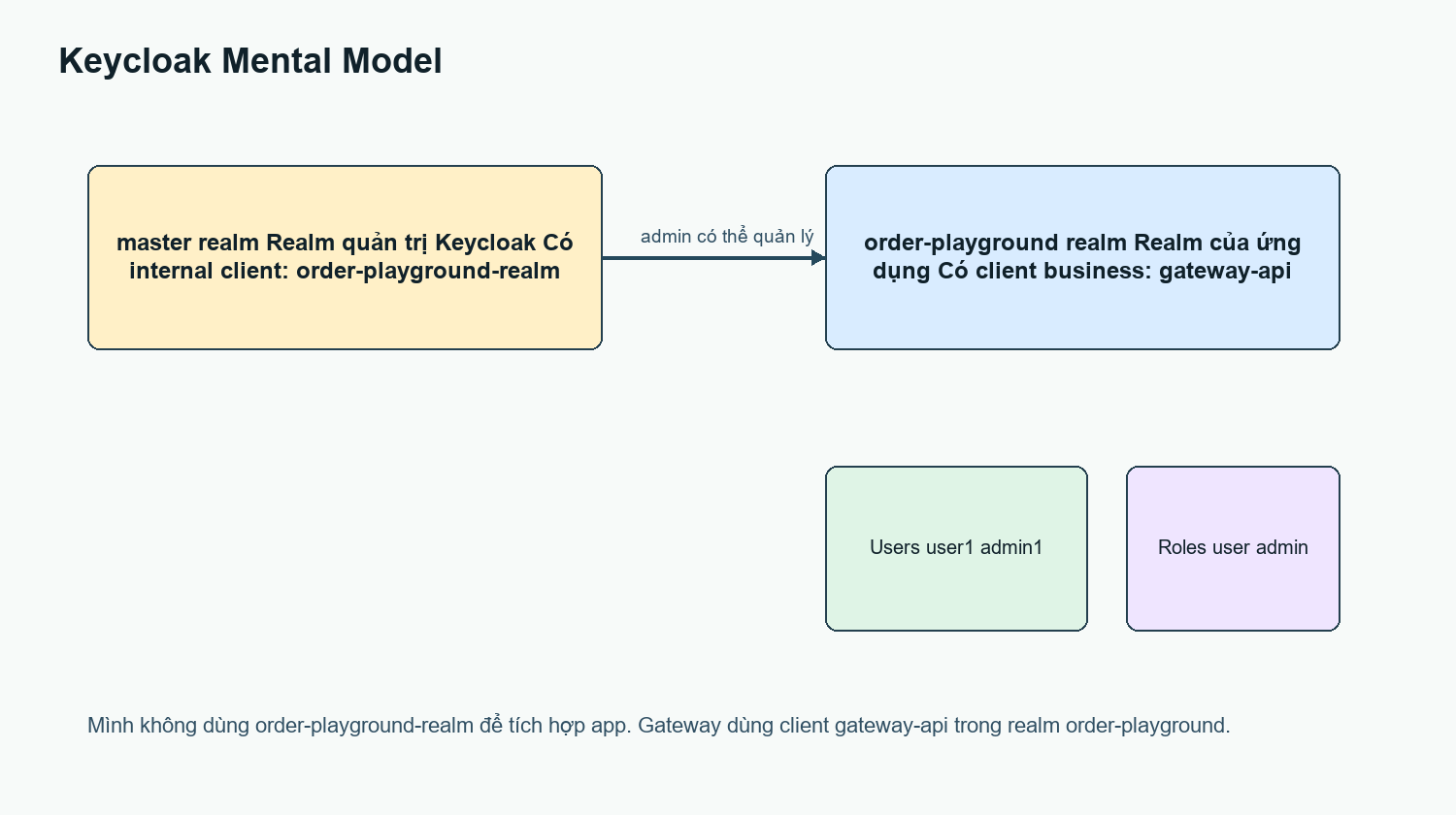
Figure 3. Mental model: the master realm is different from the app realm.
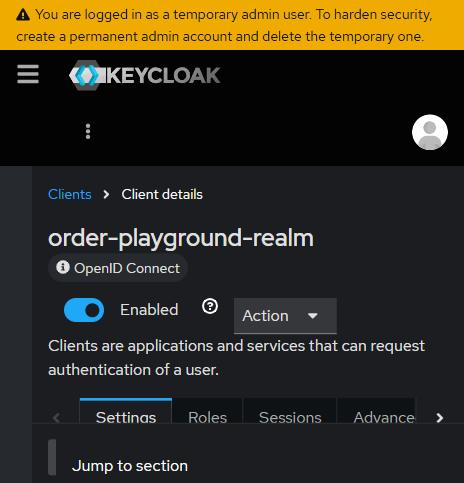
Figure 4. The Keycloak master realm contains the order-playground-realm client, which is not the gateway’s business client.
This part is easy to mix up. The master realm is Keycloak’s administrative realm. order-playground is the realm for the demo application. The gateway-api client inside the order-playground realm is the actual business client used to obtain tokens. The order-playground-realm client inside master is an internal administrative client created by Keycloak.
5.5 JWT issuer mismatch
Symptom: the token was issued through localhost, but the gateway running inside Docker used the hostname keycloak to fetch JWKS. If the issuer does not match, a perfectly valid token can still be rejected. The fix was to separate KEYCLOAK_ISSUER_URL for the public issuer and KEYCLOAK_JWKS_BASE_URL for the internal Docker network call.
This was the issue that stuck with me the most because at first glance it looked like the token itself was wrong. In reality, the token was fine — the verifier was simply expecting a different issuer. In local Docker, the same Keycloak instance can be seen under two different names: localhost from your machine, and keycloak from inside a container.
5.6 Temporal namespace and activity mismatch
Temporal auto-setup needs time before the default namespace is ready. If the worker starts too early, the gateway should retry instead of failing immediately. Another issue was an activity name mismatch: the workflow called an activity name that did not match the name registered by the worker, which caused the activity to remain pending or retry forever. Temporal UI made this much easier to understand than logs alone.
One of the best things about Temporal is that an error does not disappear into a single log line. It stays in the workflow history. I can reopen each event and see which activity was scheduled, which one started, and which one failed. For someone new to it, that UI made workflows feel far less abstract.
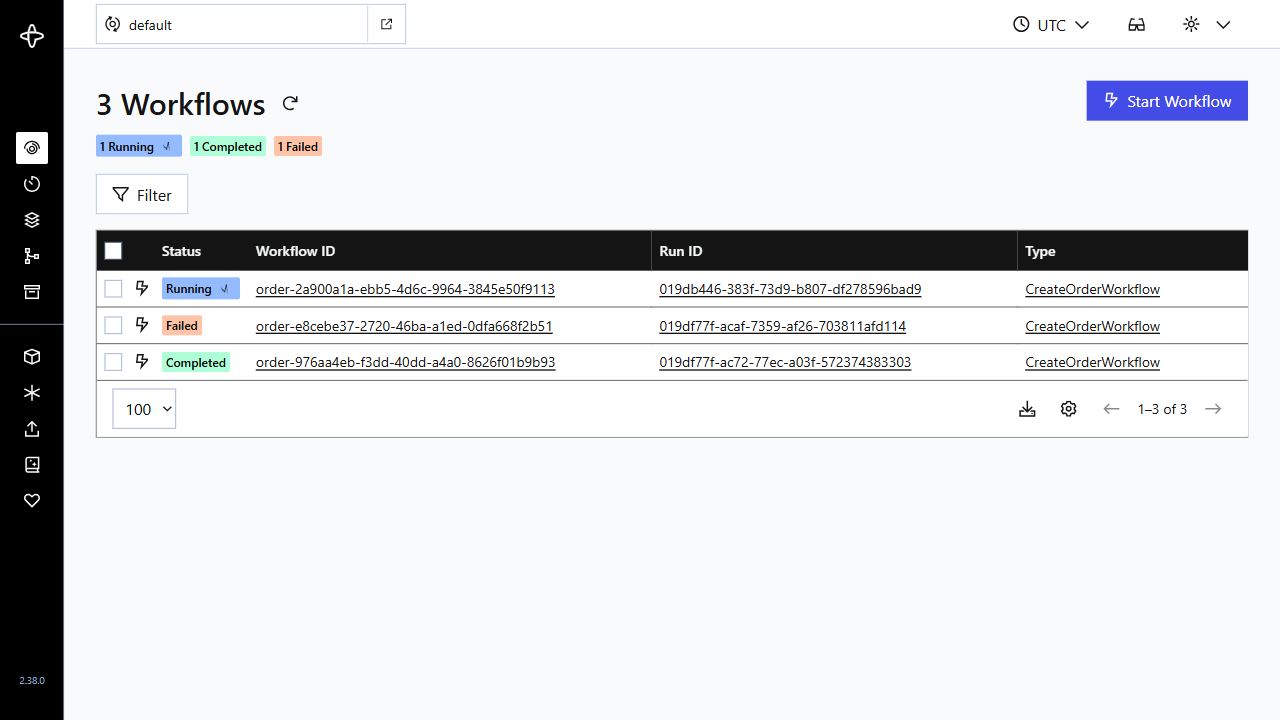
Figure 5. Temporal UI shows Running, Completed, and Failed workflows.
6. Trade-offs
| Topic | Strength | Trade-off |
|---|---|---|
| Stateless JWT | Fast to verify, and the gateway does not need to call the auth server on every request. | Revocation is not immediate if the token is still valid. |
| Temporal | Clear retries, history, and workflow state visibility. | Workflow code requires careful versioning. |
| Internal gRPC | Clear contracts and a good fit for service-to-service communication. | Manual debugging is harder than REST if you do not have the right tooling. |
| Local Docker Compose | Easy to spin up a lab and learn service dependencies. | It does not fully reflect production behavior. |
7. Troubleshooting table
| Problem | Where to look | What to check | Lesson |
|---|---|---|---|
| 401/403 | Keycloak + gateway logs | realm, client, token, role | Auth is both identity and permission. |
| Order stuck in PENDING | Temporal UI | workflow history, pending activity, retry | Workflow state does not live inside the HTTP request. |
| No audit record found | MongoDB | audit_events by orderId | The audit trail helps reconstruct the flow. |
| Order not found | MySQL | orders, order_items, workflow_runs | Business state needs a clear source of truth. |
| Container will not start | Docker logs | port conflicts, health checks, startup retry | Debug the infrastructure before changing code. |
8. Wrap-up
After debugging this playground, Keycloak and Temporal no longer felt like two unfamiliar dashboards to me. Keycloak helped me answer who is allowed into the system and what they are allowed to do. Temporal helped me figure out exactly where an order was getting stuck. MySQL and MongoDB helped me verify the real state instead of blindly trusting the API response.
Learning backend systems should not stop at seeing an "OK" response and calling it done. You still need to verify whether the result is actually correct. Once you build this kind of debugging mindset, you will be in a much better position to deal with race conditions and hard-to-trace issues in the future.
