

What matters
- MCP Gateway fixes the visibility gaps, weak access control, and fragmented logs that come with running many AI agents at once.
- It centralizes credentials, enforces rate limits, integrates with RBAC, and supports private VPC deployment, shrinking risk if an agent is compromised.
- Example: a support agent limited to reading and updating tickets, with sensitive actions blocked right at the gateway.
Once AI agents start connecting to Slack, Jira, internal databases, or third-party APIs, the question is no longer just “what can the agent do?” It becomes “how does the organization control those connections?” That is exactly why MCP Gateway has become a critical part of AgentBase for teams running agents in production.
Why enterprises need an MCP Gateway
In many real-world systems, each AI agent connects to external tools and services in its own way. That approach works well enough in the early stages because it helps teams move fast, but as the number of agents grows, three problems show up quickly: limited visibility into access flows, weak control over which tools an agent can call, and fragmented logs that are hard to use for audits or incident investigations.
If every agent holds its own credentials and talks directly to each downstream service, the attack surface expands with every new integration. At the same time, compliance frameworks such as ISO 27001 and SOC 2 place a strong emphasis on logging, traceability, and the ability to produce evidence that controls are actually working.
What MCP Gateway is and why it matters
MCP, short for Model Context Protocol, is an open standard that gives AI applications a more consistent way to connect to external tools, data sources, and workflows. Instead of forcing every agent to build one-off integrations, MCP provides a standardized interface between AI applications and external systems.
An MCP Gateway is best understood as a proxy layer or control plane that sits between the agent and the services it needs to reach. Every outbound request from the agent passes through this central layer before reaching Slack, Jira, a database, or any other API. That gives platform teams a single place to enforce policy, manage credentials, and centralize audit logs.
MCP Gateway in AgentBase
In AgentBase, MCP Gateway acts as a centralized proxy. Every outbound tool call from an agent passes through one control point before it reaches its destination. There are no exceptions in that path.
Architecture before and after MCP Gateway:
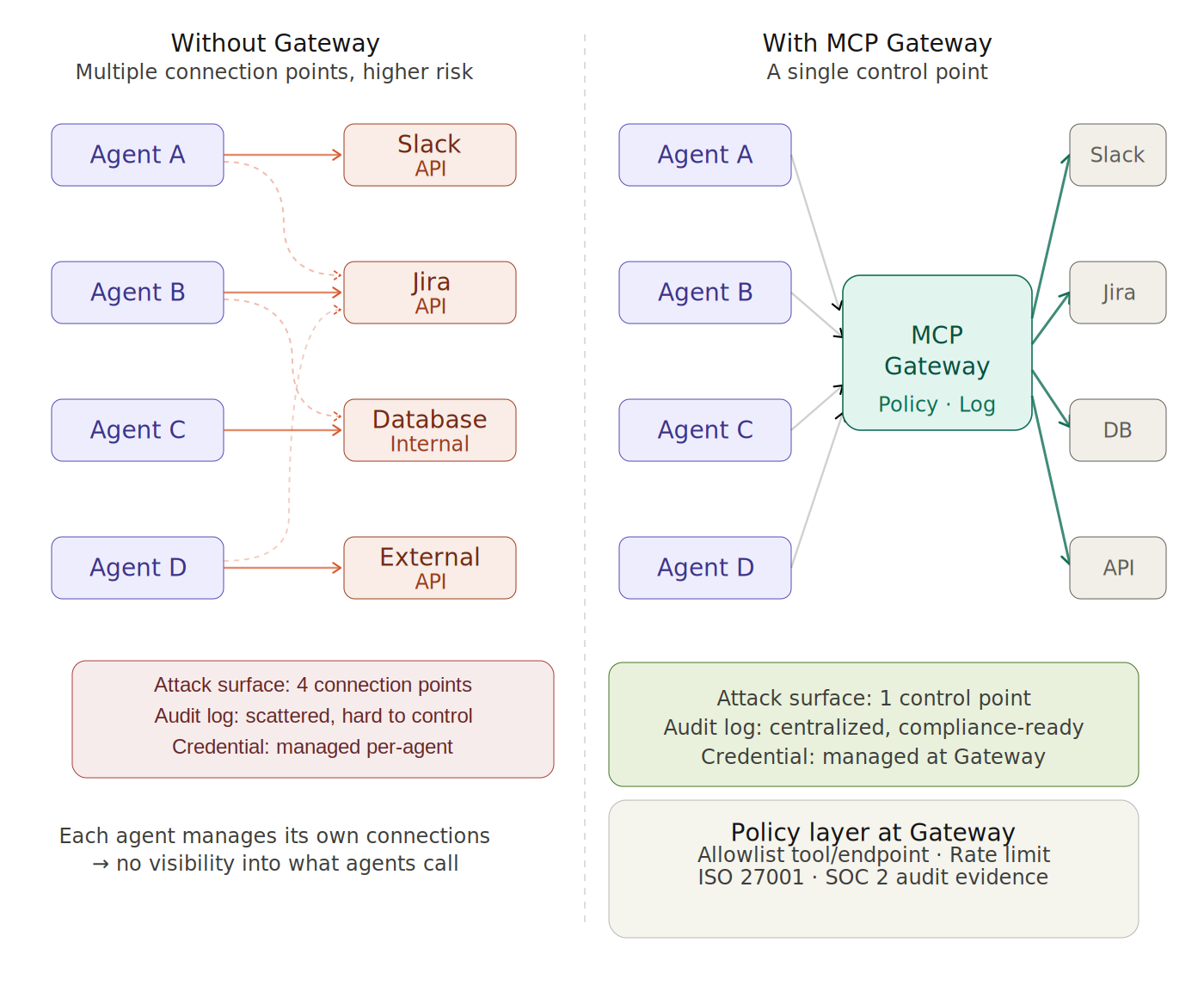
Without a gateway, each agent becomes its own connection point. That means access control is distributed, configuration is distributed, and logs are scattered across multiple systems.
With MCP Gateway, all outbound calls are consolidated into a single control point. That model does not eliminate every risk, but it does reduce operational complexity, improve access boundaries, and give security teams a far more centralized view of what agents are doing.
Read more: Access Control for AI Agents: Managing Identity and Permissions in Production
From a developer’s perspective: turning a REST API into an MCP tool in minutes
One of the strongest advantages of MCP Gateway in AgentBase is the developer experience. Instead of writing custom wrapper code for every external service, the gateway lets you expose almost any REST API as an MCP tool that agents can use immediately, with no boilerplate and no separate server to build.
A typical flow looks like this:
- You already have an internal REST API, for example
GET /api/inventory/{sku}. - You register that endpoint with MCP Gateway and define its input and output schema.
- The gateway automatically exposes it as an MCP tool, for example
check_inventory. - Any agent in the system can now call
check_inventorywithout needing to know the original URL.
No wrapper code. No authentication logic repeated inside every agent. No separate integration guide for each team. The gateway handles the heavy lifting.
That is a real advantage for platform teams managing a growing set of internal services. Instead of having every agent team integrate every API on its own, you publish once through the gateway and make it reusable across the system.
From the platform team’s perspective: one control point, one policy layer
If developers care about integration speed, platform and security teams care about something else: control. As the number of agents grows alongside the number of outbound connections, the key question is not just whether an agent can call a tool. The real question is whether that entire access path is governed through a single control plane.
That is where MCP Gateway fits into AgentBase. It serves as a policy layer between the agent and the external service, where each tool call can be inspected, evaluated against rules, and either allowed or denied before the request is forwarded. According to VNG Cloud documentation, this is implemented through Policy Groups, which let teams control exactly which agents can call which tools without modifying agent code.
At this layer, platform teams can define allowlists by tool or endpoint. For example, a customer support agent might only be allowed to read or update tickets, while more sensitive actions are blocked directly at the gateway. That approach keeps permissions aligned with the agent’s role, instead of letting every agent carry more access than it actually needs.
MCP Gateway is also the right place to enforce operational controls such as rate limiting and quotas. This reduces the risk of agents overcalling external services, putting unnecessary load on downstream systems, or generating uncontrolled costs in automated workflows.
Another major advantage is credential centralization. Instead of distributing API keys and authentication details across individual agents, organizations can move authentication into the gateway. Agents simply request the tool call, while credentials, downstream authentication, and connection-level updates are all handled in one place.
When an API key needs to be rotated, an endpoint changes, or an authentication method is updated, platform teams can make the change once at the gateway instead of touching every agent. At small scale, that difference may seem minor. At production scale, it becomes a major factor in operational stability, configuration consistency, and centralized control.
The dual benefit of MCP Gateway: reduced attack surface and centralized audit logs for compliance
This is the part that matters most to security and compliance teams. When every outbound call passes through a centralized gateway, the organization gains a clearly defined control point between the agent and the external service, rather than allowing each agent to open outbound access in its own way.
The first benefit is a smaller attack surface. In a direct-connection model, each agent can become a separate access point if it is compromised. Once all tool calls are routed through MCP Gateway, the actions available to the agent are no longer determined only by the code inside the agent. They are also constrained by the policies enforced at the gateway. In practice, that means even if an agent is compromised, its blast radius is still limited by the final control layer in front of the target system.
The second benefit is centralized audit logging. For security operations and compliance reviews, teams need to know who did what, when it happened, and what the result was. When every tool call is recorded in one place, operations teams can build a more consistent audit trail instead of trying to reconstruct events from logs spread across different systems.
The value of that approach becomes most obvious during an audit or an incident investigation. If you need to prove that an agent accessed only the approved tools or only the approved scope of data, you need a source of truth that is detailed, consistent, and easy to verify. A gateway-centered model makes that evidence much easier to retrieve than a patchwork of logs from separate services.
This is not just about saving time for the operations team. At enterprise scale, the difference between fragmented logs and a centralized audit trail often becomes the difference between a clean audit process and a long, painful effort to prove that your controls are actually working.
Integrated with the AgentBase ecosystem
MCP Gateway does not operate in isolation. It is tightly integrated with the rest of AgentBase:
- RBAC (Role-Based Access Control): The gateway follows the platform’s permission model. Policies can be assigned at the role level, not just to individual agents. For example, every agent in a
customer-supportrole can be restricted to the same approved set of tools without configuring each one separately. - Private Networking: With Private VPC support, MCP Gateway can run entirely inside the enterprise network. External service calls still go through the gateway, but the gateway itself does not need to be exposed to the public internet. That helps keep sensitive traffic inside your own perimeter.
- Marketplace Agent: When marketplace-provided agents are deployed, MCP Gateway acts as the control point that ensures those agents use only the approved tools, even if the agent code itself comes from a third party.
Getting started
If you are already using AgentBase, MCP Gateway is available as part of Phase 2 and can be enabled from the console at https://aiplatform.console.vngcloud.vn. A typical onboarding flow looks like this:
- Enable MCP Gateway for your project.
- Register the external services your agent needs to call, including the URL, authentication method, and tool schema if needed.
- Define policies for each agent or role, including allowed tools and rate limits.
- Update the agent configuration so outbound calls are routed through the gateway instead of going direct.
If you are building a new agent, /agentbase-wizard can guide you through integrating MCP Gateway from the initial scaffold, so you do not have to retrofit it after deployment.
Conclusion
As AI agents become more capable inside the enterprise, the challenge is no longer just functionality. It is governance. The question “what can an agent connect to?” has to be matched by another question: “who controls those connections, and what evidence do we have?”
MCP Gateway in AgentBase addresses both sides of that equation. Developers get a faster path to publishing and consuming MCP tools, while platform and security teams get the visibility and control plane they need to operate AI agents responsibly at enterprise scale.
When you have one control point for every outbound agent connection, you are not just reducing risk. You are building the foundation to scale with confidence.
Learn more about the AgentBase platform and the latest features at aiplatform.console.vngcloud.vn. To start building AI agents with MCP Gateway, see the full guide in the GreenNode AgentBase documentation.
