

Hello everyone, I’m Hoang Viet, a Software Intern who has just joined VNG. When I first started working on the project, I began with an email from my mentor listing quite a few things: Go Gin, MySQL, MongoDB, Temporal, Keycloak, OIDC/OAuth, HTTP/1.1, HTTP/2, and gRPC. If I opened each set of docs and read them separately, I might remember the definitions, but it was still very hard to picture how they all fit together inside a real backend system or where a request would actually go @@.
So I decided to build a small playground: a mini Order System. The goal was not to create a production-ready system, but to have a working flow that I could build, debug, and use to answer for myself: at which step does each technology appear, and what problem does it solve?
To keep this article from getting too long, today I won’t go deep into the code behind this playground. Instead, I’ll focus on how to explore it, read through it, and understand the flow of three core technologies: Temporal, Keycloak, and gRPC ^^. This article will mainly cover how to run the project, how I approach new technologies, and the mistakes I ran into while building it, so if you notice anything off, feel free to leave your feedback below!
Here is the playground I prepared: https://github.com/Keruedu/OrderPlayground
Prerequisites: what do you need before running it?
- Docker Desktop and Docker Compose to run the local environment.
- Basic PowerShell knowledge to call APIs, get tokens, and run quick queries.
- Basic Go knowledge: packages, handlers, context, and how the app reads environment configuration.
- Basic HTTP/JWT knowledge: understanding that a Bearer token is sent in the Authorization header.
- You do not need in-depth knowledge of Temporal or Keycloak beforehand. This article uses the order flow to explain just enough.
What we build: a mini Order Processing System
The main flow is very small:
The user logs in through Keycloak, calls the order creation API through the Gin gateway, the gateway writes the order to MySQL, stores an audit event in MongoDB, and then starts a Temporal workflow. The workflow then calls the inventory-service and notifier-service through gRPC, and finally updates the order status to COMPLETED or FAILED.
This is how I remember the role of each component: Gin receives requests, Keycloak issues tokens, MySQL stores the primary state, MongoDB stores the logs, Temporal orchestrates long-running processes, and gRPC is the communication channel between internal services.
Architecture overview
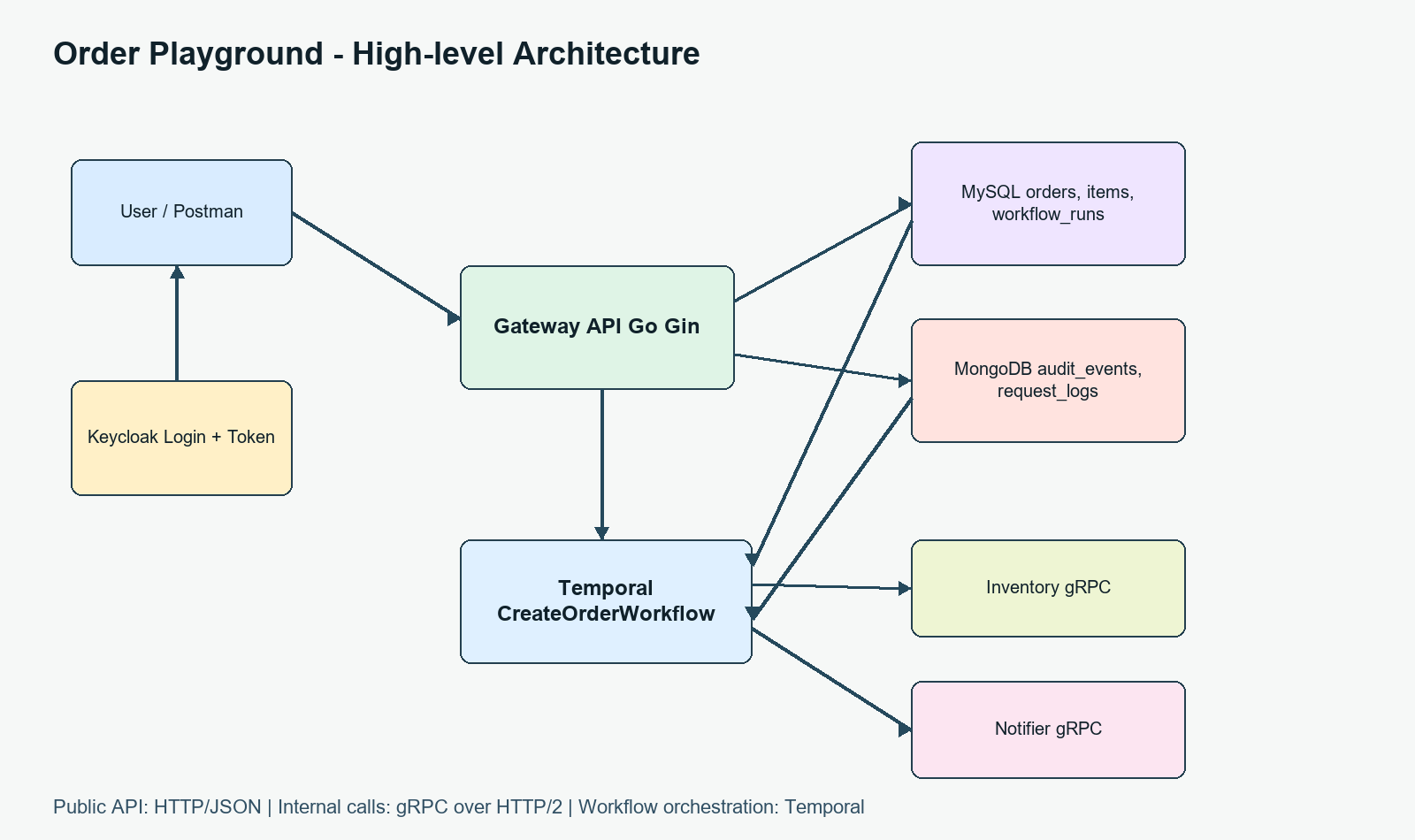
Figure 1. High-level architecture of the playground.
The public API uses HTTP/JSON because it is easy to call with curl or Postman. Internal services use gRPC because the contract is clearer and it runs over HTTP/2. Temporal is not part of the direct request path; it receives the workflow only after the gateway has created the order in the PENDING state.
I also deliberately separated the protocol boundaries to make them easier to learn. From the user to the gateway, it is HTTP/1.1 with JSON because this is the most familiar API style for testing. From the workflow to the inventory/notifier services, it is gRPC so that HTTP/2 appears in internal communication. Keycloak uses OIDC/OAuth2 to issue tokens; it is not the place that stores orders or runs workflows.
Decision & trade-off
| Decision | Why I chose it | Trade-off |
|---|---|---|
| Order System instead of hello world | A small flow, but it includes auth, databases, audit, workflow, and internal service calls. | The setup is heavier, but in return it shows the real connections between the technologies. |
| MySQL for orders | Orders and order_items have a clear schema, which fits a relational database. | You need to pay attention to migrations and connection pooling. |
| MongoDB for audit | Audit events have flexible metadata and are easy to store as documents. | If you want good query performance, you still need to think about indexes. |
| HTTP/JSON for public APIs, gRPC for internal services | External clients are easy to test, while internal services have a stricter contract. | gRPC is harder to debug than REST if you do not have the right tooling. |
| Temporal for workflow | It provides retries, history, and a UI to observe the order as it moves through each step. | Workflow code requires care around versioning and determinism. |
Step-by-step: running the playground
In this section, I’ll walk through how to run this playground step by step. During the build process, I also encountered quite a few issues that needed debugging. That part is fairly long but also very important, so I’ll split it into a separate article ^^. In that follow-up post, I’ll talk about the bugs I ran into and how I solved them.
Start Docker Compose
docker compose -f infra\\docker\\docker-compose.yml --env-file .env up -d --buildDuring real testing on my machine, ports 27017 and 7233 were already occupied by other containers, so I used an override to expose Mongo on 27018 and Temporal on 7234. This was a very practical local development lesson: before assuming the code is wrong, check for port conflicts.
$env:MONGO_PORT='27018'; docker compose -f infra\\docker\\docker-compose.yml -f infra\\docker\\docker-compose.local-ports.yml --env-file .env up -d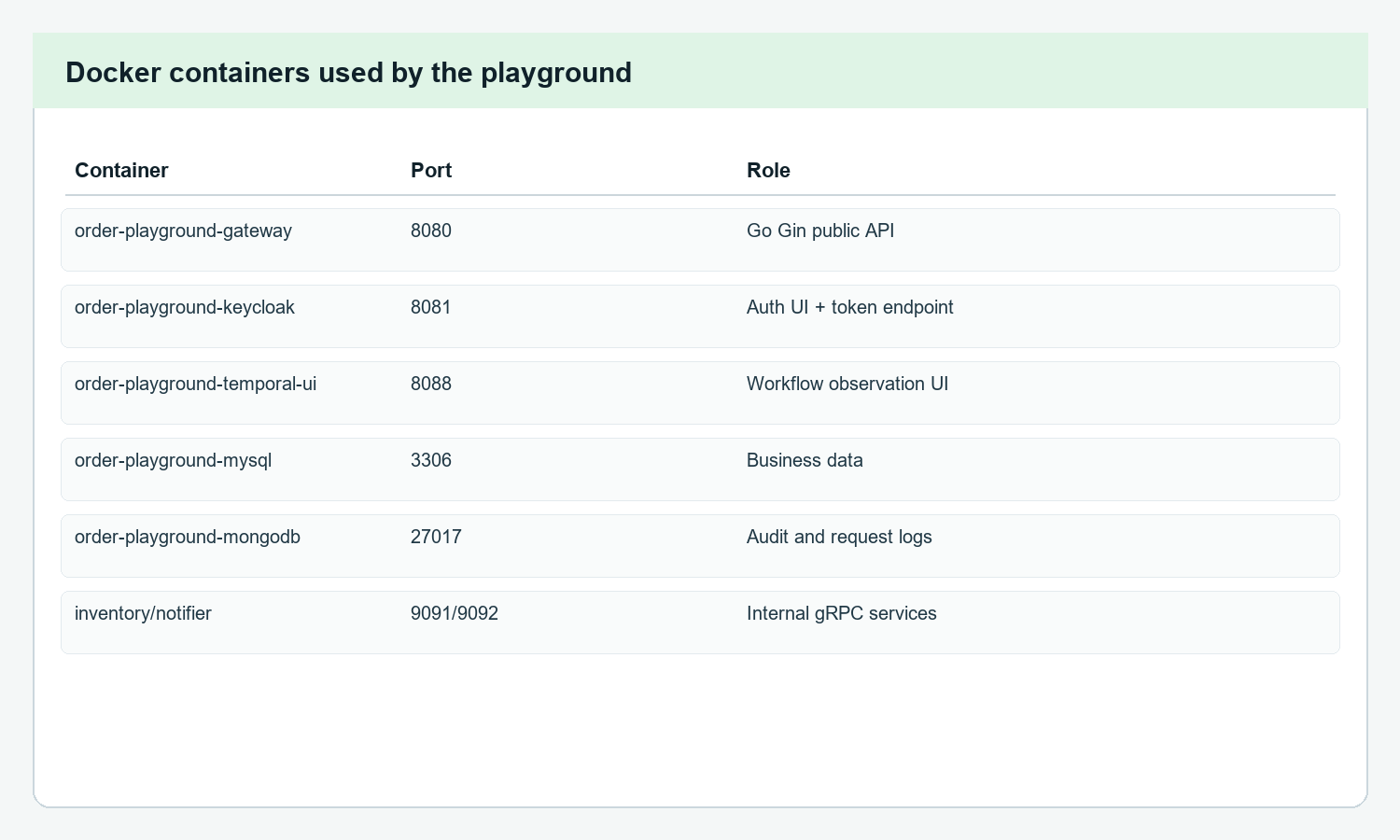
Figure 2. The main containers and ports used in the playground.
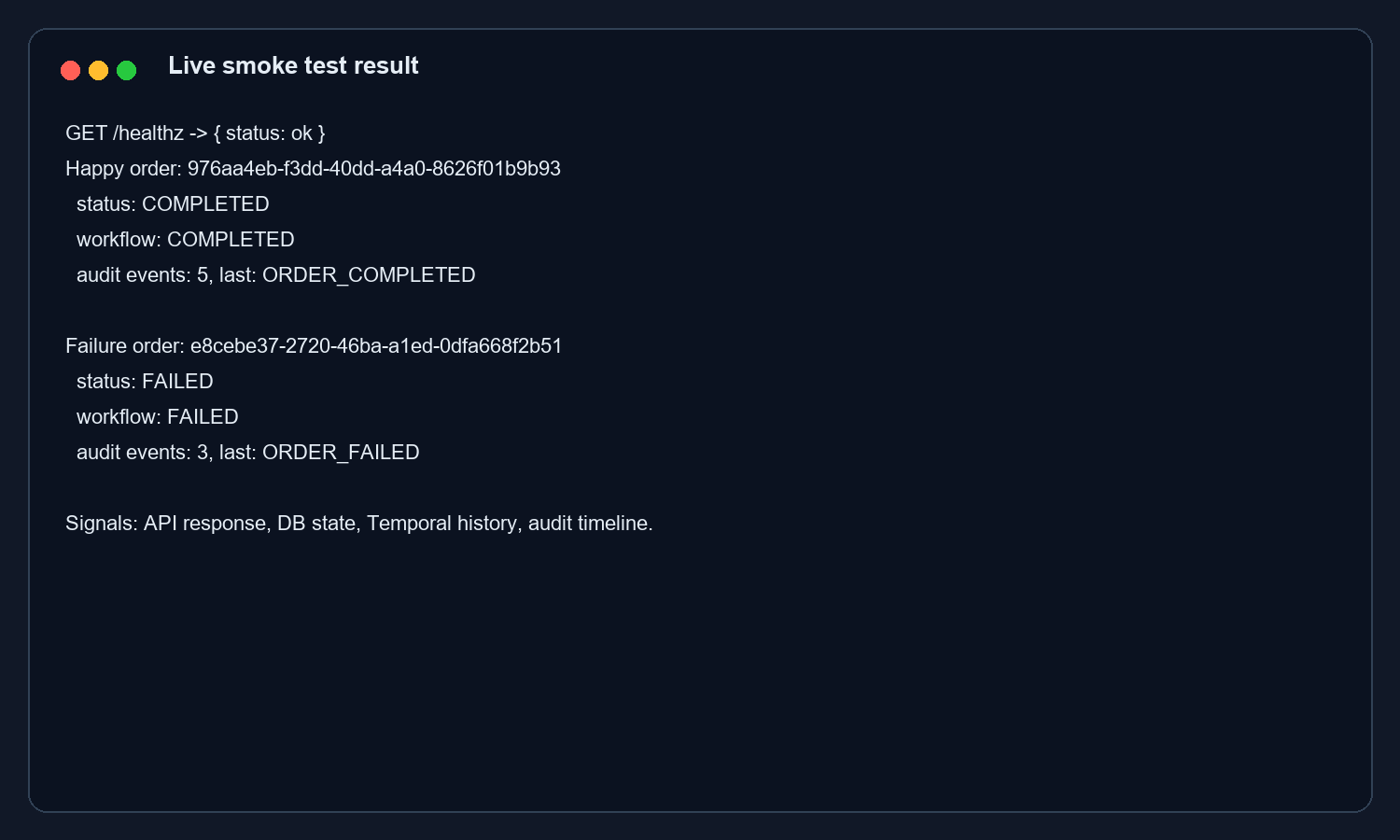
Figure 3. A real smoke test: one COMPLETED order and one FAILED order.
Login to get a token from Keycloak
$userToken = (Invoke-RestMethod -Method Post `
-Uri "http://localhost:8081/realms/order-playground/protocol/openid-connect/token" `
-ContentType "application/x-www-form-urlencoded" `
-Body @{
client_id="gateway-api"
grant_type="password"
username="user1"
password="user1pass"
}).access_token
Here, Keycloak acts like the place that issues an entry pass. The gateway does not log the user in by itself; it only checks whether that token has the correct issuer, the correct audience, and the appropriate role.
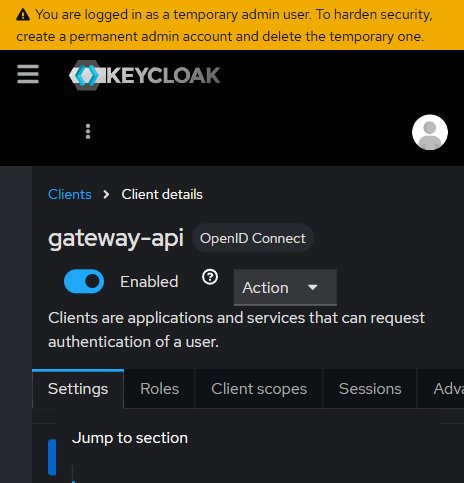
Figure 4. Keycloak: the gateway-api client in the order-playground realm.
Call POST /api/orders
$body = @{
customer_name = "Nguyen Trung"
currency = "USD"
items = @(
@{ sku = "BOOK-001"; quantity = 1; price = 15.5 },
@{ sku = "PEN-002"; quantity = 2; price = 4.25 }
)
} | ConvertTo-Json -Depth 5
$order = Invoke-RestMethod -Method Post `
-Uri "http://localhost:8080/api/orders" `
-Headers @{ Authorization = "Bearer $userToken" } `
-ContentType "application/json" `
-Body $body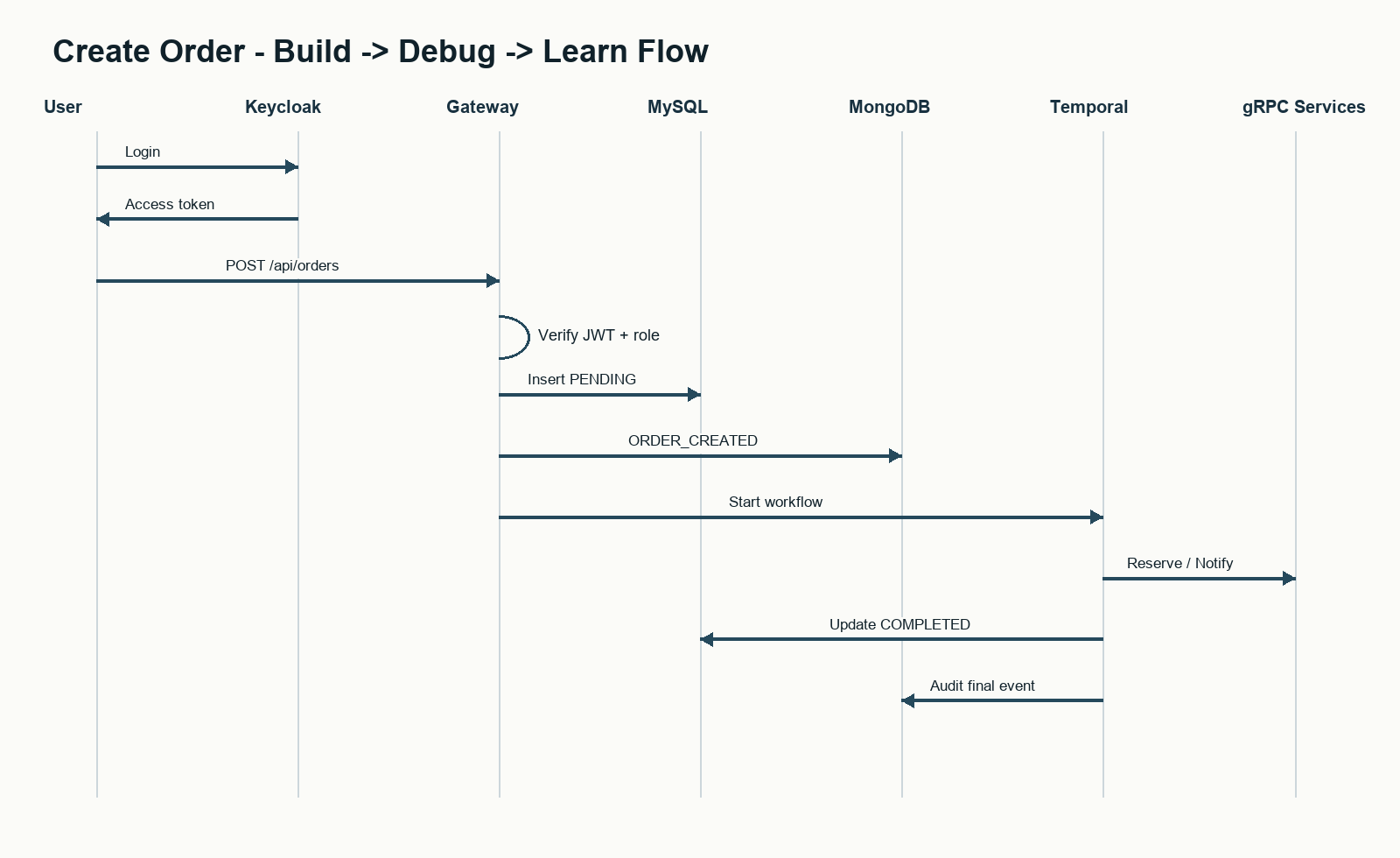
Figure 5. The sequence from login to workflow during order creation.
Check MySQL, MongoDB, and Temporal
docker exec order-playground-mysql mysql -uorder_app -porder_pass -D order_playground -e "SELECT id,status,created_by FROM orders;"
docker exec order-playground-mongodb mongosh --username mongoadmin --password mongopass --authenticationDatabase admin order_playground --quiet --eval "db.audit_events.find().pretty()"
MySQL tells me the current state of the order. MongoDB shows me the business timeline. The Temporal UI shows me which step the workflow failed at, how many times it retried, or whether it has completed.
One small testing tip: do not look only at the response from POST /api/orders. It is correct for the initial response to return PENDING because the workflow runs asynchronously. I need to wait a few seconds and then call GET /api/orders/:id or open the Temporal UI to see the final result. This was also where I understood more clearly the difference between Gin’s request lifecycle and Temporal’s workflow lifecycle.
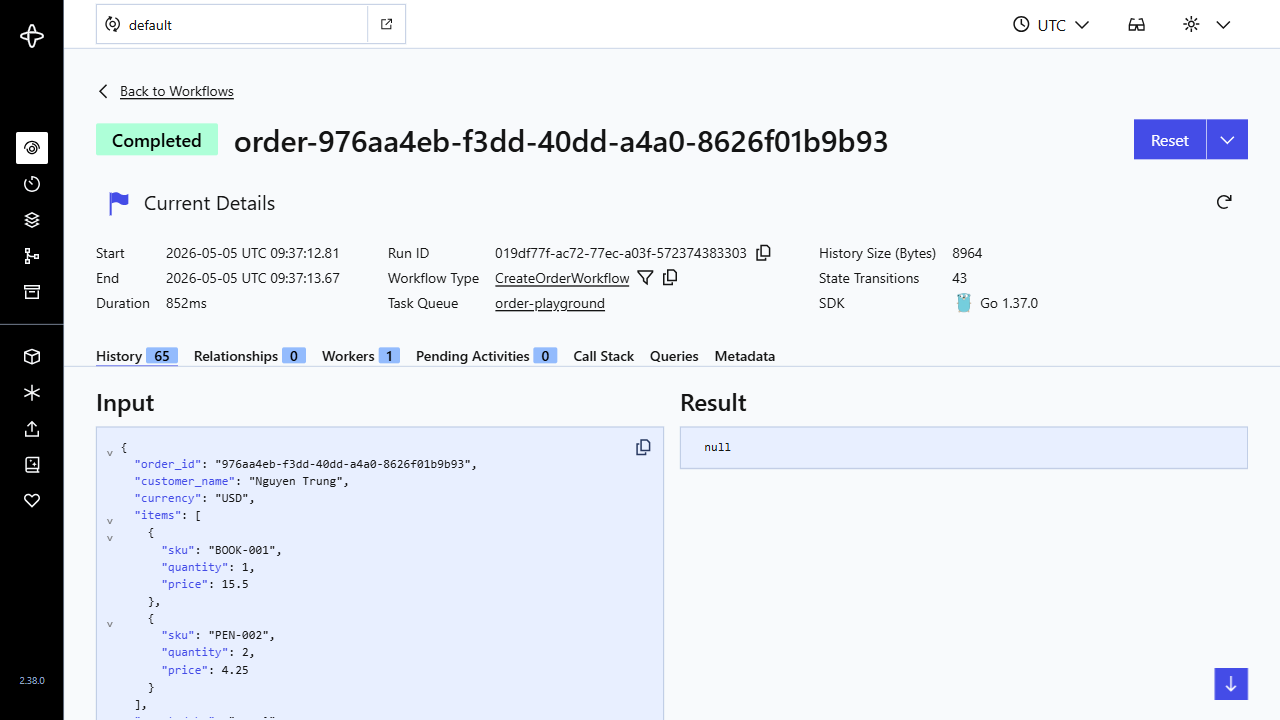
Figure 6. Temporal UI: the order workflow has completed.
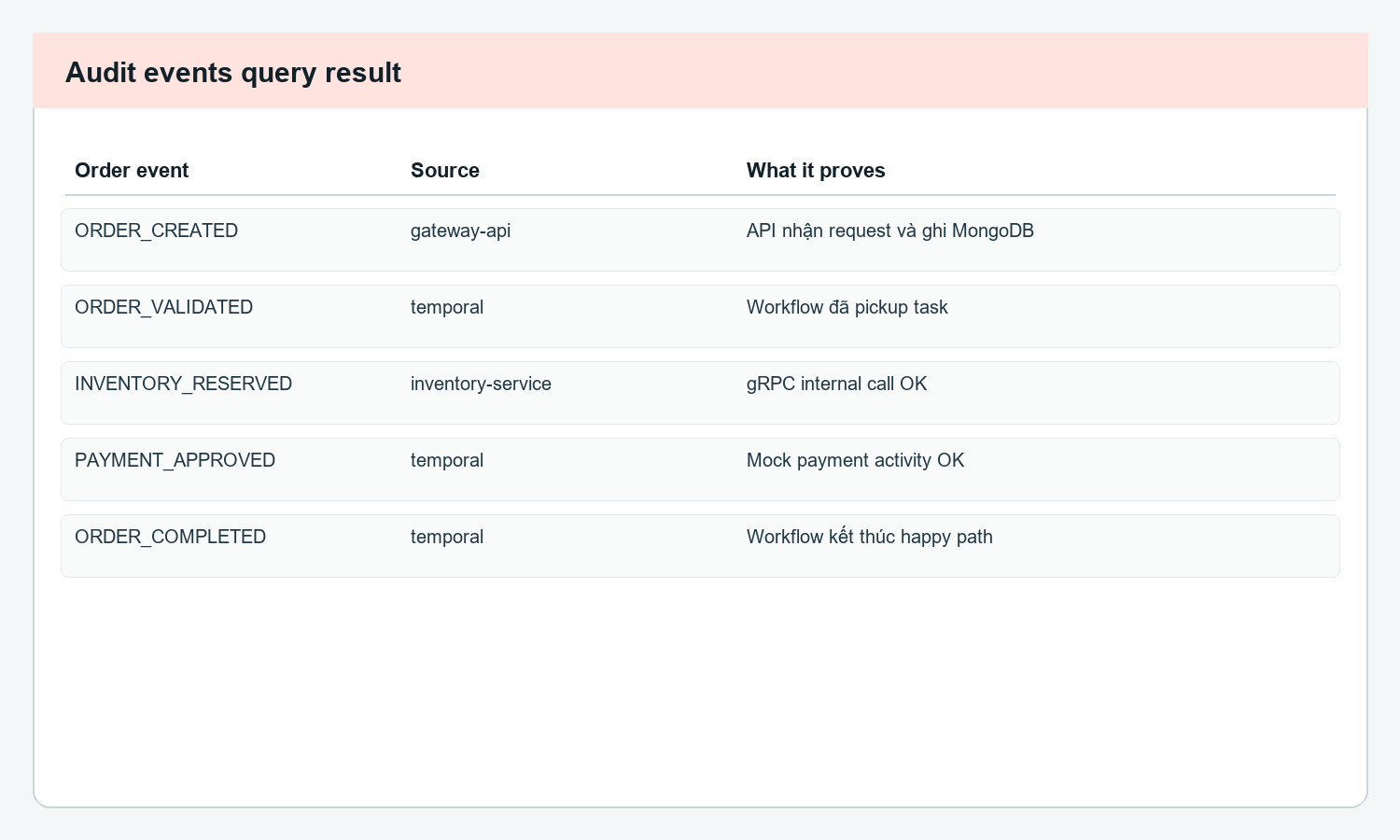
Figure 7. Audit events used to cross-check the flow.
Testing: happy path and failure path
- Happy path: create an order with a quantity less than or equal to 5, and expect the order to move from PENDING to COMPLETED.
- Failure path: create an order with a quantity greater than 5, let the inventory-service reject it, and expect the workflow to move the order to FAILED.
- Auth path: call /api/orders without a token to see a 401 response, then use user1 to call /api/admin/orders to see a 403 response.
For convenience, I already wrote a test file, so you only need to run:
powershell -NoProfile -ExecutionPolicy Bypass -File .\\scripts\\test.ps1The files for all three scenarios are located at:
- Entry point: scripts/test.ps1
- Test logic: tests/e2e/order-scenarios.ps1
How I read the repo without getting overwhelmed
If I read the repo from start to finish, it is very easy to get lost because there are so many folders @@. A more reasonable way is to read it by following the journey of one order. Each time I move through a layer, I ask only one question: what does this layer receive, what does it write, and who does it call next?
- Read the router/handler first to see where the request enters.
- Follow the MySQL/MongoDB repositories to see where the data is written.
- Open the workflow/activity code last to understand the async part.
- When auth breaks, open Keycloak; when an order gets stuck, open Temporal; when state looks wrong, inspect the database.
Conclusion
What I like about this way of learning is that I do not have to cram all the theory at once. It gives me a real order to follow. From there, each term no longer stands alone: Keycloak sits at the entrance, MySQL/MongoDB handle state and audit, Temporal handles the workflow, and gRPC handles internal service communication.
The biggest lesson for me is this: when the stack is broad, a small but working playground helps you learn much faster than reading each technology in isolation.
Also, during the build process I ran into many debugging issues, so I’ll write a separate debugging article later, because that part is quite long but also important ^^
