

What matters
- Managed Kubernetes (VKS) splits responsibilities cleanly: the provider handles the control plane under a 99.99% SLA, leaving the team to manage only worker nodes, so a small team without DevOps can still run production.
- The team still needs to write Helm charts, configure resources, manage secrets, and set up monitoring, and should avoid running databases inside the cluster.
- A six-person startup brought four microservices to production on VKS in just one day using Helm and ArgoCD under a GitOps workflow.
If you are a CTO of a 5–8 person startup and considering Kubernetes, chances are you are facing one of these two scenarios:
First, your app is running on Docker Compose or a few detached VMs—everything is fine for now, but you are deploying manually, rollback is a nightmare, and you have to stay up late every time traffic spikes.
Second, you have heard enough about Kubernetes and know it is the right direction to go, but looking through the documentation, you immediately see that setting up K8s properly requires an infrastructure specialist—which your team does not have yet.
This article is for both cases. With managed Kubernetes like GreenNode VKS, the technical barrier to running production K8s is much lower than it was three years ago—low enough for a team without a dedicated DevOps engineer to pull it off, provided you choose the right stack.
1. Startups Wanting to Use K8s Without a Dedicated DevOps Resource
Kubernetes solves the practical problems that startups face when scaling: zero-downtime deployments, auto-scaling during traffic spikes, self-healing when containers crash, and clean CI/CD pipelines for multiple services. These are not nice-to-have features when you have paying customers—they are core requirements. The problem is that traditional K8s comes with a daunting list of ops work:
Setting up a Highly Available (HA) control plane with an etcd cluster, installing CNI plugins, ingress controllers, and cert-manager.
Upgrading versions 3 times a year and rotating certificates annually (if you forget, the cluster dies).
Periodically backing up etcd and patching the OS for worker nodes.
Handling infrastructure incidents when they occur at 2 AM—that falls on you.
For a 5–8 person team where backend engineers handle everything, that checklist is unfeasible. Most startups at this stage end up choosing one of three paths: continuing with Docker Compose and accepting its limitations, hiring freelance DevOps to set it up and then having no one to maintain it, or using foreign cloud providers' K8s but facing issues with latency and compliance.
2. How Managed K8s Solves This Problem
Managed Kubernetes is not "K8s made easier"; it is a clear separation of responsibilities between the provider and you. Kubernetes consists of two main parts: The Control Plane, which is the brain of the cluster containing the API server, etcd, scheduler, and controller manager. This is the most complex part, the most prone to incidents, and requires experienced hands to maintain. The Worker Nodes are where your applications actually run. This is the part that developers understand and control via manifests and Helm charts. Managed K8s like GreenNode VKS takes the entire control plane out of your hands. The provider is responsible for setup, maintenance, upgrades, and incident response. You only work with worker nodes and workloads—exactly the part where developers excel over ops engineers.
This is not "K8s for the lazy"; it is allocating tasks based on expertise: the provider handles the complex infrastructure, while your team focuses on the product and deployment.
If you want to learn more about why managed Kubernetes makes sense for startups at this stage, read our full breakdown: Managed Kubernetes for Startups: When Is the Right Time?
3. What VKS Handles Automatically: Control Plane, Etcd, Upgrades, Monitoring
Here is the specific list of what GreenNode VKS takes care of—so you don't have to think about it:
3.1 Fully Managed and Multi-AZ Control Plane
The API server, etcd cluster, scheduler, and controller manager are all operated by GreenNode on a Multi-AZ infrastructure with a 99.99% SLA. If one availability zone encounters an issue, the control plane remains operational. The control plane is provided free of charge.
3.2 Automated Cluster Upgrades
Kubernetes releases a minor version about 3 times a year. With a self-managed cluster, each upgrade costs 4–8 hours of engineering time. VKS handles this with zero downtime—you choose the version (currently supporting 1.29 and 1.30), and the rest is automated.
3.3 Etcd Backup and Certificate Rotation
etcd stores the entire state of your cluster. VKS manages etcd backups automatically and rotates certificates before they expire—preventing sudden cluster failures due to expired certificates.
3.4 Integrated Cluster Autoscaler
It automatically adds worker nodes when pods are pending due to a lack of resources, and removes idle nodes to optimize costs. According to Kubernetes documentation, the cluster autoscaler needs careful configuration—VKS integrates it out-of-the-box following best practices.
3.5 IAM and Private Clusters
Control access via IAM policies, support fully private clusters with no public API endpoints, and whitelist IPs for the API server. This fits the requirements of B2B enterprise clients and fintech.
4. What You Still Need to Do Yourself
Managed K8s handles the control plane—but there are things you remain responsible for. Knowing this beforehand prevents surprises after you have deployed.
4.1 Writing and Maintaining Kubernetes Manifests
Deployments, Services, Ingresses, ConfigMaps, and Secrets—you still have to write them yourself. To simplify this: use Helm charts. Most popular applications already have community Helm charts on Artifact Hub. For internal apps, write the chart once and reuse it.
4.2 Resource Requests and Limits
If you do not configure these correctly, the Cluster Autoscaler will not scale properly, and pods might get evicted. You need to do this right once.
4.3 Secrets Management
Kubernetes Secrets are encoded in base64 by default—not encrypted. You need Sealed Secrets or an external secret manager. For early-stage startups, Sealed Secrets is more than enough.
4.4 Ingress and TLS
The Ingress controller and cert-manager need to be installed once. After that, adding a new domain only takes a few lines of YAML.
4.5 Monitoring and Logging
VKS does not come with a built-in monitoring stack—you need to install Prometheus + Grafana or use managed monitoring. You should set this up right from the start, not after your first incident.
4.6 Databases Should Not Run Inside the Cluster
Many startups try to run PostgreSQL or MySQL inside Kubernetes for convenience. Don't do it. Databases have complex stateful requirements that do not fit well with the K8s pod lifecycle. Using a managed database and separating it from the cluster significantly reduces complexity and risk.
5. Recommended Stack for a 3–10 Person Startup: VKS + Helm + ArgoCD
A minimalist yet production-ready stack for startups without dedicated DevOps. Each component solves a specific problem without overlapping:
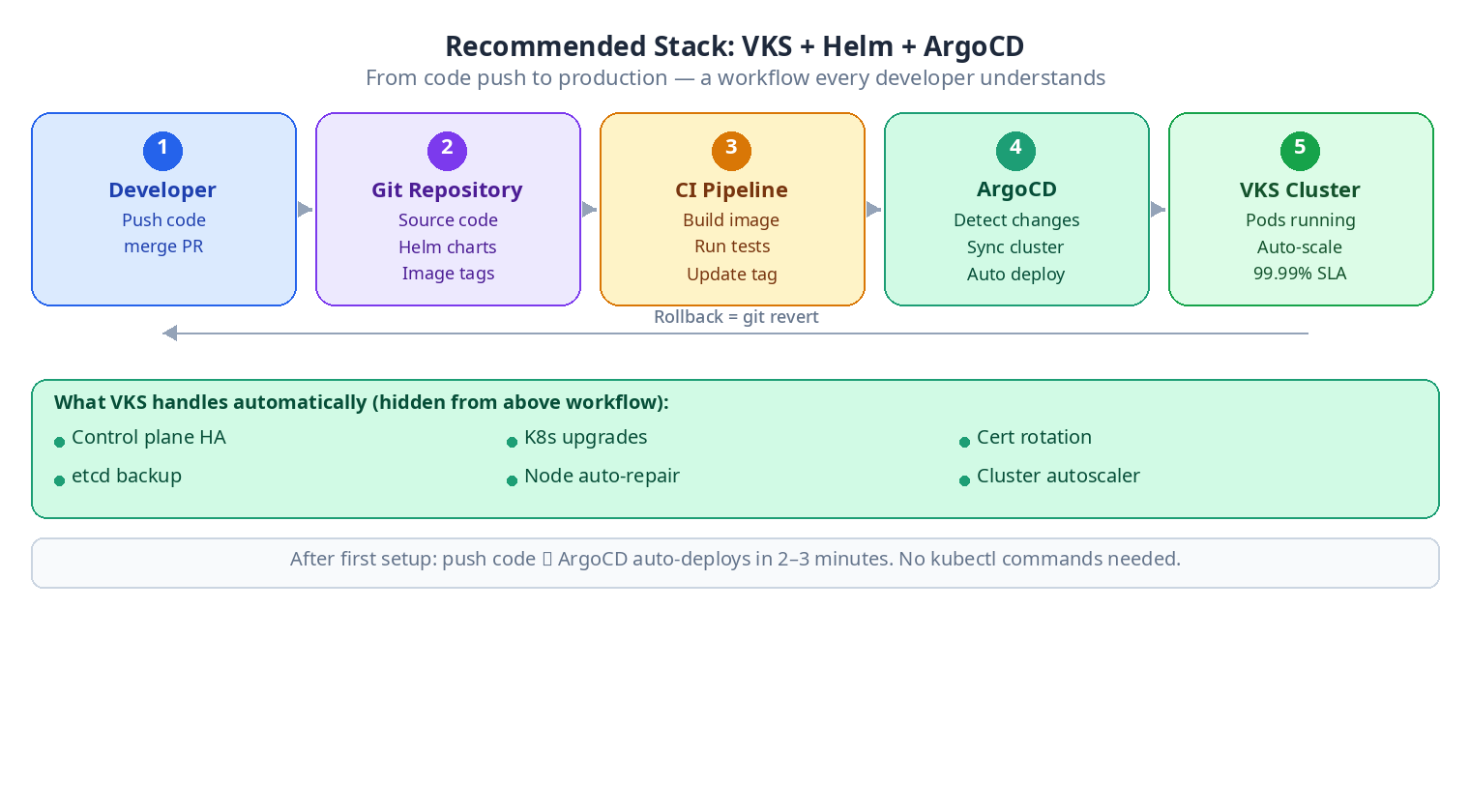
GreenNode VKS: Managed Kubernetes that handles all control plane ops. This is the foundation upon which everything else sits.
Helm: The package manager for Kubernetes. Internal apps can have their charts written once and reused.
ArgoCD: The GitOps controller. Workflow: push code → CI builds the image → update the image tag in Git → ArgoCD automatically deploys it. No manual
kubectl applyneeded. Refer to the ArgoCD documentation to understand the installation.cert-manager: Automatically provisions and renews TLS certificates from Let's Encrypt. Install it once; after that, each Ingress only needs a single annotation.
nginx-ingress: Ingress controller to route traffic. The standard choice, highly documented with a massive community.
Sealed Secrets (optional but recommended): Encrypts Kubernetes secrets before committing them to Git. This fits perfectly into ArgoCD's GitOps workflow.
6. Why This Stack Fits Teams Without Dedicated DevOps
Together, Helm and ArgoCD create a workflow that developers understand: everything is code in Git, deploying is the result of merging a PR, and rolling back is just reverting a commit. You do not need to know the internals of Kubernetes to operate day-to-day.
7. Case Study: Deploying Production SaaS in 1 Day on VKS
A synthesis scenario based on common patterns of B2B SaaS startups in Vietnam.
Background
A 6-person startup running 4 microservices (API, worker, scheduler, frontend) on Docker Compose on a single VM. The CTO serves as the backend lead. There is no DevOps resource. They are preparing to onboard their first enterprise customer, who is asking about the deployment architecture and uptime SLA.
Day 1 — Morning: Provisioning the VKS Cluster
Create a VKS cluster with 3 worker nodes across 2 different AZs.
Set up kubeconfig on the local machine.
Install nginx-ingress and cert-manager using available Helm charts, taking about 30 minutes including testing.
Day 1 — Afternoon: Containerizing and Writing Helm Charts
The 4 services already have Dockerfiles from the previous Docker Compose environment.
Write Helm charts for each service with separate values files for staging and production.
Writing a basic chart for a REST API service takes about 45 minutes.
Day 1 — End of Day: Setting up ArgoCD and Deploying
Install ArgoCD into the cluster (using an available Helm chart).
Create an ArgoCD Application resource for each service, pointing to the Git repo.
ArgoCD syncs for the first time—bringing the 4 services live on production.
Create an Ingress with TLS—cert-manager automatically fetches certificates from Let's Encrypt.
Results After 1 Day of Setup
4 services running on K8s with health checks and auto-restart capability.
Zero-downtime rolling deployments.
Auto-scaling during traffic spikes.
TLS enabled on all endpoints.
Rollback by simply reverting a commit in Git.
Every deployment thereafter: push code, CI builds the image, and ArgoCD automatically deploys within 2–3 minutes.
8. Practical Limitations to Know Beforehand
Kubernetes still has a learning curve. If no one on the team has ever used
kubectl, it will take a few days to get used to the core concepts. This is a one-time investment, not an ongoing burden.Debugging still requires understanding K8s. When a pod crashes or a deployment fails, you need to be able to read
kubectl describe podandkubectl logs. It is not difficult, but it must be learned.Stateful workloads require caution. Databases should not run inside the cluster. Message queues and caches (Redis) can run there, but you must clearly understand PersistentVolumes and storage classes.
Costs increase compared to a single VM. 3 worker nodes are more expensive than 1 VM. This is an intentional trade-off: you are buying reliability and engineering ops time, not just compute resources.
Conclusion
The VKS + Helm + ArgoCD stack allows a 3–10 person team without dedicated DevOps to run production Kubernetes with a developer-friendly workflow: everything is Git, deploying is merging a PR, and rolling back is reverting a commit. The parts you still need to invest in are: understanding basic K8s concepts, writing Helm charts, and setting up monitoring. It takes a total of a few working days—after that, your daily workflow becomes much simpler than it ever was with Docker Compose.
