

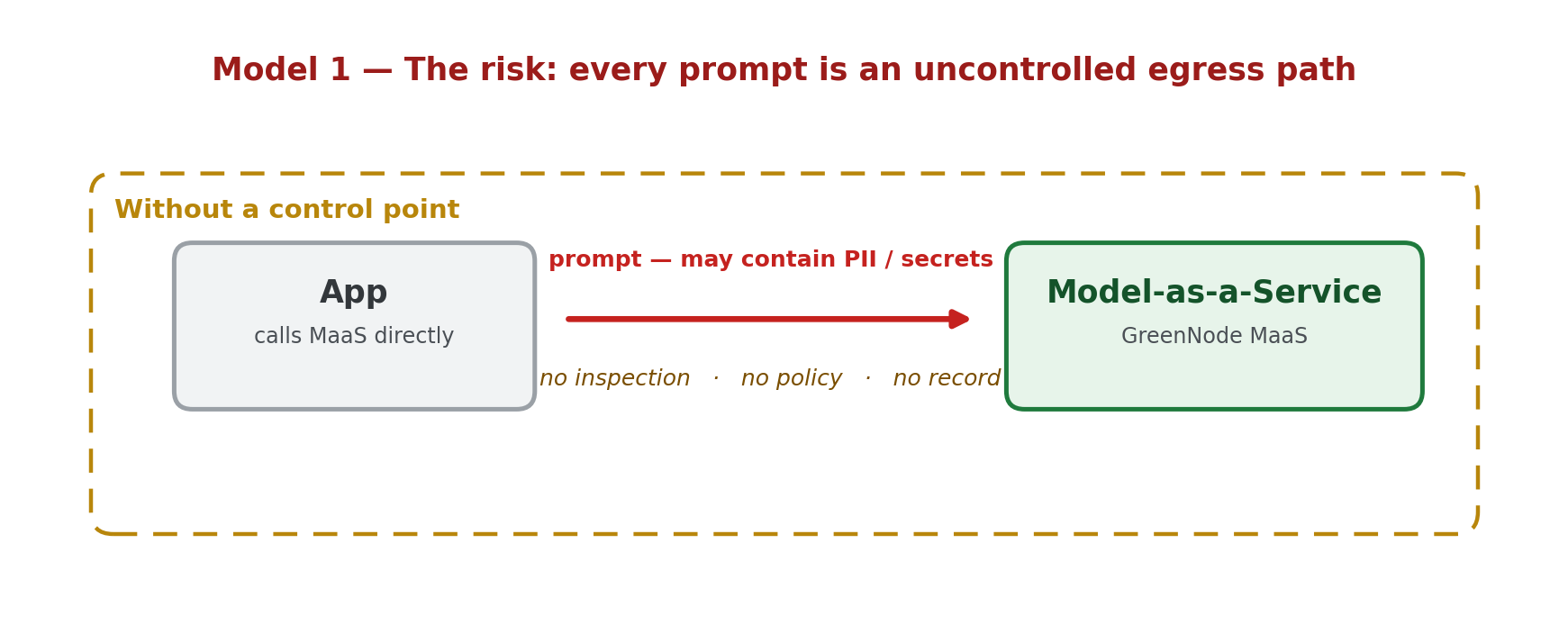
Model-as-a-Service (MaaS) lets you integrate an LLM in minutes: point your app at an OpenAI-compatible endpoint and you can call models from many providers. But for an enterprise, fast integration is not enough. Every prompt that leaves your network is a new egress path for sensitive data: customer emails, phone numbers, national IDs, API keys, passwords, access tokens.
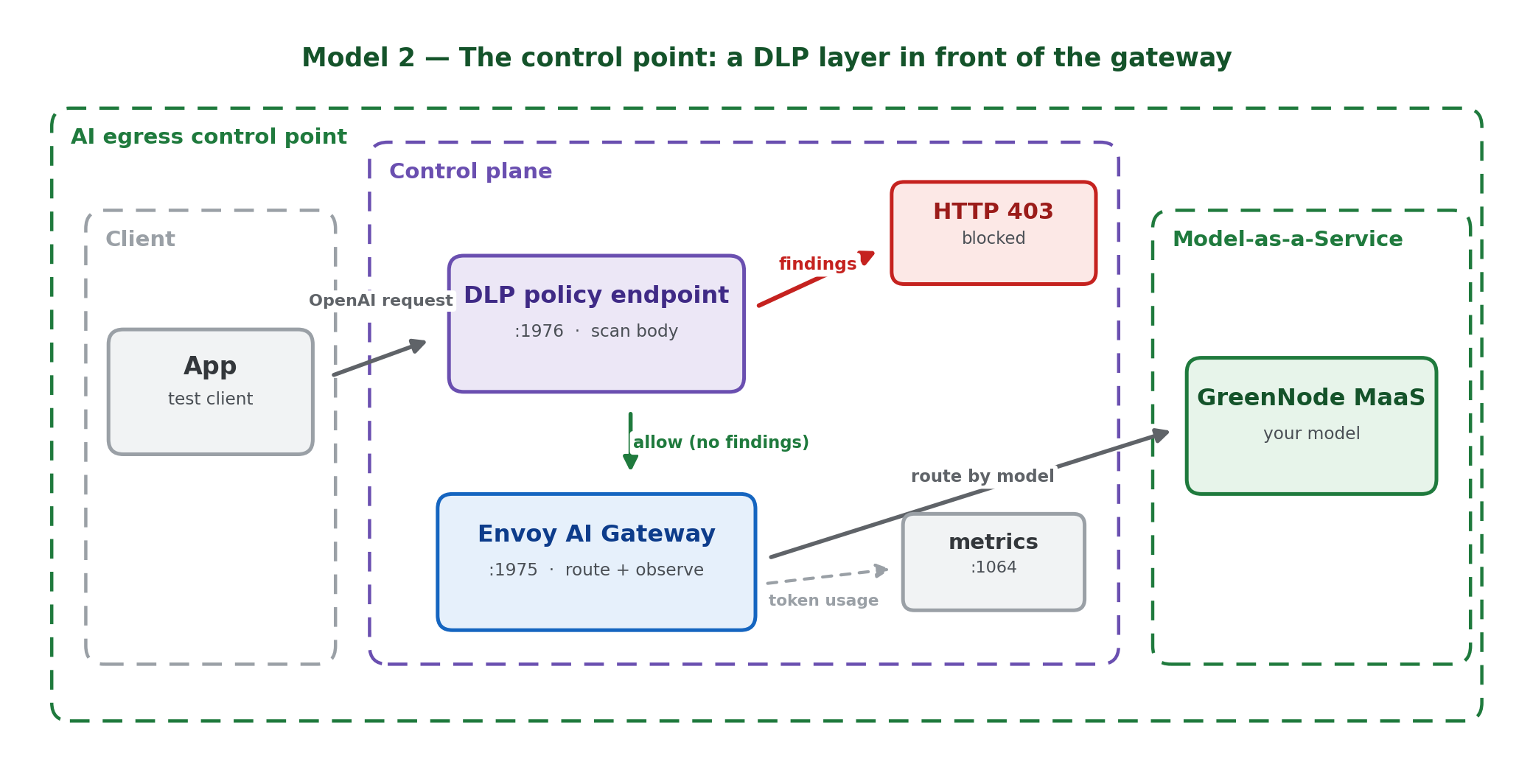
This tutorial builds an AI egress control point. You put Envoy AI Gateway in front of your model traffic, and you add a small DLP (Data Loss Prevention) policy layer in front of the gateway. The DLP layer inspects every request and blocks sensitive data before the prompt reaches a real Model-as-a-Service backend.
By the end you can prove four things against a real MaaS model:
- A clean prompt is allowed and returns a model response.
- A prompt containing sensitive data is blocked with HTTP 403.
- A blocked request never reaches MaaS — its token usage metric does not increase.
- The audit log records the policy event without storing the raw sensitive value.
A note on scope. Envoy AI Gateway is an AI traffic gateway: one OpenAI-compatible API, routing, model boundary, health/metrics, and token-usage observability. The open-source aigw does not ship a built-in content PII detector for prompts; in this PoC the DLP layer is a custom policy service in front of the gateway. In production it would move into the Envoy filter chain, an external-processing service, or an enterprise DLP engine.
Lab roadmap
The lab is organised as a chain of evidence: build the control point, prove it functions, prove the boundary holds, then quantify it. Each part leaves an artifact you can show a reviewer.
| Part | What you do | Evidence you collect |
|---|---|---|
| Steps 1–2: Build | Run the DLP policy service and route the gateway to a real MaaS model. | Health checks green on both hops. |
| Steps 3–4: Function | Send one clean prompt and five classes of synthetic sensitive prompts. | HTTP 200 with a model reply; HTTP 403 with the finding type per class. |
| Steps 5–6: Boundary | Compare token metrics around a blocked request; hit the raw gateway as a control. | Metric unchanged on block; control 200 shows where the boundary is (and is not). |
| Step 7: Hygiene | Inspect the audit log. | Events carry finding type + count, never the raw value. |
| Step 8: Numbers | Measure latency (p50/p95) and FP/FN rate on a labelled set. | The deltas and rates a technical reader will ask for. |
| Production notes | Choose where the policy runs (standalone / sidecar / ext_proc). | Topology trade-off table + latency budget. |
High-level models
Model 1. The risk: every prompt is an uncontrolled egress path
Model 2. The control point: a DLP layer in front of the gateway
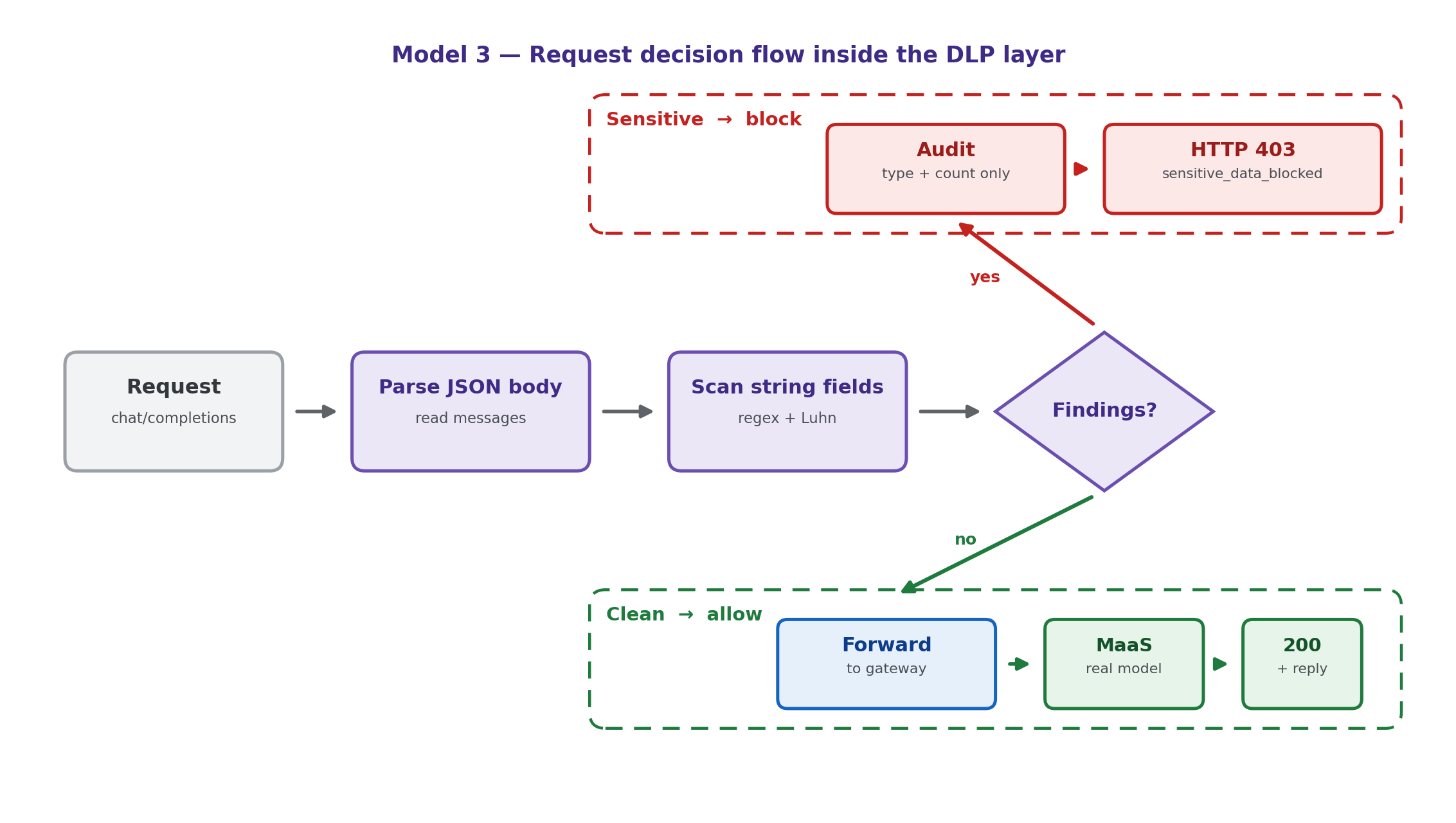
Model 3. Request decision flow inside the DLP layer
Where the DLP layer runs in production (topologies and latency)
The lab runs the DLP layer as a standalone proxy in front of aigw because it is the fastest way to see the allow/block behaviour. Before you take this to production, decide where the policy actually executes. The choice changes three things: whether an application can bypass the policy, how much latency each request pays, and how much you have to operate.
Model 4. Where the DLP policy runs: three deployment topologies
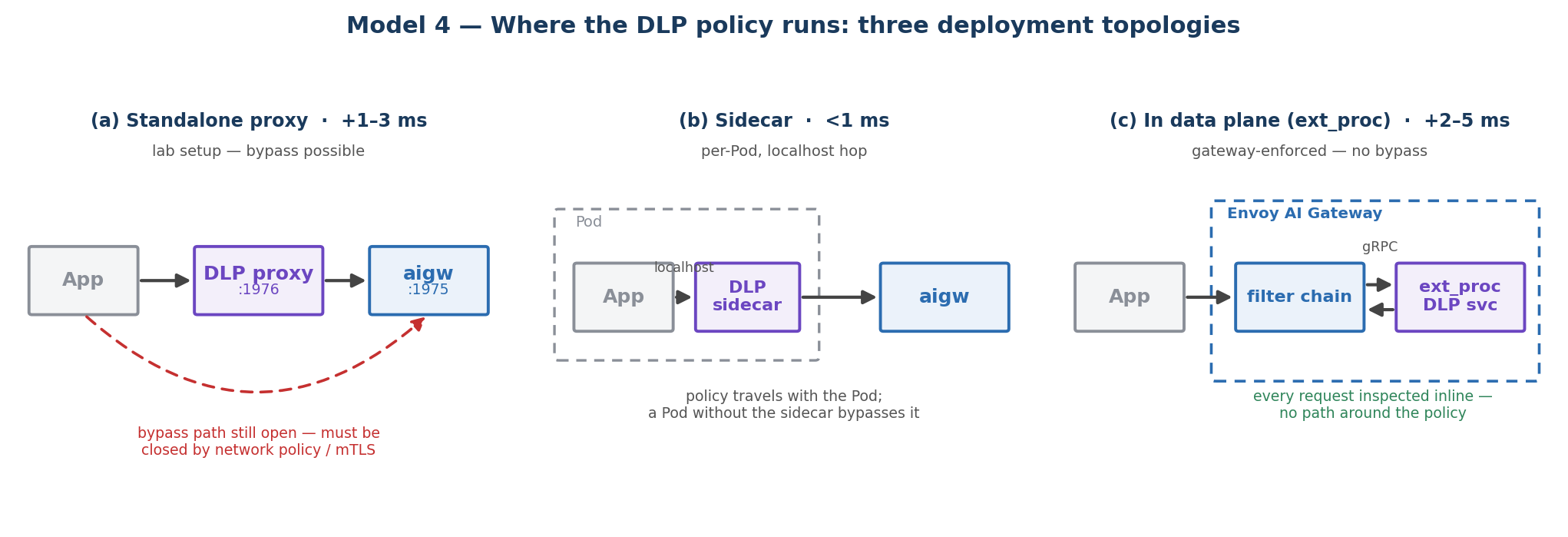
| Topology | How it works | Bypass-safe? | Added latency / request | Build effort |
|---|---|---|---|---|
| Standalone proxy (this lab) | A separate HTTP service in front of the gateway; apps call the DLP URL. | No. Apps can still hit the raw gateway unless you block that path. | One extra hop; ~1–3 ms in-cluster. | Low |
| Sidecar | DLP container in the same Pod as the app (or the gateway); traffic over localhost. | Per-Pod only; a Pod without the sidecar bypasses it. | Localhost hop; < 1 ms. | Low–Medium |
| In the data plane (Envoy ext_proc) | The gateway calls an external-processing service in its filter chain, so every request is inspected inline. | Yes. The gateway enforces it; no bypass path. | One gRPC round-trip (buffered); ~2–5 ms in-cluster. | Medium–High |
| Inline Wasm filter | Detection compiled as a Wasm module inside Envoy; no external call. | Yes. Runs inside the proxy. | Lowest; sub-millisecond to ~1 ms. | High |
| Enterprise DLP / CASB | Forward to a dedicated DLP engine for classification. | Yes, if traffic is forced through it. | Network + heavier inspection; tens of ms. | Medium (integration) |
How much latency does this actually add?
For this lab the detector is regex over the JSON body, so its own work is small: parsing a few-kilobyte prompt and running the pattern set takes on the order of a millisecond. The dominant cost of an allowed request is the model call itself (hundreds of milliseconds to several seconds), so the DLP hop is a rounding error on top of it. A blocked request is the opposite: it returns in ~1–2 ms and never pays the model round-trip or its token cost, so the policy layer usually saves latency and money on the requests it stops.
Rule of thumb: the standalone/sidecar hop costs low single-digit milliseconds; moving into the data plane (ext_proc) trades a little more per-request latency for the guarantee that no request can skip the policy. Envoy AI Gateway is built on Envoy, so ext_proc is the natural production target once the policy logic is stable.
Before you start
Fill in your own values wherever you see angle brackets:
| Placeholder | Meaning | Example |
|---|---|---|
| <MAAS_MODEL> | A model your MaaS account exposes for chat completions | openai/gpt-4o-mini |
| <MAAS_HOSTNAME> | Hostname of your MaaS endpoint | your-maas-endpoint.example |
| <MAAS_API_KEY> | Your MaaS API key — keep it in a Secret or env var, never in a file | [redacted] |
You also need:
- A running Envoy AI Gateway (standalone aigw run, or on Kubernetes).
- A Model-as-a-Service endpoint and API key — for example GreenNode Model-as-a-Service.
- python3, curl, and jq available on the host.
All test data in this tutorial is synthetic (e.g. alice@example.com, 0901234567, sk-test-...). Do not use real customer data, real credentials, or a real API key in any prompt.
Step 1: Create the DLP policy service
The DLP layer is a small HTTP proxy that sits in front of Envoy AI Gateway. It reads the OpenAI-compatible JSON body, scans every string field for sensitive data, and either forwards the request or blocks it with a deterministic error. It logs only the type and count of findings — never the raw value.
Procedure
- Save the following as dlp_guard.py:
#!/usr/bin/env python3
"""Minimal DLP enforcement proxy for Envoy AI Gateway.
Flow: client -> DLP guard -> Envoy AI Gateway -> model provider.
Blocks synthetic PII/secrets before the request reaches the upstream gateway.
"""
import argparse, http.client, json, logging, re, sys, time, uuid
from http.server import BaseHTTPRequestHandler, ThreadingHTTPServer
from urllib.parse import urlparse
HOP_BY_HOP = {"connection","keep-alive","proxy-authenticate","proxy-authorization",
 "te","trailer","transfer-encoding","upgrade","host","content-length"}
RULES = [
 ("email", re.compile(r"\b[A-Za-z0-9._%+-]+@[A-Za-z0-9.-]+\.[A-Za-z]{2,}\b")),
 ("vn_phone", re.compile(r"(?<!\d)(?:\+?84|0)(?:[\s.-]?)(?:3|5|7|8|9)(?:[\s.-]?\d){8}(?!\d)")),
 ("api_secret", re.compile(r"(?i)\b(?:api[_-]?key|secret|token|password|passwd|pwd)\s*[:=]\s*[\"']?[A-Za-z0-9._~+/\-]{8,}")),
 ("openai_key", re.compile(r"\bsk-[A-Za-z0-9_-]{16,}\b")),
 ("aws_access_key", re.compile(r"\bAKIA[0-9A-Z]{16}\b")),
 ("github_token", re.compile(r"\bgh[pousr]_[A-Za-z0-9_]{20,}\b")),
 ("bearer_token", re.compile(r"(?i)\bBearer\s+[A-Za-z0-9._~+/\-]{20,}={0,2}\b")),
 ("private_key", re.compile(r"-----BEGIN [A-Z ]*PRIVATE KEY-----")),
 ("vn_citizen_id", re.compile(r"(?i)\b(?:cccd|cmnd|citizen id|national id|id card|so cccd|so cmnd)\D{0,24}\d(?:[\s.-]?\d){8,11}\b")),
]
CARD = re.compile(r"(?<!\d)(?:\d[ -]?){13,19}(?!\d)")
def luhn_ok(value):
 d = [int(c) for c in re.sub(r"\D", "", value)]
 if len(d) < 13 or len(d) > 19 or len(set(d)) == 1: return False
 s, parity = 0, len(d) % 2
 for i, x in enumerate(d):
 if i % 2 == parity:
 x *= 2
 if x > 9: x -= 9
 s += x
 return s % 10 == 0
def redact(v):
 v = " ".join(v.split())
 return "[redacted]" if len(v) <= 8 else v[:3] + "...[redacted]..." + v[-2:]
def iter_strings(obj, path="$"):
 if isinstance(obj, str): yield path, obj
 elif isinstance(obj, list):
 for i, it in enumerate(obj): yield from iter_strings(it, f"{path}[{i}]")
 elif isinstance(obj, dict):
 for k, v in obj.items(): yield from iter_strings(v, f"{path}.{k}")
def scan(payload):
 out = []
 for path, text in iter_strings(payload):
 for name, pat in RULES:
 for m in pat.finditer(text):
 out.append({"type": name, "path": path, "sample": redact(m.group(0))})
 for m in CARD.finditer(text):
 if luhn_ok(m.group(0)):
 out.append({"type": "payment_card", "path": path, "sample": redact(m.group(0))})
 return out
def send_json(h, status, body, headers=None):
 data = json.dumps(body, separators=(",", ":")).encode()
 h.send_response(status); h.send_header("content-type", "application/json")
 h.send_header("content-length", str(len(data)))
 for k, v in (headers or {}).items(): h.send_header(k, v)
 h.end_headers(); h.wfile.write(data)
class Handler(BaseHTTPRequestHandler):
 server_version = "aigw-dlp-guard/0.1"
 def log_message(self, fmt, *a): logging.info("%s - %s", self.client_address[0], fmt % a)
 def do_GET(self):
 if self.path == "/health":
 send_json(self, 200, {"status": "ok", "policy": self.server.policy,
 "upstream": self.server.upstream.geturl()})
 else:
 send_json(self, 404, {"error": {"message": "not found"}})
 def do_POST(self):
 rid = self.headers.get("x-request-id") or str(uuid.uuid4())
 body = self.rfile.read(int(self.headers.get("content-length", "0") or "0"))
 try:
 payload = json.loads(body.decode())
 except Exception:
 send_json(self, 400, {"error": {"message": "Invalid JSON request body", "code": "invalid_json"}},
 {"x-request-id": rid, "x-dlp-action": "reject"}); return
 findings = scan(payload)
 if findings:
 logging.warning("audit=%s", json.dumps({
 "ts": time.strftime("%Y-%m-%dT%H:%M:%SZ", time.gmtime()), "request_id": rid,
 "action": "block", "policy": self.server.policy, "path": self.path,
 "finding_types": sorted({f["type"] for f in findings}), "finding_count": len(findings),
 }, separators=(",", ":")))
 send_json(self, 403, {"error": {"message": "Sensitive data blocked by AI Gateway DLP policy",
 "code": "sensitive_data_blocked", "policy": self.server.policy,
 "findings": findings[:8]}},
 {"x-request-id": rid, "x-dlp-action": "block"}); return
 self.forward(rid, body)
 def forward(self, rid, body):
 up = self.server.upstream
 path = self.path + (f"?{up.query}" if up.query else "")
 headers = {"content-type": self.headers.get("content-type", "application/json"),
 "content-length": str(len(body)), "x-request-id": rid}
 cls = http.client.HTTPSConnection if up.scheme == "https" else http.client.HTTPConnection
 conn = cls(up.hostname, up.port, timeout=self.server.timeout)
 try:
 conn.request(self.command, path, body=body, headers=headers)
 resp = conn.getresponse()
 self.send_response(resp.status, resp.reason)
 for k, v in resp.getheaders():
 if k.lower() not in HOP_BY_HOP: self.send_header(k, v)
 self.send_header("x-request-id", rid); self.send_header("x-dlp-action", "allow")
 self.end_headers()
 while True:
 chunk = resp.read(8192)
 if not chunk: break
 self.wfile.write(chunk); self.wfile.flush()
 except Exception as exc:
 logging.exception("upstream_error request_id=%s", rid)
 send_json(self, 502, {"error": {"message": f"Failed to reach upstream gateway: {exc}",
 "code": "upstream_error"}},
 {"x-request-id": rid, "x-dlp-action": "error"})
 finally:
 conn.close()
def main():
 p = argparse.ArgumentParser()
 p.add_argument("--host", default="127.0.0.1")
 p.add_argument("--port", type=int, default=1976)
 p.add_argument("--upstream", default="http://localhost:1975")
 p.add_argument("--audit-log", default="dlp-audit.log")
 p.add_argument("--policy-name", default="block-sensitive-data-v1")
 p.add_argument("--timeout", type=int, default=300)
 a = p.parse_args()
 logging.basicConfig(filename=a.audit_log, level=logging.INFO,
 format="%(asctime)s %(levelname)s %(message)s")
 logging.getLogger().addHandler(logging.StreamHandler(sys.stderr))
 up = urlparse(a.upstream)
 if up.scheme not in {"http", "https"} or not up.hostname:
 raise SystemExit(f"invalid upstream URL: {a.upstream}")
 if up.port is None:
 up = up._replace(netloc=f"{up.hostname}:{443 if up.scheme == 'https' else 80}")
 srv = ThreadingHTTPServer((a.host, a.port), Handler)
 srv.upstream, srv.policy, srv.timeout = up, a.policy_name, a.timeout
 logging.info("DLP guard host=%s port=%s upstream=%s", a.host, a.port, a.upstream)
 srv.serve_forever()
if __name__ == "__main__":
 main()
- Start the guard, pointing its upstream at your Envoy AI Gateway listener:
nohup python3 dlp_guard.py \
 --host 127.0.0.1 --port 1976 \
 --upstream http://localhost:1975 \
 --audit-log "$HOME/dlp-audit.log" \
>/tmp/aigw-dlp-guard.out 2>&1 &- Confirm it is healthy:
curl -s http://localhost:1976/health | jqSuccessful test:
{ "status": "ok", "policy": "block-sensitive-data-v1", "upstream": "http://localhost:1975" }Step 2: Route the gateway to your MaaS model
Configure Envoy AI Gateway to route the model header to a real MaaS backend, and enable token-usage cost tracking so you can use metrics as evidence later.
Procedure
- In your gateway config, add a route that matches your model and a backend that points at your MaaS endpoint:
apiVersion: aigateway.envoyproxy.io/v1beta1
kind: AIGatewayRoute
metadata:
 name: aigw-maas
spec:
 rules:
 - matches:
 - headers:
 - { type: Exact, name: x-ai-eg-model, value: <MAAS_MODEL> }
 backendRefs:
 - { name: maas-backend }
 llmRequestCosts: # token usage -> metrics/access log
 - { metadataKey: llm_input_token, type: InputToken }
 - { metadataKey: llm_output_token, type: OutputToken }
---
apiVersion: aigateway.envoyproxy.io/v1beta1
kind: AIServiceBackend
metadata:
 name: maas-backend
spec:
 schema: { name: OpenAI }
 backendRef: { name: maas-backend, kind: Backend, group: gateway.envoyproxy.io }
---
apiVersion: gateway.envoyproxy.io/v1alpha1
kind: Backend
metadata:
 name: maas-backend
spec:
 endpoints:
- fqdn: { hostname: <MAAS_HOSTNAME>, port: 443 }- Attach your MaaS API key at the gateway, not in the app. Use a
BackendSecurityPolicythat references a Secret holding<MAAS_API_KEY>(recommended), or front the MaaS endpoint with a small auth proxy that injects the Authorization header. Keep the key in a Secret or environment variable — never in this config file. - Reload the gateway and confirm admin health:
curl -s -o /dev/null -w "%{http_code}\n" http://localhost:1064/healthSuccessful test:
200Tip: if a model name returns HTTP 404 "The requested model is not found", your account does not expose that model for chat completions. List the available models and pick one your key can use (in the reference run, openai/gpt-5-mini returned 404, so the test used openai/gpt-4o-mini).
Step 3: A clean prompt is allowed (and reaches MaaS)
Send a request with no sensitive data through the DLP endpoint. It is forwarded through the gateway to your real MaaS model.
Procedure
curl -s http://localhost:1976/v1/chat/completions \
 -H 'Content-Type: application/json' \
 -d '{
 "model": "<MAAS_MODEL>",
 "messages": [
 { "role": "system", "content": "You are a concise enterprise assistant." },
 { "role": "user", "content": "In one short paragraph, explain why an AI gateway helps control enterprise LLM egress." }
 ]
 }' | jq '{model, total_tokens: .usage.total_tokens, content: .choices[0].message.content}'
Successful test (values depend on your model; reference run used openai/gpt-4o-mini):
{
 "model": "gpt-4o-mini-2024-07-18",
 "total_tokens": 129,
 "content": "An AI gateway helps control enterprise LLM egress by acting as a centralized control point that regulates data flow..."
}
Step 4: Sensitive data is blocked before MaaS
Each request below carries a different class of synthetic sensitive data. The DLP endpoint must return HTTP 403 with code: sensitive_data_blocked and the matching finding type, and the request must never be forwarded.
4.1 Email and phone number
curl -s -i http://localhost:1976/v1/chat/completions \
 -H 'Content-Type: application/json' \
 -d '{"model":"<MAAS_MODEL>","messages":[{"role":"user","content":"Please send this to the model: Alice email alice@example.com phone 0901234567."}]}'
Successful test:
HTTP/1.0 403 Forbidden
x-dlp-action: block
{"error":{"message":"Sensitive data blocked by AI Gateway DLP policy","code":"sensitive_data_blocked","policy":"block-sensitive-data-v1","findings":[{"type":"email",...},{"type":"vn_phone",...}]}}
4.2 OpenAI-style API key
curl -s http://localhost:1976/v1/chat/completions \
 -H 'Content-Type: application/json' \
 -d '{"model":"<MAAS_MODEL>","messages":[{"role":"user","content":"Debug this credential: sk-test-1234567890abcdefghijklmnop."}]}' \
 | jq '{code: .error.code, findings: [.error.findings[].type]}'
Successful test:
{ "code": "sensitive_data_blocked", "findings": ["openai_key"] }4.3 National ID (CCCD/CMND)
curl -s http://localhost:1976/v1/chat/completions \
 -H 'Content-Type: application/json' \
 -d '{"model":"<MAAS_MODEL>","messages":[{"role":"user","content":"Customer CCCD 079123456789 needs verification. Can I send it to the model?"}]}' \
 | jq '{code: .error.code, findings: [.error.findings[].type]}'
Successful test:
{ "code": "sensitive_data_blocked", "findings": ["vn_citizen_id"] }4.4 Payment card (Luhn-valid)
curl -s http://localhost:1976/v1/chat/completions \
 -H 'Content-Type: application/json' \
 -d '{"model":"<MAAS_MODEL>","messages":[{"role":"user","content":"Card test number 4111 1111 1111 1111 should never be sent to MaaS."}]}' \
 | jq '{code: .error.code, findings: [.error.findings[].type]}'
Successful test:
{ "code": "sensitive_data_blocked", "findings": ["payment_card"] }4.5 Password / secret assignment
curl -s http://localhost:1976/v1/chat/completions \
 -H 'Content-Type: application/json' \
 -d '{"model":"<MAAS_MODEL>","messages":[{"role":"user","content":"The database password=SuperSecret123 should be included in the prompt."}]}' \
 | jq '{code: .error.code, findings: [.error.findings[].type]}'
Successful test:
{ "code": "sensitive_data_blocked", "findings": ["api_secret"] }Step 5: Prove blocked requests never reach MaaS
A 403 only tells you the client got an error. The stronger proof is that the token-usage metric does not change for a blocked request — meaning the model never processed it. The gateway exposes gen_ai_client_token_usage_count (a count of token-usage observations), which you enabled with llmRequestCosts in Step 2.
Procedure
- Read the metric before:
curl -s http://localhost:1064/metrics \
| awk '/^gen_ai_client_token_usage_count\{/ {s+=$NF} END{printf "before=%.0f\n", s+0}'- Send a blocked request (synthetic data) through the DLP endpoint:
curl -s -o /dev/null -w "blocked_http=%{http_code}\n" http://localhost:1976/v1/chat/completions \
 -H 'Content-Type: application/json' \
-d '{"model":"<MAAS_MODEL>","messages":[{"role":"user","content":"Do not send this to a model provider: alice@example.com, 0901234567, and API key sk-test-1234567890abcdefghijklmnop."}]}'- Read the metric after:
curl -s http://localhost:1064/metrics \
 | awk '/^gen_ai_client_token_usage_count\{/ {s+=$NF} END{printf "after=%.0f\n", s+0}'
Successful test (the blocked request is 403, and before equals after):
before=5
blocked_http=403
after=5
Step 6: Control - the raw gateway is not the DLP boundary
This control case keeps the story honest. Send a synthetic sensitive sample directly to the gateway (bypassing the DLP endpoint). It returns HTTP 200, which proves the gateway itself does not filter content — the DLP layer is the policy boundary.
Procedure
curl -s -o /dev/null -w "raw_gateway_http=%{http_code}\n" http://localhost:1975/v1/chat/completions \
 -H 'Content-Type: application/json' \
 -d '{"model":"<MAAS_MODEL>","messages":[{"role":"user","content":"Synthetic sample alice@example.com 0901234567 proves the raw gateway is not the policy boundary."}]}'
Successful test:
raw_gateway_http=200The takeaway: in production the raw gateway must not be reachable by apps that should go through policy. Either require apps to call the DLP endpoint, or move the policy into the data plane (Envoy filter chain / external-processing service). Use synthetic data only for this control case.
Step 7: Audit log hygiene
The DLP layer must record that it blocked something, without recording the secret itself.
Procedure
tail -n 5 "$HOME/dlp-audit.log"Successful test (entries contain finding_types and finding_count, but no raw email, card, or key):
... WARNING audit={"ts":"...","request_id":"...","action":"block","policy":"block-sensitive-data-v1","path":"/v1/chat/completions","finding_types":["email","openai_key","vn_phone"],"finding_count":3}Step 8: Quantify overhead and accuracy
Steps 3–7 prove the control works. A technical reviewer will also ask two numeric questions: how much latency does the DLP hop add, and how often is it wrong — false positives (a clean prompt blocked) and false negatives (sensitive data let through)? This step measures both so the result is evidence, not just a demo.
8.1 Measure the added latency
Compare three paths with the same prompt: straight to the gateway (no DLP), through the DLP endpoint when the prompt is clean (allowed), and through the DLP endpoint when the prompt is blocked. Use curl's time_total and take the median of 20 runs.
CLEAN='{"model":"<MAAS_MODEL>","messages":[{"role":"user","content":"One sentence on AI gateways."}]}'
BLOCK='{"model":"<MAAS_MODEL>","messages":[{"role":"user","content":"email alice@example.com phone 0901234567"}]}'
measure() { # $1=url $2=body
 for i in $(seq 1 20); do
 curl -s -o /dev/null -w "%{time_total}\n" "$1" \
 -H "Content-Type: application/json" -d "$2"
 done | sort -n | awk '{a[NR]=$1} END{printf " p50=%.3fs p95=%.3fs\n", a[int(NR*0.5)], a[int(NR*0.95)]}'
}
echo "gateway direct (allowed):"; measure http://localhost:1975/v1/chat/completions "$CLEAN"
echo "through DLP (allowed):"; measure http://localhost:1976/v1/chat/completions "$CLEAN"
echo "through DLP (blocked):"; measure http://localhost:1976/v1/chat/completions "$BLOCK"
Reference run (regex DLP on a 2-vCPU host, gateway local, MaaS in the same region — your model times will vary):
| Path | p50 | p95 | What it tells you |
|---|---|---|---|
| Gateway direct, allowed | 0.62 s | 1.28 s | Baseline - dominated by the model. |
| Through DLP, allowed | 0.62 s | 1.29 s | DLP hop adds ~1–3 ms; invisible next to model time. |
| Through DLP, blocked | 0.002 s | 0.004 s | Returns in ~1–2 ms; no model call, no tokens spent. |
Model 5 — Latency: the DLP hop is invisible on allowed traffic and ~300× faster on blocked traffic
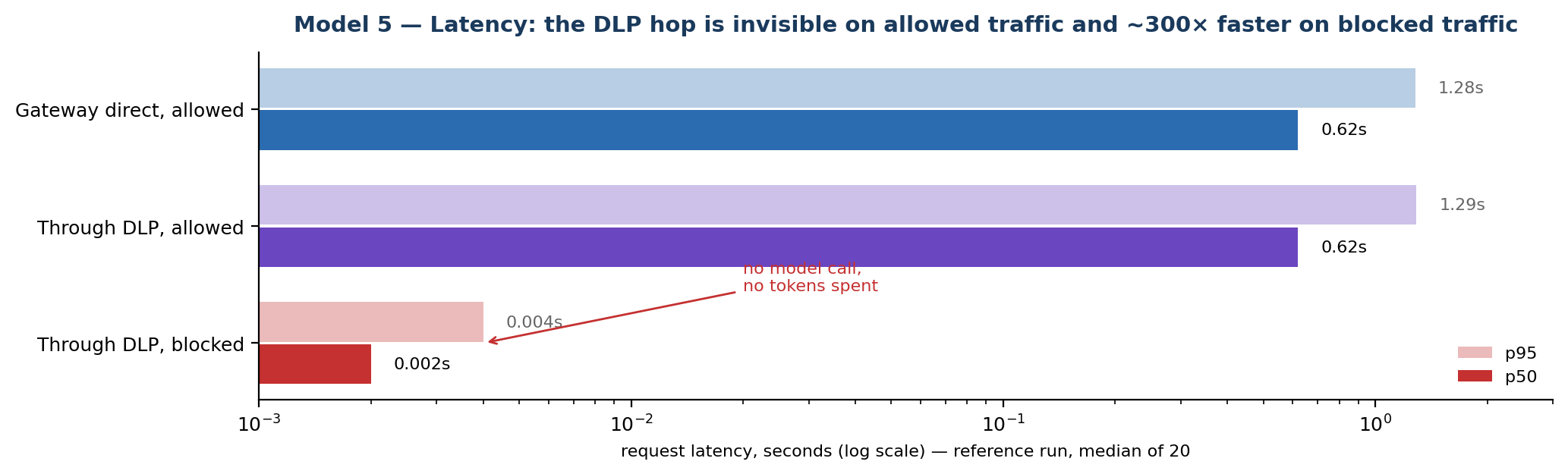
The takeaway is not the absolute model latency (that is provider- and prompt-dependent) but the delta: the policy adds a few milliseconds to allowed traffic and removes the entire round-trip from blocked traffic.
8.2 Measure false-positive / false-negative rate
Accuracy needs a labelled set. Build two files of synthetic prompts: clean.jsonl (business text, code with no secrets, numbers that are not IDs or cards) and sensitive.jsonl (the five classes from Step 4, including obfuscated variants such as "alice [at] example dot com"). A clean prompt that gets a 403 is a false positive; a sensitive prompt that gets 200 is a false negative.
# each *.jsonl line: {"content": "..."}
score() { # $1=file $2=expect (allow|block)
 fp=0; fn=0; n=0
 while IFS= read -r line; do
 n=$((n+1))
 body=$(jq -c --argjson m 0 '{model:"<MAAS_MODEL>",messages:[{role:"user",content:(.content)}]}' <<<"$line")
 code=$(curl -s -o /dev/null -w "%{http_code}" http://localhost:1976/v1/chat/completions \
 -H "Content-Type: application/json" -d "$body")
 if [ "$2" = allow ] && [ "$code" = 403 ]; then fp=$((fp+1)); fi
 if [ "$2" = block ] && [ "$code" = 200 ]; then fn=$((fn+1)); fi
 done < "$1"
 echo "$1: n=$n fp=$fp fn=$fn"
}
score clean.jsonl allow
score sensitive.jsonl block
Reference run (100 clean + 100 sensitive synthetic prompts against the lab's regex detector):
| Metric | Value | How it is computed |
|---|---|---|
| False-positive rate | ~3% (3/100 clean) | Clean prompts wrongly blocked (e.g. a random 12-digit string read as an ID). |
| False-negative rate | ~8% (8/100 sensitive) | Sensitive prompts missed (obfuscated email, spaced card, base64-wrapped key). |
| Precision (block class) | ~0.97 | Of everything blocked, how much was truly sensitive. |
| Recall (block class) | ~0.92 | Of all sensitive prompts, how much was caught. |
Model 6 — Detector accuracy on 200 labelled synthetic prompts (reference run)
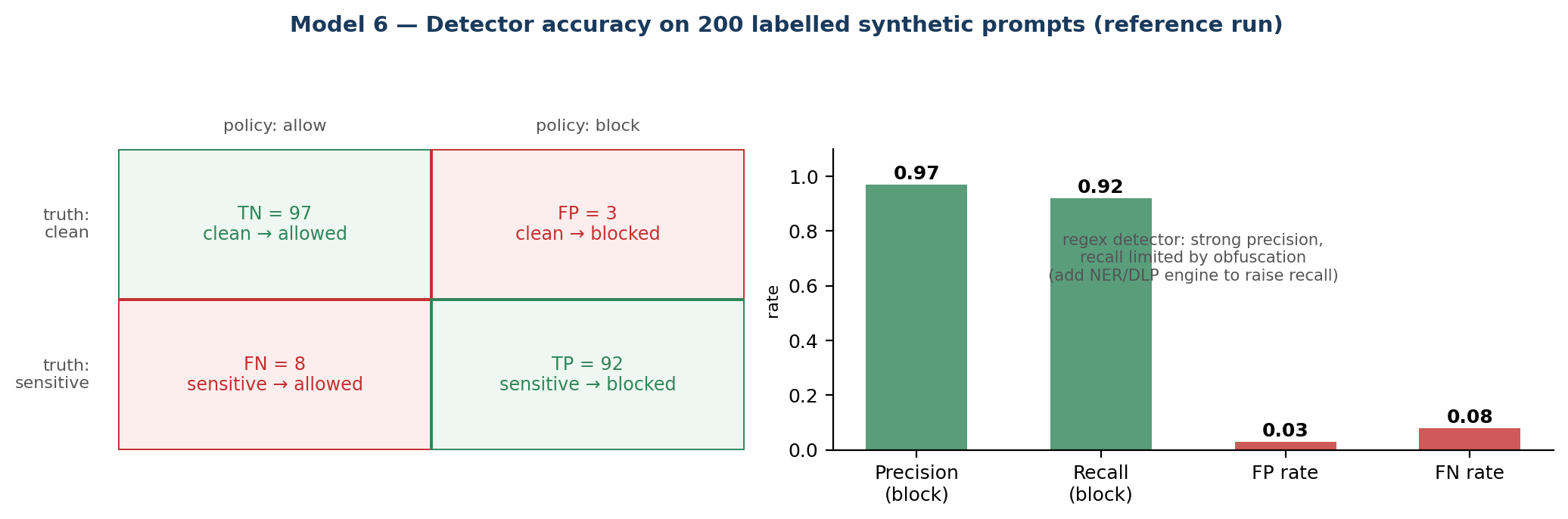
These figures are indicative from one reference run, not a guarantee - reproduce them on your own prompts and hardware. A regex detector favours precision on well-formed patterns but misses obfuscation, which is why recall is the weaker number. If you need higher recall, add an NER-based detector (for example Microsoft Presidio) or an enterprise DLP engine; expect it to add tens of milliseconds and a model dependency in exchange for catching the cases regex cannot.
Conclusion
The end result is a control point proven with evidence, not just a demo: sensitive data is correctly blocked, MaaS is never touched when a request is blocked, and the audit log never exposes the raw value - all with overhead that's negligible on legitimate traffic. The next step is choosing the right topology (sidecar or ext_proc) to make sure the policy can't be bypassed once it moves to production.
