

Imagine you want to bring an AI Agent into production. It usually starts with a Python file: import LangChain, build a reasoning loop, wire up tools, and handle every error that might come up. Once the code runs smoothly, the real deployment work begins — packaging it into a Docker image, writing Deployment/Service/ConfigMap manifests, and setting up observability.
For teams already used to running infrastructure with kubectl apply, this is a fairly different workflow from how they manage infrastructure day to day.
kagent takes a different approach: what if an AI Agent were simply a Kubernetes Custom Resource, just like a Deployment or a Service? Instead of writing your own Dockerfile and reasoning loop in Python, you only need a YAML file declaring the system prompt, tools, and model, then deploy it with:
kubectl apply -f agent.yamlWhat Is kagent and What Problem Does It Solve
kagent is an open-source, Kubernetes-native framework that lets you define, deploy, and operate AI agents as pure Kubernetes resources. Instead of writing complex Python code to build an agent, you declare the agent in YAML — exactly the way you'd deploy a Deployment or a Service.
Each agent in kagent is a Kubernetes Custom Resource (CRD), which means you can:
- kubectl apply to create or update an agent
- kubectl get to view the list and status
- kubectl delete to remove an agent
- Manage it via GitOps — commit the YAML to Git and the agent syncs automatically
Before kagent, deploying an AI Agent to production on Kubernetes typically involved five steps: writing code with LangChain or an equivalent framework, building and pushing a Docker image, writing Kubernetes manifests, implementing observability/retry/error handling yourself, and managing config and API keys for each LLM provider.
Every new AI Agent could therefore drag along its own CI/CD loop.
kagent condenses that whole process into two steps: write a YAML file defining the agent, and kubectl apply -f agent.yaml. The agent becomes a genuine CRD (Custom Resource Definition) — you can kubectl get, kubectl describe, kubectl delete it, and manage it via GitOps like any other K8s resource.
Core philosophy: Agent-as-Code. Agents are defined declaratively in YAML, versioned, reviewed through pull requests, and deployed using the exact K8s workflow the ops team already knows — instead of a separate track just for AI.
kagent was open-sourced by Solo.io — the company behind Istio and kgateway — on March 17, 2025, and reached over 300 GitHub stars within a week. In April 2025, the project was contributed to CNCF Sandbox at KubeCon Europe. By August 2025, kagent had more than 100 contributors, with over 85% coming from outside Solo.io — a signal that it's no longer just one company's internal project.
Technically, kagent is built on Google ADK (Agent Development Kit) and supports additional integrations with LangGraph, CrewAI, and the OpenAI Agents SDK. It doesn't try to replace these frameworks — it focuses on doing one thing well: bringing agents naturally into the Kubernetes lifecycle.
kagent's Overall Architecture: 4 Components, One Flow
kagent consists of four core components, each with its own role:
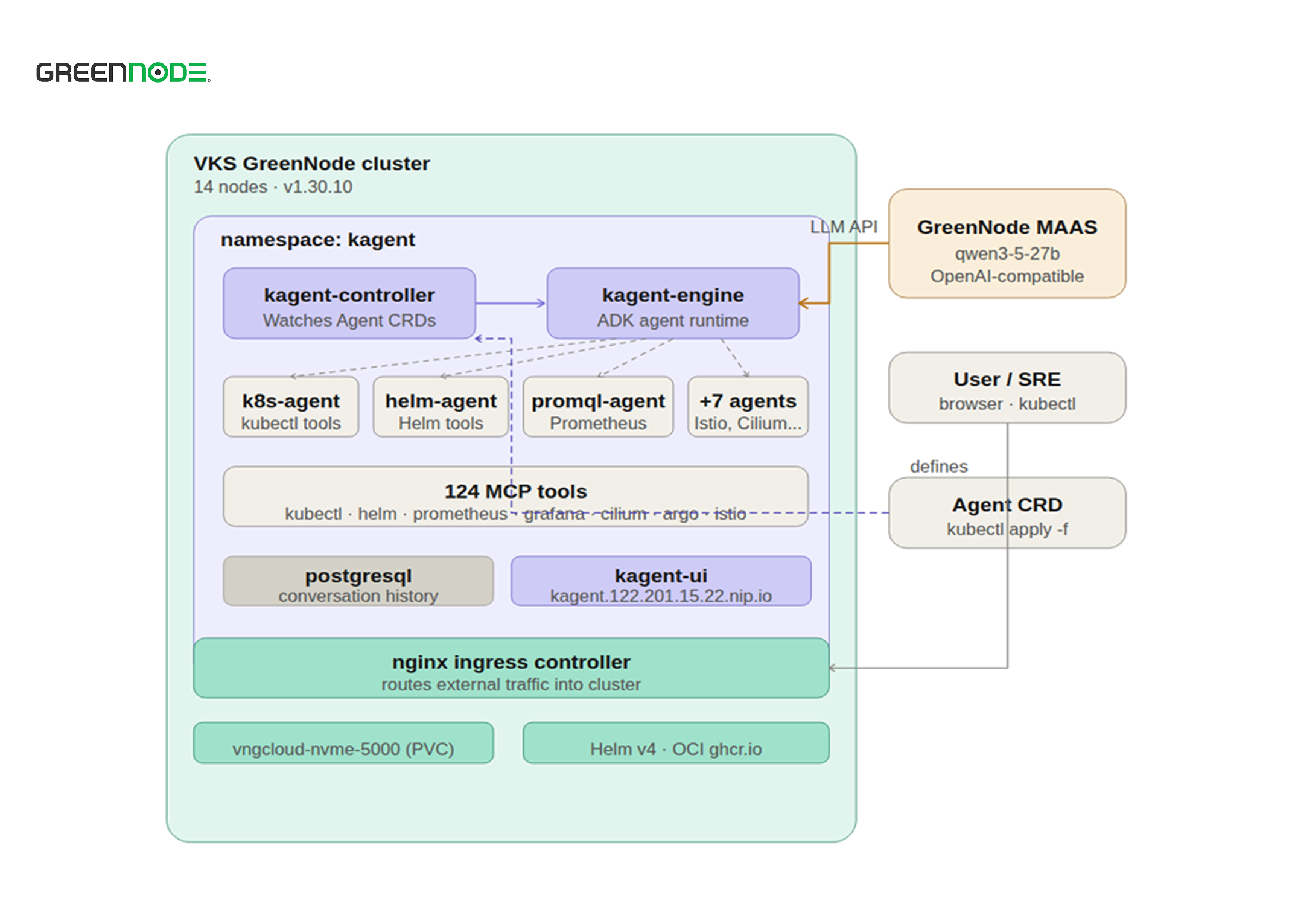
| Component | Language | Role | Communication |
|---|---|---|---|
| Controller | Go | Kubernetes controller — watches the CRD, manages agent lifecycle | Kubernetes API Server |
| Engine | Python or Go | Agent execution runtime — conversation loop, tool calling | LLM provider, MCP servers |
| Dashboard (UI) | TypeScript/React | Web interface — chat with agents, view sessions, manage resources | Engine via HTTP |
| CLI (kagent) | Go | Deploy, invoke, and manage agents from the terminal | Engine via HTTP |
When you create an Agent resource, the sequence of events will feel familiar to anyone who's debugged a Deployment: the Controller receives the event from the API Server, creates a Pod running the Engine according to the Agent spec, the Engine starts up and loads the system prompt, connects to the MCP server, then registers with the control plane to start accepting requests. From there, every chat turn follows a loop: the user calls in via UI or API → the Engine calls the LLM → the LLM decides whether a tool call is needed → the Engine executes the tool → the result is returned.
Go ADK or Python ADK?
Starting from v0.9, kagent lets you choose between two runtimes for the Engine. This choice directly affects cold-start time during autoscaling:
| Criteria | Python ADK (default) | Go ADK |
|---|---|---|
| Startup time | ~15 seconds | ~2 seconds |
| Resource usage | Higher | Lower (compiled binary) |
| Framework support | Google ADK, LangGraph, CrewAI, OpenAI SDK | Native Go implementation |
| Memory, MCP, HITL | Yes | Yes |
| Choose when | You need a specific framework integration | You need fast, resource-efficient autoscaling |
Switching to the Go runtime is just one line in the spec:
spec:
  type: Declarative
  declarative:
    runtime: go # or "python" (default)
For an always-on agent, the 15s vs. 2s difference barely matters. But for a scale-to-zero agent driven by traffic, it's the difference between a request waiting 15 seconds and one that responds almost instantly.
Concepts to Know Before Building Your First Agent
An Agent in kagent has three parts: Agent Instructions (the system prompt defining role and behavior), Tools (functions the agent can call), and Skills (capability descriptions that help the agent act more autonomously). A minimal example:
apiVersion: kagent.dev/v1alpha2
kind: Agent
metadata:
  name: k8s-troubleshoot-agent
  namespace: kagent
spec:
  description: "Agent that automatically investigates K8s incidents"
  type: Declarative
  declarative:
    modelConfig: default-model-config
    systemMessage: |
      You are an SRE agent specialized in investigating Kubernetes incidents.
      When you receive an alert: get pods, get events, check logs,
      and propose concrete fix steps.
    tools:
      - type: McpServer
        mcpServer:
          name: kagent-tool-server
          kind: RemoteMCPServer
          toolNames:
            - k8s_get_resources
            - k8s_get_pod_logs
            - k8s_describe_resource
ModelConfig is where the agent points to its LLM provider. It's also kagent's most flexible feature: model config lives in its own separate CRD, decoupled from agent logic, so switching providers doesn't touch the system prompt or tool list. kagent supports OpenAI, Anthropic, Google Gemini (via API or Vertex AI), Azure OpenAI, self-hosted Ollama, and any OpenAI-compatible endpoint — including GreenNode MAAS:
apiVersion: kagent.dev/v1alpha2
kind: ModelConfig
metadata:
  name: greennode-maas
  namespace: kagent
spec:
  provider: OpenAI
  model: qwen/qwen3-5-27b
  apiKeySecret: maas-api-secret
  openAI:
    baseUrl: https://maas-llm-aiplatform-hcm.api.vngcloud.vn/v1
Tools and MCP. kagent uses the Model Context Protocol (MCP) as its standard for connecting tools — an MCP server exposes a set of tools, and the agent declares which ones it uses. There are three tool sources: RemoteMCPServer (a built-in MCP server — kagent-tool-server ships with 124 tools out of the box, grouped into Kubernetes (~40), Helm (~10), Prometheus (~8), Grafana (~6), Cilium (30+), Argo Rollouts (~8), Istio (~10), and Gateway API (~6)); MCPServer, which a team deploys itself for custom tools; and Agent as Tool — using one agent as a tool for another, opening the door to multi-agent architectures.
Human-in-the-Loop. For sensitive actions (deleting resources, applying manifests), kagent supports pausing for approval before executing:
requireApproval:
  - k8s_delete_resource
  - k8s_apply_manifest
When you reject a tool call, the reason for rejection is sent back to the LLM as context — the agent adjusts its approach instead of failing outright. Every agent also has a built-in ask_user tool to pause and ask the user for clarification when needed, with no extra config required.
Memory and Context Compaction. Starting from v0.9, an agent can enable vector memory to retain context across conversations (automatically gaining three extra tools: save_memory, load_memory, prefetch_memory, extracted after every 5 messages). When a conversation grows past the context window, a compaction mechanism automatically summarizes older messages:
spec:
  declarative:
    context:
      compaction:
        compactionInterval: 5 # compact every 5 user messages
        overlapSize: 2 # keep 2 overlapping messages
        tokenThreshold: 10000 # or when exceeding 10k tokens
Agent-to-Agent (A2A). Agents can call other agents as tools, enabling multi-agent workflows — for example, an SRE agent calling a promql-agent to build a PromQL query, then calling a k8s-agent to correlate it with K8s events. Every agent is automatically exposed as an MCP server at the /mcp endpoint, meaning tools like Cursor or Claude Desktop can call your agent directly as a sub-agent.
Installing kagent on GreenNode VKS
Installing kagent per the official docs works smoothly on most clusters, but GreenNode VKS has a few quirks worth knowing beforehand so you don't waste time debugging.
Requirements: Kubernetes v1.28+ (tested on GreenNode VKS v1.30.10), Helm v3.8+, kubectl pointed at the cluster, and an API key for your LLM provider (GreenNode MAAS, OpenAI, Anthropic, etc.).
Step 1: Install the CRDs. kagent is published via an OCI registry (ghcr.io), not a regular Helm HTTP repo — running helm repo add will return a 404. Install the CRDs separately first to avoid losing data on uninstall:
helm install kagent-crds \
  oci://ghcr.io/kagent-dev/kagent/helm/kagent-crds \
  --namespace kagent \
  --create-namespace
Step 2: Create the secret for GreenNode MaaS
kubectl create secret generic kagent-maas-secret \
  --namespace kagent \
  --from-literal=OPENAI_API_KEY=<your-maas-api-key>
Step 3: Install kagent
helm install kagent \
  oci://ghcr.io/kagent-dev/kagent/helm/kagent \
  --namespace kagent \
  --set providers.default=openAI \
  --set providers.openAI.apiKeySecretRef=kagent-maas-secret \
  --set providers.openAI.baseURL=https://maas-llm-aiplatform-hcm.api.vngcloud.vn/v1 \
  --set providers.openAI.model=qwen/qwen3-5-27b
Note: --set providers.openAI.baseURL does not automatically map to ModelConfig — it needs to be patched manually in step 5.
Step 4: Fix PostgreSQL stuck Pending. This is a VKS-specific quirk: the default StorageClass uses WaitForFirstConsumer, which leaves the PostgreSQL pod stuck because no PVC gets created automatically. Create the PVC manually:
cat <<EOF | kubectl apply -f -
apiVersion: v1
kind: PersistentVolumeClaim
metadata:
  name: kagent-postgresql
  namespace: kagent
spec:
  accessModes: [ReadWriteOnce]
  storageClassName: vngcloud-nvme-5000-delete
  resources:
    requests:
      storage: 8Gi
EOF

kubectl -n kagent delete pod -l app.kubernetes.io/name=postgresql
Step 5: Patch the baseURL for GreenNode MaaS. The correct field is spec.openAI.baseUrl — lowercase l, not baseURL. This is the most common setup mistake. Check it first with kubectl explain:
kubectl explain modelconfig.spec.openAI

kubectl -n kagent patch modelconfig default-model-config \
  --type=merge \
  -p '{"spec":{"openAI":{"baseUrl":"https://maas-llm-aiplatform-hcm.api.vngcloud.vn/v1"}}}'
Step 6: Expose the UI via Ingress (if your cluster has an nginx ingress controller):
cat <<EOF | kubectl apply -f -
apiVersion: networking.k8s.io/v1
kind: Ingress
metadata:
  name: kagent-ui-ingress
  namespace: kagent
spec:
  ingressClassName: nginx
  rules:
    - host: kagent.<ingress-ip>.nip.io
      http:
        paths:
          - path: /
            pathType: Prefix
            backend:
              service:
                name: kagent-ui
                port:
                  number: 8080
EOF
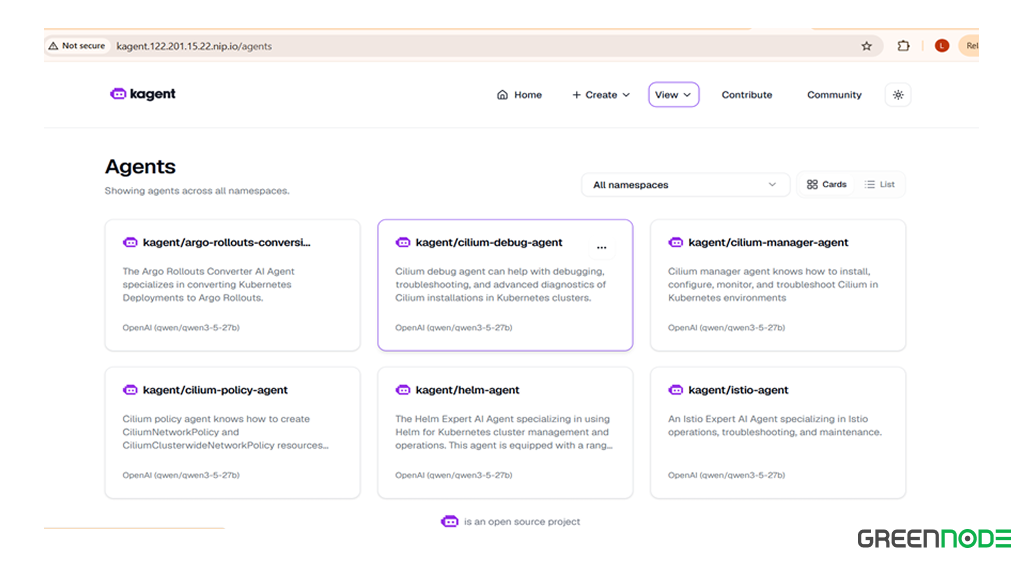
After about 30 minutes (including troubleshooting time), the full stack is up and running: controller, engine, 10 agents, PostgreSQL, and the UI.
Day-to-Day Operations
Creating a new agent is just writing YAML and applying it:
kubectl apply -f my-sre-agent.yaml
kubectl -n kagent get agents
The most commonly used commands:
# List all agents
kubectl -n kagent get agents

# View details of an agent
kubectl -n kagent describe agent k8s-agent

# View all kagent resources
kubectl -n kagent get agents,modelconfigs,toolservers,memories

# View kagent-engine logs
kubectl -n kagent logs -l app.kubernetes.io/component=engine -f

# Port-forward the UI if there's no ingress
kubectl -n kagent port-forward service/kagent-ui 8080:8080
The dashboard at http://kagent.<ingress-ip>.nip.io (or localhost:8080 via port-forward) brings four things into one place: chatting directly with any agent in natural language, approving/rejecting risky tool calls, reviewing session history, and tracking the list of available MCP servers/tools.
With the 10 default agents included, some real-world questions look like this:
| Agent | Example Question | Tool Called |
|---|---|---|
| k8s-agent | List all pods stuck in Pending and explain why | k8s_get_resources, k8s_describe_resource |
| k8s-agent | Pod X is CrashLooping — what do the logs say? | k8s_get_pod_logs, k8s_get_events |
| helm-agent | Which Helm release is currently failed? | helm_list_releases, helm_get_values |
| promql-agent | Average CPU usage over the last 1h for the production namespace | prometheus_query_range |
| observability-agent | Any issues on the cluster in the last 24h? | prometheus_query, grafana_list_dashboards |
| cilium-policy-agent | Write a policy allowing frontend to call backend on port 8080 | cilium_policy_create |
| argo-rollouts-agent | Switch the nginx deployment to 20% canary | argo_set_rollout_image, argo_rollouts_list |
| istio-agent | Why can't service A call service B? | istio_analyze, istio_get_config |
Common Errors on GreenNode VKS
| Error | Cause | Fix |
|---|---|---|
| helm repo add → 404 | kagent uses an OCI registry, not an HTTP Helm repo | Use oci://ghcr.io/kagent-dev/kagent/helm/kagent |
| PostgreSQL stuck Pending | StorageClass WaitForFirstConsumer doesn't auto-create a PVC | Manually create a PVC with vngcloud-nvme-5000-delete |
| NFS mount failed | NFS CSI can't create a directory on the server | Switch to block storage; avoid nfs-csi for PostgreSQL |
| Agent 401 Incorrect API key | baseURL not set — calls api.openai.com directly | Patch ModelConfig: spec.openAI.baseUrl to the MAAS endpoint |
| unknown field spec.baseURL | Wrong field name (capital U) | Use spec.openAI.baseUrl (lowercase l), verify with kubectl explain |
| kmcp/querydoc ImagePullBackOff | VKS node can't reach ghcr.io (timeout) | Scale to 0: kubectl scale deployment --replicas=0 |
| Tool description too generic | Agent doesn't call the tool at the right time | Add specific keywords to the tool description and system prompt |
| Agent doesn't call tools on its own | System prompt doesn't clearly guide when to use tools | Add explicit tool-usage instructions to systemMessage |
kagent vs. Building an Agent Yourself
The most practical question when weighing kagent is: compared to a team writing its own SRE agent in code, what do you gain and lose?
| Criteria | kagent | Build it yourself |
|---|---|---|
| Deploying a new agent | kubectl apply -f agent.yaml | Write Python code + Dockerfile + K8s manifest |
| Adding a new tool | Declare a ToolServer CRD | Implement in code, rebuild image |
| Multi-agent | Agent-as-Tool, built-in routing | Implement cross-agent calls yourself |
| Observability | Built-in OpenTelemetry | Integrate logging/tracing yourself |
| Human-in-the-Loop | requireApproval in YAML | Implement the approval workflow yourself |
| Switching LLM provider | Edit ModelConfig, done | Edit code, retest, redeploy |
| Chat UI | Built-in dashboard | Must build it yourself |
| Flexibility | Bound to kagent's framework | Full freedom |
| Best fit | Many agents, DevOps teams, GitOps | A specialized agent needing maximum control |
In short: kagent trades away some flexibility for faster deployment and a ready-made operational layer (observability, HITL, UI) that follows Kubernetes conventions. For a team already running multiple clusters that wants its agents to follow the same GitOps workflow as every other resource, that's a reasonable trade-off. For an agent that needs very specific logic or absolute runtime control, writing it by hand is still the better choice.
When Not to Use kagent
kagent earns its value when you need to run many agents as part of your Kubernetes infrastructure, with GitOps, RBAC, and observability aligned with the rest of the cluster. If you only need a single AI microservice exposed via a REST endpoint, with no need for a CRD lifecycle or a chat UI, kagent's overhead (CRD, controller, engine pod) won't pay for itself; a service that calls the LLM API directly will be simpler. Likewise, if your infrastructure doesn't run on Kubernetes, kagent's core value — Agent-as-Code on K8s — simply doesn't apply.
Conclusion
kagent puts AI agents exactly where infrastructure teams are already used to working: a CRD, a kubectl apply, a pull request review before merging. On VKS GreenNode, standing up the infrastructure takes only about 30 minutes if you know three quirks ahead of time - OCI registry instead of a Helm repo, PVCs that must be created manually because of WaitForFirstConsumer, and the lowercase baseUrl field. After that, adding a new agent is just a matter of writing YAML.
Content compiled from the official kagent docs and hands-on experience deploying on a 14-node GreenNode VKS cluster.
