What matters
- Local self-host is free but unreliable — no uptime, no public access without extra tunneling, fine only for testing.
- VPS gives full control (Ubuntu/Docker/Nginx stack) for $5–24/month, but takes 30–90 min to set up and you own security/patching yourself.
- AgentBase deploys in 40–60 seconds with built-in RBAC and uptime, but costs more if run 24/7 (~1.7M VND/month) and drops local-model support.
If you've already read our previous post on self-hosting OpenClaw, you know that running it on a local machine has some hard limits — inconsistent uptime, a non-trivial setup process, and real security exposure once you need the agent reachable from outside your network.
The natural follow-up question is: if not local, which cloud deployment path makes sense?
This guide compares the three most common options side by side — local/self-hosted, a self-managed VPS, and AgentBase (managed agent platform) — across the criteria that actually matter: setup complexity, ongoing maintenance, real pricing, and how each holds up when you need to scale.
Local / Self-hosted: Overview, pricing, best for
Overview
Running OpenClaw directly on your own machine or an on-premises server. This is how most people start — pull the Docker image, wire up a Telegram bot, and you're running within minutes.
Strengths:
- No hosting cost
- Full control over data and configuration
- Great for experimenting and learning how OpenClaw works
- Can run a local model (Ollama) on the same machine without any network overhead
Weaknesses:
- Agent goes offline whenever the machine shuts down or loses internet
- No stable public URL without an additional tunneling layer (ngrok, Cloudflare Tunnel, etc.)
- Difficult to integrate with webhooks or messaging channels that require a persistent endpoint
- Not viable for scheduled automation or any use case that needs 24/7 availability
Pricing
Direct cost: Essentially zero — you're paying for electricity and bandwidth you'd already be using.
Hidden costs worth accounting for:
- Machine must stay powered on → continuous electricity draw
- Any power outage or ISP issue takes the agent offline with no warning
- Hard to quantify the cost of downtime once the agent is part of an actual workflow
Best for
- Developers evaluating OpenClaw for the first time
- Experimental or personal use cases where uptime isn't critical
- Running a local LLM (Ollama, LM Studio) with a dedicated GPU
- Scenarios where it's fine if the agent is only available when your machine is on
Self-managed VPS: Overview, pricing, best for
Overview
Provision a Linux VPS (Ubuntu, Debian), SSH in, and build the full stack yourself: Docker, Nginx, SSL certificate, systemd service, firewall rules. OpenClaw runs as a container on that server.
This is the most common path for developers already comfortable with Linux — it gets the agent running 24/7 without tying it to a personal device.
Strengths:
- Agent runs continuously, independent of any personal device
- Full control at the OS level
- Flexible: install additional dependencies, run other services on the same host
- Can co-locate Ollama if the provider offers GPU instances
Weaknesses:
- Initial setup takes 30–90 minutes — SSH hardening, Docker, Nginx reverse proxy, SSL, firewall
- You own the security patching, OpenClaw updates, and certificate renewal
- No centralized management interface when running multiple instances
- Early 2026 saw a security incident affecting tens of thousands of misconfigured OpenClaw instances — the attack surface is real for anyone unfamiliar with proper server hardening
Minimum stack for a stable production setup:
Ubuntu 22.04 VPS
├── Docker + docker-compose
├── OpenClaw container (bind to 127.0.0.1:18789, not 0.0.0.0)
├── Nginx reverse proxy + WebSocket support (proxy_read_timeout 86400)
├── Certbot SSL
├── UFW firewall (allow only ports 22, 80, 443)
└── systemd service (keeps the process alive across reboots)
Pricing
VPS pricing varies by provider and specs. The practical minimum for a stable OpenClaw deployment is 2 vCPU / 4 GB RAM — 1 GB RAM will throw OOM errors during installation.
| Provider | Spec | Price/month |
|---|---|---|
| DigitalOcean | 2 vCPU / 4 GB | ~$24 |
| Contabo | 3 vCPU / 8 GB | ~$5 |
| Hetzner | 2 vCPU / 4 GB | ~€6 |
| Vietnamese VPS providers (avg.) | 2 vCPU / 4 GB | ~150–300K VND |
Hidden costs to factor in:
- Initial setup time: 1–2 hours
- Ongoing maintenance (updates, log checks, cert renewal): ~30 min/month
- Incident response when something breaks: unpredictable
- Fixed monthly bill regardless of how many hours the agent actually runs
Best for
- Developers comfortable with Linux who want full OS-level control
- Running OpenClaw alongside other services on the same host to consolidate costs
- Integrating Ollama with a dedicated GPU server
- Teams with existing DevOps capacity to manage the infrastructure
- Running 1–2 agents with no plans to scale to more instances
GreenNode AgentBase (Fully Managed Platform): Overview, pricing, best for
Overview
Deploy OpenClaw directly from the GreenNode AgentBase Agent Marketplace — no server to provision, no SSH session to open, no Nginx or SSL configuration required. The platform handles all of that.
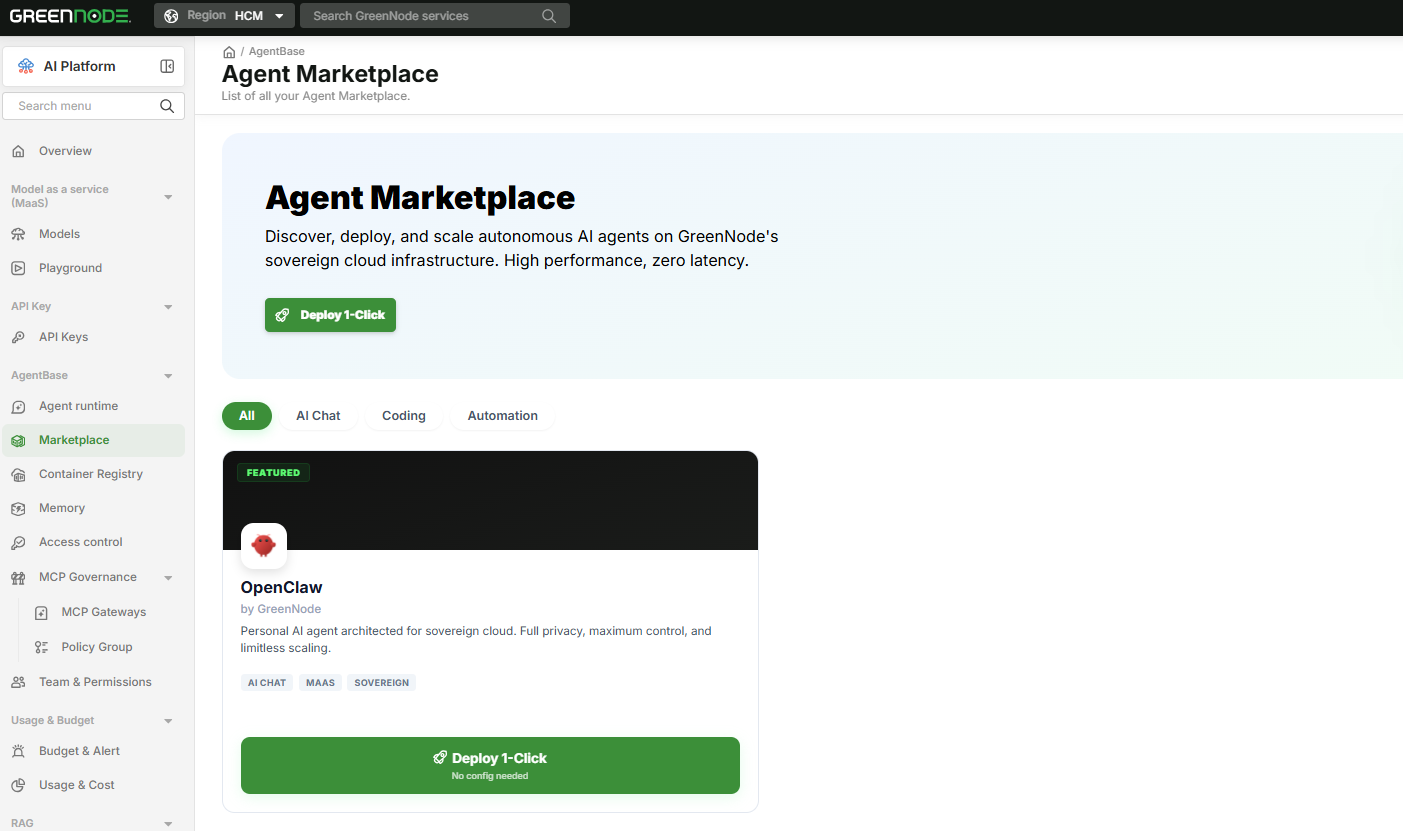
The deployment process is fully automated: it provisions an Identity and authentication token, connects to GreenNode MaaS (or your own BYOK key from OpenAI, Anthropic, or Gemini), and starts the container. The agent is live in 40–60 seconds.
Strengths:
- No infrastructure knowledge required to get started
- Agent runs 24/7 and automatically restarts on crash
- All instances managed from a single My Agents Dashboard — start, stop, view logs, and track costs in one place
- Built-in RBAC: assign roles and permissions per team member
- Private VPC: deploy agents entirely within your internal network — data never leaves your system
- Billed by the hour, only when the agent is actually running
Weaknesses:
- Less flexibility at the OS level compared to a VPS — no direct SSH access to the container
- No support for local models (Ollama) — requires a cloud LLM API
- Hourly billing can exceed a fixed VPS cost if the agent runs continuously 24/7
Read more: GreenNode AgentBase Review (2026): Is It the Right Way to Run OpenClaw?
Pricing
AgentBase charges by the hour, only while the agent is running — a stopped instance costs nothing.
| Plan | Price/hour | Spec |
|---|---|---|
| General | 2,365 VND/hr | runtime-s2-general-2x4 |
| Standard | 7,940 VND/hr | runtime-s2-standard-4x16 |
| High CPU | 3,584 VND/hr | runtime-s2-highcpu-4x4 |
| High Memory | 13,748 VND/hr | runtime-s2-highmem-4x32 |
Estimated monthly cost by usage pattern (General plan):
| Usage pattern | Runtime hours/month | Estimated cost/month |
|---|---|---|
| Light use (4 hrs/day) | ~120 hrs | ~283,800 VND |
| Moderate use (8 hrs/day) | ~240 hrs | ~567,600 VND |
| Always-on (24/7) | ~720 hrs | ~1,702,800 VND |
Quick comparison with a self-managed VPS:
- Light to moderate usage: AgentBase General is typically cheaper than or comparable to a fixed VPS
- Always-on 24/7: a VPS generally wins on cost at the General tier
- Running two or more agents: AgentBase's cost and operational advantages become significantly more pronounced
Best for
- Developers who want an agent running in production today, not after two hours of server setup
- Teams managing two or more agents who need centralized visibility
- Organizations that need RBAC, cost controls, and an audit trail
- Use cases where sensitive data must stay within an internal network (Private VPC)
- Teams without dedicated DevOps resources who still need production-grade reliability
Self‑Host vs. VPS vs. GreenNode AgentBase: A Comparison
| Criteria | Local / Self-hosted | Self-managed VPS | AgentBase |
|---|---|---|---|
| Time to first running agent | < 10 min | 30–90 min | 40–60 sec |
| Technical requirements | Low | High (Linux, Docker, Nginx) | None |
| 24/7 uptime | ✗ | ✓ | ✓ |
| Infrastructure security | Self-managed | Self-managed | Platform-managed |
| Multi-agent management | None | Manual | Centralized dashboard |
| Team access control | None | DIY | RBAC built-in |
| Private network | DIY | DIY | Private VPC available |
| Cost monitoring | None | None | Budget alerts built-in |
| Billing model | Free | Fixed monthly | Pay per hour used |
| Cost (4 hrs/day usage) | ~$0 | ~$5–24/month | ~284K VND/month |
| Cost (always-on 24/7) | ~$0 | ~$5–24/month | ~1,703K VND/month |
| Local LLM (Ollama) | ✓ | ✓ (with GPU) | ✗ |
| Scales to multiple agents | ✗ | Limited | ✓ |
Which option is right for you?
Go with local / self-hosted if:
- You're evaluating OpenClaw for the first time and don't have a production use case yet
- You need to run a local model (Ollama, LM Studio) with your own GPU
- The agent only needs to be available when you're at your machine
Go with a self-managed VPS if:
- You're comfortable with Linux and want full OS-level control
- You're running other services on the same server and want to consolidate costs
- You have a DevOps team to own the infrastructure
- You need Ollama running on a dedicated GPU server
Go with AgentBase if:
- You want a production-grade agent running today, not after a multi-hour setup
- You're managing two or more agents and need a single place to monitor and control them
- You're a team or organization that needs RBAC, cost controls, and an audit trail
- Data residency requirements mean traffic can't leave your internal network
- You'd rather pay for what you actually use than commit to a fixed monthly bill for a server that idles overnight
Self-hosting on a VPS and using a managed platform aren't mutually exclusive over time. Many developers start on a VPS to understand how OpenClaw works end-to-end, then migrate once the operational overhead outweighs the flexibility — or once managing more than a couple of agents becomes unwieldy.
If you're at the stage where you need reliable uptime for a team, or you're scaling to multiple agents, AgentBase is built for exactly that.
Want to try deploying OpenClaw without touching a server?