

As you may know, the NVIDIA GPU Operator simplifies deploying and managing GPU nodes in Kubernetes. We cover initial setup in the VKS GPU Node Groups guide — but once you hit production, a new problem appears: not all GPU cards can run the same driver version.
Here’s the typical situation you’ll run into:
- Old GPU cards stuck on an older driver (e.g. RTX 2080 Ti on 550)
- Current nodes on the active default
- New GPU cards that require a newer driver than what the rest of the cluster is running
Core rule: Nodes with a working driver are never touched without intent. Direct OS driver installs (without the Operator) are not covered here — they add significant lifecycle overhead.
Two Approaches to GPU Drivers on VKS
In production, you almost always end up juggling multiple GPU driver versions at once, and over time two practical patterns have emerged for how to manage them with the GPU Operator. In the first pattern (Approach A), you keep a single global driver definition in ClusterPolicy and selectively opt nodes out of upgrades when you need to protect them.
In the second pattern (Approach B), you flip the model around: each driver build becomes its own NVIDIADriver resource, and you label each node with the exact version you want it to run.
In the rest of this guide, I’ll walk you through how each approach feels to operate day to day, where I think each one fits, and how you can move safely from the legacy pattern to the newer per-node model.
Approach A — Skip Label + ClusterPolicy
When you use Approach A, you’re leaning on the ClusterPolicy you probably already have to define a single, cluster-wide GPU driver version and then doing everything you can not to disturb nodes that are already happy. By default, new nodes pick up that global version automatically, and you “freeze” a node simply by adding a skip label that tells the Operator to leave its existing driver alone. I like this pattern for established clusters where you can’t risk downtime, but from experience it starts to hurt once you need to keep older cards on a legacy driver while the rest of the cluster moves forward.
ClusterPolicy defines one global driver version for the whole cluster. Nodes opt out of upgrades via a label.
- New node joins → gets the ClusterPolicy driver version automatically
- Freeze a node → kubectl label node <node> nvidia.com/gpu-driver-upgrade.skip=true
- Promote new default → freeze all current nodes, update ClusterPolicy version
Good for: existing clusters already running ClusterPolicy that cannot afford downtime to migrate.
Limitation: Cannot install a legacy driver on a new old-card node once ClusterPolicy has moved to a newer incompatible version. The operator will immediately try the wrong driver and fail. Workaround requires temporarily rolling ClusterPolicy back, which is risky.
Recommendation: Approach A is a legacy pattern. If you can afford ~3 min of GPU downtime per node during a maintenance window, migrate to Approach B. See the migration steps below.
Reference: https://docs.nvidia.com/datacenter/cloud-native/gpu-operator/latest/gpu-driver-upgrades.html
Approach B — NVIDIADriver CRD
With Approach B, I treat driver configuration as a set of explicit NVIDIADriver custom resources, each one representing a specific driver build that I care about. Instead of inheriting a global default, every node tells me what it wants by exposing a driver-version label, and the Operator just makes that true. Once you adopt this, you no longer rely on skip labels; nothing on a node changes unless you change its label or the CR behind that version, which makes upgrades much more predictable in practice.
Each driver version is a separate NVIDIADriver CR. Each node gets a label declaring exactly which driver it wants. No global config, no skip labels.
apiVersion: nvidia.com/v1alpha1
kind: NVIDIADriver
metadata:
name: driver-550
namespace: gpu-operator
spec:
driverType: gpu
repository: vcr.vngcloud.vn/108942-aiplatform-public
image: driver
version: "550.54.15"
nodeSelector:
nvidia.com/driver-version: "550"
repoConfig:
name: "custom-repo"
---
apiVersion: nvidia.com/v1alpha1
kind: NVIDIADriver
metadata:
name: driver-570
namespace: gpu-operator
1
spec:
driverType: gpu
repository: vcr.vngcloud.vn/108942-aiplatform-public
image: driver
version: "570.148.08"
nodeSelector:
nvidia.com/driver-version: "570"
repoConfig:
name: "custom-repo"
New node joins → no driver installed until you label it:
kubectl label node <node> nvidia.com/driver-version=570
Good for: new clusters, explicit per-node control, no accidental upgrades.
Tradeoff: new node has no driver until labeled — requires config/code on node creation.
When to Use Which Approach
Both approaches let you run mixed driver versions at the same time, but they feel very different when you’re on call for the cluster. Approach A optimizes for convenience and near-zero-downtime promotion of a single global default, which is great until a legacy GPU forces you into awkward workarounds. Approach B makes you pay an upfront cost in labeling and automation, but in return you get precise, per-node control where nothing moves unless you decide it should.
| Approach A — Skip Label | Approach B — NVIDIADriver CRD |
New cluster | Works | Works, cleaner |
Migrate existing cluster | Zero downtime | ~3 min downtime (daemonset restart) |
New node auto-gets driver | Yes | No — pending until labeled |
Freeze a node | Add skip label | Don't change its version label |
Promote new version | Freeze all nodes + update ClusterPolicy | Create new CR, label new nodes |
Skip labels needed | Yes | No |
Playbooks You Can Copy and Run
The playbooks below are the exact sequences I reach for when I’m changing drivers in a real cluster, not just in a lab. I’ve written them so you can copy, paste, and run them with minimal editing, while understanding what each step protects you from. Feel free to adapt them to your own tooling and processes, but I recommend you keep the same structure so you don’t accidentally touch nodes you didn’t mean to.
Approach A — Promote new driver version
Step 1 — Freeze all current GPU nodes:
kubectl get nodes -l nvidia.com/gpu.present=true -o name | \
xargs -I{} kubectl label {} nvidia.com/gpu-driver-upgrade.skip=true --overwrite
Step 2 — Update ClusterPolicy:
kubectl patch clusterpolicy/cluster-policy --type='json' -p='[
{"op": "replace", "path": "/spec/driver/version", "value": "580.x.x"},
{"op": "replace", "path": "/spec/driver/repository", "value": "vcr.vngcloud.vn/108942-aiplatform-public"} ]'
New nodes joining from now get 580.x.x. Frozen nodes stay on their current driver.
Migrate from Approach A → Approach B
Requires a maintenance window. Each node will have ~3 min GPU unavailability during driver daemonset restart.
Step 1 — Label every node with its current driver version:
# For each node, set the version label matching what it already has installed
kubectl label node <node> nvidia.com/driver-version=570 --overwrite Step 2 — Enable NVIDIADriver CRD and disable ClusterPolicy driver management:
helm upgrade nvidia-gpu-operator \
--version v25.3.1 \
-n gpu-operator \
oci://vcr.vngcloud.vn/108942-aiplatform-public/helm-charts/gpu-operator \
--set driver.nvidiaDriverCRD.enabled=true \
--set driver.nvidiaDriverCRD.deployDefaultCR=false \
--wait
Step 3 — Apply NVIDIADriver CRs for each version in use:
kubectl apply -f driver-550.yaml
kubectl apply -f driver-570.yaml
# etc.
The operator will restart driver daemonsets during this transition (~3 min per node). After this, the cluster is on Approach B and skip labels are no longer needed.
If a driver pod stays not-ready because the GPU is held by an existing process, cordon and drain the node to evict workloads:
kubectl cordon <node>
kubectl drain <node> --ignore-daemonsets --delete-emptydir-data
# Wait for driver pod on that node to reach Running, then uncordon
kubectl uncordon <node>
Approach B — Promote new driver version
Step 1 — Create a CR for the new version:
kubectl apply -f - <<EOF
apiVersion: nvidia.com/v1alpha1
kind: NVIDIADriver
metadata:
name: driver-580
namespace: gpu-operator
spec:
driverType: gpu
repository: vcr.vngcloud.vn/108942-aiplatform-public
image: driver
version: "580.65.06"
nodeSelector:
nvidia.com/driver-version: "580"
repoConfig:
name: "custom-repo"
EOF
Step 2 — Label new nodes:
kubectl label node <new-node> nvidia.com/driver-version=580
Existing nodes (driver-version=550, driver-version=570) are completely unaffected — their CRs did not change.
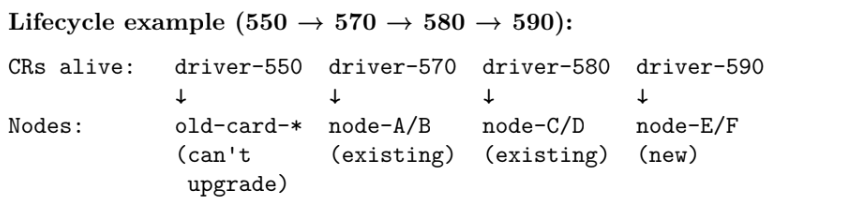
No node is ever touched unless you change its nvidia.com/driver-version label.
Cleanup — once all nodes on a version are decommissioned, delete the CR:
kubectl delete nvidiadriver driver-570Check driver versions across all nodes
Once you’re running multiple driver generations side by side, you and I both need a quick way to answer “who is on what?” at any moment. I rely on the following command to show, in one place, the driver version each node is actually reporting and the label that decides which NVIDIADriver CR it targets. It’s the first thing I run when I’m verifying a migration, hunting for stragglers, or checking that new capacity is coming up with the driver I expect.
kubectl get nodes -l nvidia.com/gpu.present=true \
-o custom-columns='NAME:.metadata.name,DRIVER:.metadata.labels.nvidia\.com/cuda\.driver\.major,VERSION-LABEL:.metadata.labels.nvidia\.com/driver-version,SKIP:.metadata.labels.nvidia\.com/gpu-driver-upgrade\.skip'
Monitoring and Safety Checks
One subtle but important detail I want you to remember is that upgrading the GPU Operator itself does not upgrade any drivers. When I bump the Operator, I treat it as a control-plane change only; the driver versions on your nodes stay governed by ClusterPolicy in Approach A, or by NVIDIADriver CRs and labels in Approach B. This separation lets you schedule Operator upgrades and driver changes as two different conversations with your stakeholders, instead of one risky, all-or-nothing event.
Upgrading the GPU Operator does not change driver versions on any node — the Operator and drivers are fully decoupled.
Final Thoughts: What I Recommend You Do Next
Use Approach B wherever possible. Each node explicitly declares the driver it wants, and nothing changes unless you intentionally update that label. The per-node control eliminates entire categories of accidental upgrades and version conflicts.
If you are currently on Approach A with mixed GPU card generations, migrate — Approach A cannot handle that scenario cleanly. The ~3 minutes of downtime per node during the migration window is a worthwhile trade for long-term operational clarity.
