

Argo CD is a declarative GitOps continuous delivery tool for Kubernetes that carries the desired state declared in Git through to the actual state on a cluster, a loop usually called "reconciliation".
Running Argo CD across many clusters needs a deployment strategy that is consistent and dependable. Every topology has to answer the same three questions: which need it serves, how many places you have to edit to add a cluster, and who operates which part of it.
In day-to-day operations, shipping an application to an environment usually means a Developer files a ticket, waits for DevOps to pick it up, then verifies it once it's done. The same workflow repeats for any config change during development, whether that's bumping a version, changing a health check port, or scaling a deployment. Developer time and DevOps workload scale linearly with each other, and together they stall the SDLC.
Try counting. A fleet of 5 clusters across 4 environments with 20 applications means 100 hand-written Application files if you go one-by-one, each repeating almost everything in the file beside it. Nobody's done anything wrong, but the operational cost multiplies with every new piece added.
So what do you do, as a Developer, when you need to ship a new application from local to dev, or promote one from dev to staging for QC? At most organizations: open a ticket, prepare pre-deploy steps like secrets, hand it to DevOps, and wait out an agreed SLA. Now imagine 5 tickets at 4 hours each, while DevOps is also supporting 10 other people just like you.
This post walks through a GitOps architecture that uses an environment-as-folder monorepo to ship workloads to multiple clusters through one Argo CD Hub.
Argo CD Application and ApplicationSet
Everything Argo CD manages goes through a CRD called Application. It points at a repo, a path, and a destination cluster, which is to say it tells the controller where to pick manifests up and where to deliver them. At fleet scale the question is therefore no longer how Argo CD works, but who owns which manifest and where those Application objects come from. This section answers both, first by classifying manifests by owner, then with ApplicationSet, the thing that generates Application objects instead of leaving you to write them by hand.
Types of manifests
I refer to all the manifest types Argo CD manages as Argo Manifests. I split them into two kinds by owner rather than by resource type, because the owner is what decides who may touch a given manifest.
Application Manifests define the product and service workloads that a Developer wants to deploy. These might be the frontend, backend, or middleware of team A and team B, of some product X and product Y.
Infrastructure Manifests define the workloads an Operator manages itself, and the DevOps team owns them. This group is broader than the one above and covers three fairly different things:
- Components that configure the cluster itself, for example Argo CD, coredns, an ingress controller, a secret operator, or cert-manager.
- Applications that serve fleet administration and operations, for example dashboards, monitoring, or backup.
- Infrastructure software that serves Developers during software development, for example memcache, a message queue, or a database client.
| Manifest type | Owner |
| Application Manifest | Developer & DevOps team |
| Infrastructure Manifest | DevOps team |
Argo CD itself falls under Infrastructure Manifest, and these reconcile themselves once the first bootstrap completes. The details come later, in The only exception is Argo CD itself.
ApplicationSet, the replacement for the traditional Application
An Argo CD Application is defined like this:
apiVersion: argoproj.io/v1alpha1
kind: Application
metadata:
  name: production-backend
spec:
  project: default
  source:
    repoURL: https://github.com/acme/apps.git
    path: workloads/backend/charts/production
  destination:
    server: https://k8s-prod.internal:6443
    namespace: shop
An Application has to bind spec.destination.server directly to one specific cluster, and spec.source.path has to point at one Kubernetes manifest folder. Adding a new application means adding another Application, editing exactly those fields, then applying it again.
This works out fine if you only manage 1, 10, or 30 Application files. But what happens when the number is 1000? At that point finding the one Application you need costs real time and real confusion. With this approach, growing the scope of what Argo CD manages is "very hard".
ApplicationSet exists to invert that relationship. You no longer write Application objects, you declare functions that generate them. The inputs to those functions are generators, and each generator returns a set of parameters that get poured into a template automatically. Read more in the ApplicationSet generators documentation.
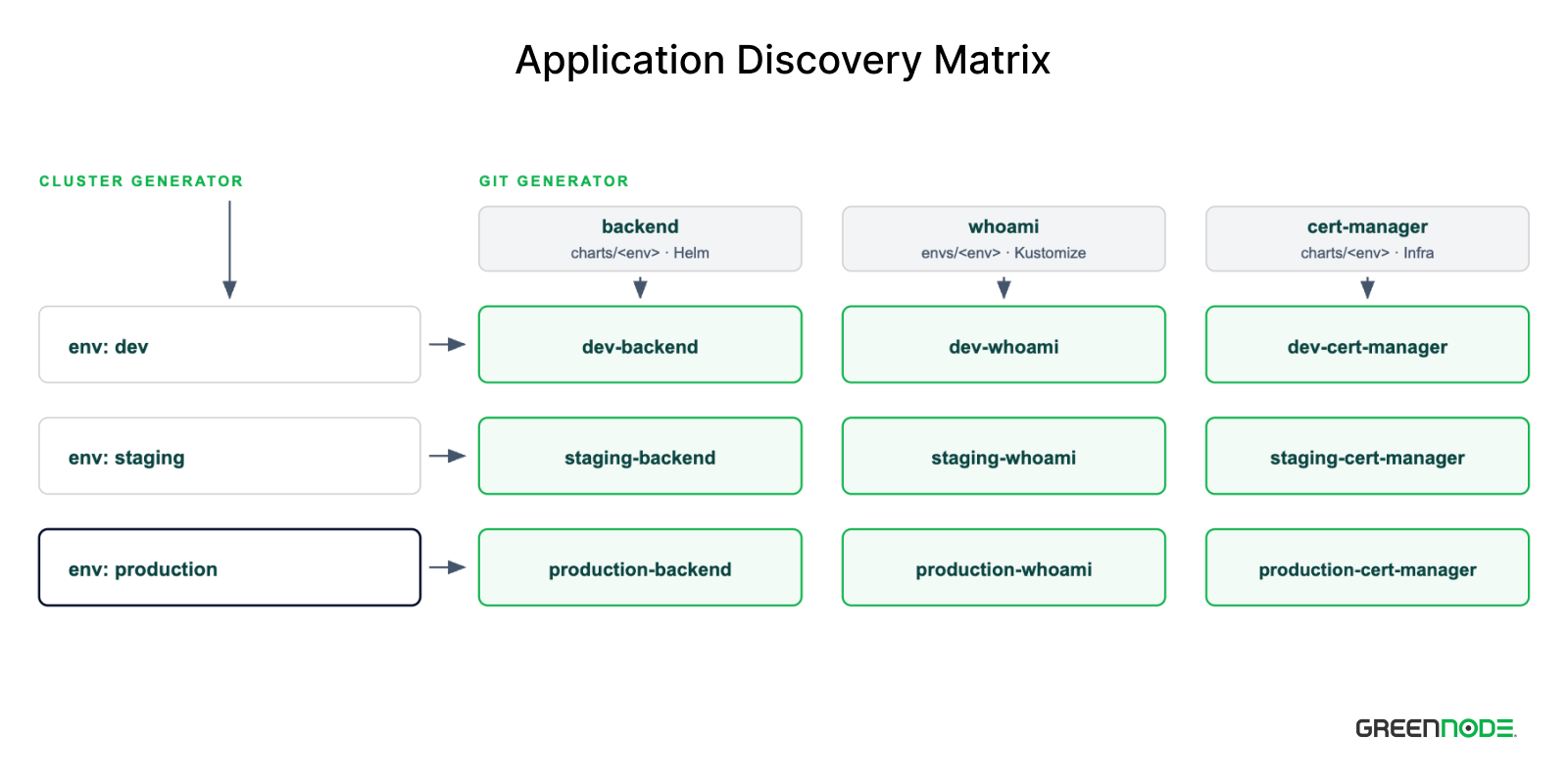
In this architecture I use 3 generator types, the Git generator, the Cluster generator, and the Matrix generator.
Git generator
Argo CD has exactly one git generator, with two different modes, files and directories (Argo CD docs).
# Infrastructure, matched by directory
- git:
    directories:
      - path: workloads/*/charts/dev

# Workload, matched by the presence of a file
- git:
    files:
      - path: workloads/*/charts/dev/app.yaml
The directories mode matches every directory fitting the pattern, so as long as the directory exists the application exists. The files mode matches one specific file, so the application only exists while that file exists, and the file contents get rendered into the template as parameters. Delete the file and by default the controller deletes the matching Application along with it, with no ApplicationSet to edit.
# workloads/backend/charts/dev/app.yaml
namespace: shop
Treat this as the on/off switch for an application per environment, and the directory structure below uses exactly this mechanism.
Cluster generator
Argo CD stores cluster information as Secrets, and the ApplicationSet controller reads precisely those Secrets to generate parameters (Argo CD docs). Registering a new cluster means creating a Secret labelled argocd.argoproj.io/secret-type: cluster.
apiVersion: v1
kind: Secret
metadata:
  name: cluster-dev
  namespace: argocd
  labels:
    argocd.argoproj.io/secret-type: cluster
    env: dev
type: Opaque
stringData:
  name: dev
  server: https://k3d-dev-server-0:6443
The cluster generator uses a selector following exactly the semantics of standard Kubernetes label selectors, which is to say matchLabels and matchExpressions combine with each other under an AND relationship. If you want an OR relationship between the values of one key, use matchExpressions with the In operator.
# Pick production clusters in Asia or the US.
- clusters:
    selector:
      matchLabels:
        env: production
      matchExpressions:
        - key: region
          operator: In
          values: [asia, us]
Matrix generator
The two generators above return two independent parameter sets. The matrix generator is the matrix that joins them together, and each resulting pair carries all the fields an Application needs. From there, the Application gets generated automatically.
    - matrix:
        generators:
          - clusters:
              selector:
                matchLabels:
                  env: "dev"
          - git: # the git generator, with repoURL
              repoURL: https://github.com/nh4ttruong/argocd-gitops-spokes.git
              revision: HEAD
              files:
                - path: workloads/*/charts/dev/app.yaml
The template section takes the parameters from both and assembles them into an Application. Based on the path workloads/*/charts/dev/app.yaml, here is an example:
  template:
    metadata:
      name: "{{index .path.segments 3}}-{{index .path.segments 1}}"   # dev-backend
    spec:
      project: "{{index .path.segments 3}}-apps"                      # dev-apps
      sources:
        - repoURL: <spokes repo>
          path: "{{.path.path}}"                                # workloads/backend/charts/dev
      destination:
        server: "{{.server}}"                                         # from the cluster generator
        namespace: "{{.namespace}}"                                   # from the app.yaml contents
By default ApplicationSet uses fasttemplate, where you write {{path[3]}}. The documentation states plainly that it will be replaced by Go Template. Turn on goTemplate: true and that same value is written {{index .path.segments 3}}, and it is the index function that lets you assemble names by convention right inside the template, as in the example above.
The easiest thing to get wrong here is which variable comes from where, because the template mixes the parameters of two generators into one place.
| Variable | Source | Example value |
{{.server}} | cluster generator | The API server endpoint of the spoke |
{{.path.path}} | git generator | workloads/backend/charts/dev |
{{index .path.segments 1}} | git generator | backend |
{{index .path.segments 3}} | git generator | dev |
{{.namespace}} | git generator | namespace: shop in app.yaml |
goTemplateOptions: ["missingkey=error"] turns looking up a key that does not exist into an error rather than something silently skipped (Argo CD docs). For a system that runs on convention, this is what stops a naming mistake right where it happens. An app.yaml missing a key makes Application generation fail, instead of producing an Application with an empty namespace.
Repositories, structure, and conventions
Split repositories by owner, not by environment
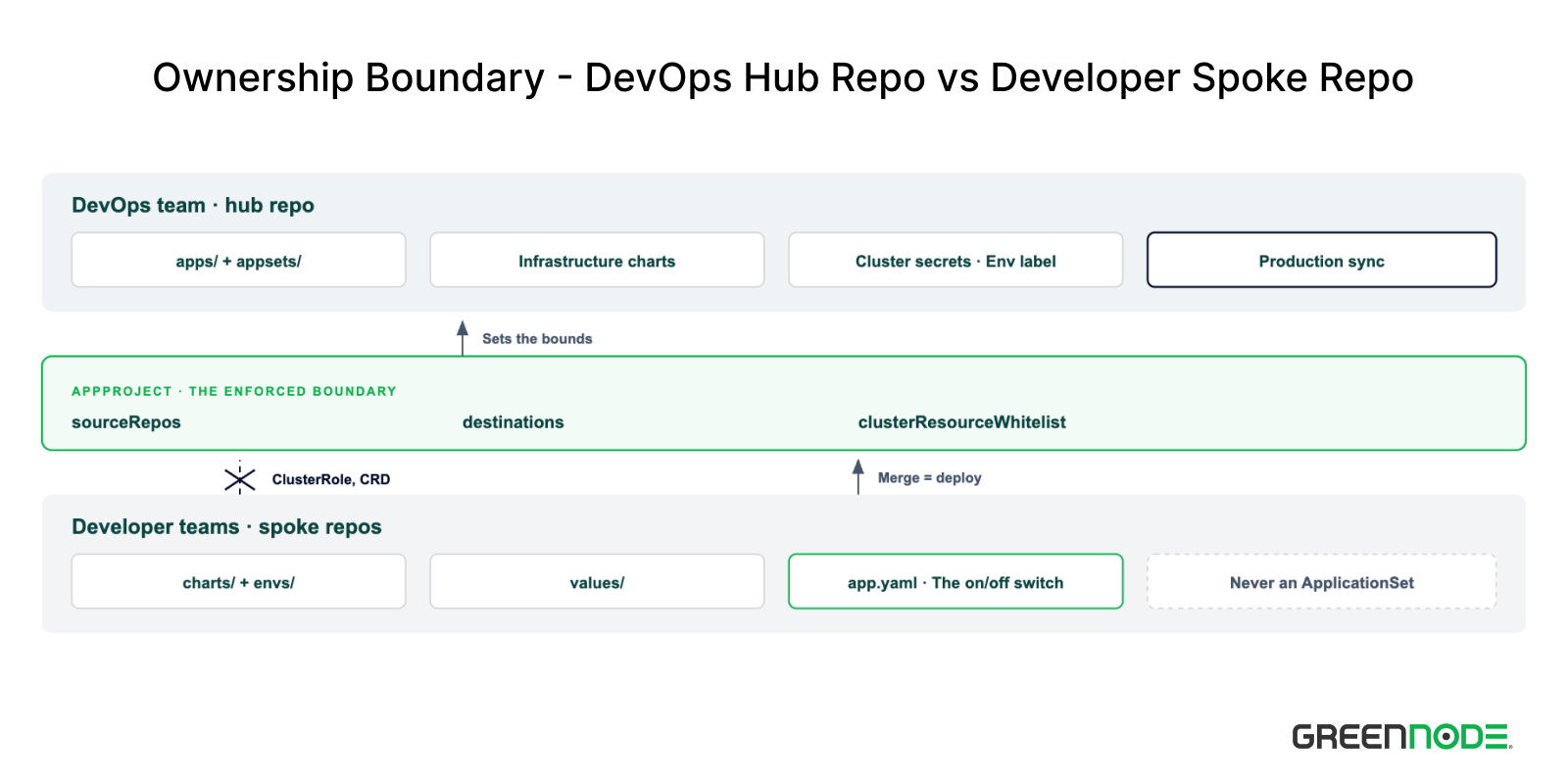
This architecture splits repos by owner, not by environment. The Hub repo belongs to the DevOps team and holds everything Argo CD, including the root app, the per-environment Applications, the ApplicationSets, the AppProjects, and the infrastructure charts. The Spoke repos belong to the developer teams and hold only the product charts and values. The reason for splitting this way is that write access in Git is granted per repo, so the repo boundary is the only boundary Git can actually enforce.
One hub plus one spoke is the smallest usable shape, while the number of spoke repos depends on the nature of the organization. One repo per team, or one repo per product, or one shared repo for cross-team workloads. The only thing that changes in the hub is the repoURL of the workload ApplicationSet.
# appsets/dev/workloads/dev-payments-team-helm.yaml
- git:
    repoURL: https://github.com/<org>/team-payments.git   # The only change
    revision: HEAD
    files:
      - path: workloads/*/charts/dev/app.yaml
The conventions inside each spoke repo stay the same, so adding a repo means adding an ApplicationSet rather than rewriting anything. So should you split repos by risk level, with non-production and production separate? The answer is in Should you split production and non-production.
Self-service within the bounds of AppProject
Many repos for self-managing teams already solve the self-service part. AppProject handles the rest, which is bounding where each team can land and what resources they can create.
# workloads/argocd/envs/hub/app-projects/dev-apps.yaml
spec:
  sourceRepos:
    - 'https://github.com/nh4ttruong/argocd-gitops-spokes.git'
  destinations:
    - namespace: '*'
      server: 'https://k3d-dev-server-0:6443'
  clusterResourceWhitelist:
    - group: ''
      kind: 'Namespace'      # Namespace only, at cluster scope
  namespaceResourceWhitelist:
    - group: '*'
      kind: '*'
Those three fields block three things: sourceRepos names the source repo, destinations.server defines the destination cluster, and clusterResourceWhitelist sets the resource scope. Developers therefore have full authority inside a namespace but cannot create a ClusterRole or a CRD, even if they merge exactly those things into their own repo.
Structure of the Hub repo
The Hub repository is laid out with the following directory structure:
hub/
├── root-app-of-apps.yaml          # App of Apps tier 1, sources the apps/ folder
├── apps/                          # App of Apps tier 2, each file sources appsets/<env>/
│   ├── hub.yaml                   # also where each environment's policy lives
│   ├── dev.yaml
│   ├── staging.yaml
│   └── production.yaml
├── appsets/                       # 14 ApplicationSets, one per (env, engine)
│   ├── hub/infrastructure/
│   ├── dev/
│   │   ├── infrastructure/
│   │   │   ├── dev-infrastructure-helm.yaml
│   │   │   └── dev-infrastructure-kustomize.yaml
│   │   └── workloads/
│   │       ├── dev-application-helm.yaml
│   │       └── dev-application-kustomize.yaml
│   ├── staging/
│   └── production/
├── workloads/                     # The platform's own infrastructure
    ├── argocd/envs/hub/           # Argo CD manages itself
    ├── cert-manager/
    │   ├── charts/<env>/Chart.yaml
    │   └── values/{common.yaml,<env>/values.yaml}
    ├── ingress-nginx/
    └── coredns/envs/<env>/
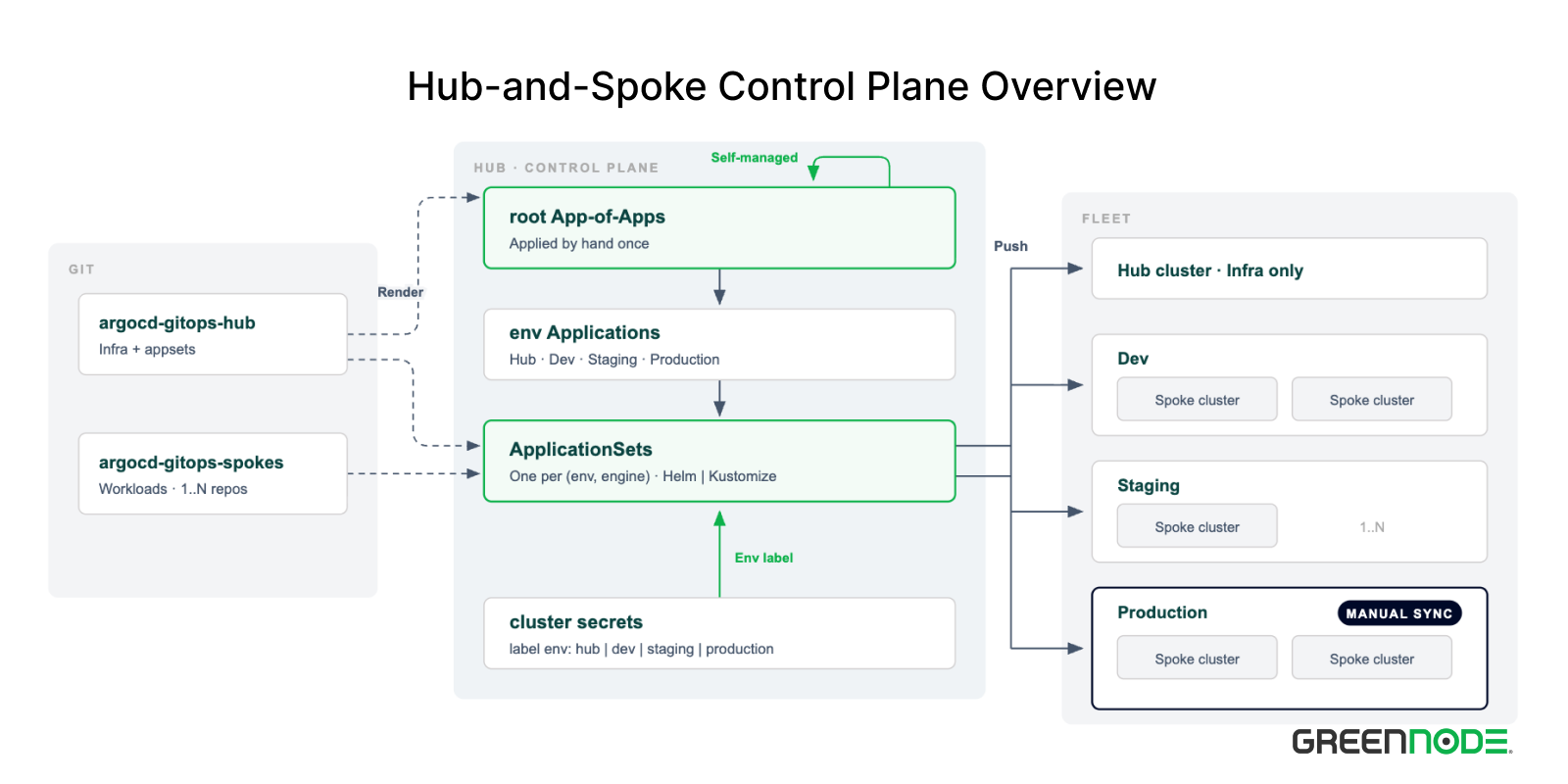
This directory layout combines the App of Apps pattern with the Application Sets & Cluster Label pattern.
root-app-of-apps.yamlis the definition file whosesourcepoints at theapps/folder.- Each file in
apps/is an environment file such asdev.yamlorstaging.yaml, and these files have a source pointing at theappsets/<env>/folder. The point of splitting them out is to make everything from environment down to workload easier to manage. - The
appsets/folder holds theApplicationSetdefinitions, laid out flat by environment, and each environment then splits intoinfrastructure/andworkloads/. This split keeps the two groups easy to tell apart, because theinfrastructure/branch holds the sets of infrastructure applications while theworkloads/branch points at the spoke applications. - The
workloads/folder holds Argo CD itself (self-bootstrap) along with the infrastructure software the hub cluster uses, for example ingress-nginx, coredns, or cert-manager. Each component here takes one of two directory shapes,charts/<env>/for Helm andenvs/<env>/for Kustomize. I cover both shapes in detail in Turning manifests into Applications.
root-app-of-apps.yaml also sources itself through directory.include, so after the first bootstrap it sits inside the reconcile loop like any other manifest.
# root-app-of-apps.yaml
sources:
  - path: .
    repoURL: https://github.com/nh4ttruong/argocd-gitops-hub.git
    targetRevision: HEAD
    directory:
      include: root-app-of-apps.yaml
  - path: apps
    repoURL: https://github.com/nh4ttruong/argocd-gitops-hub.git
    targetRevision: HEAD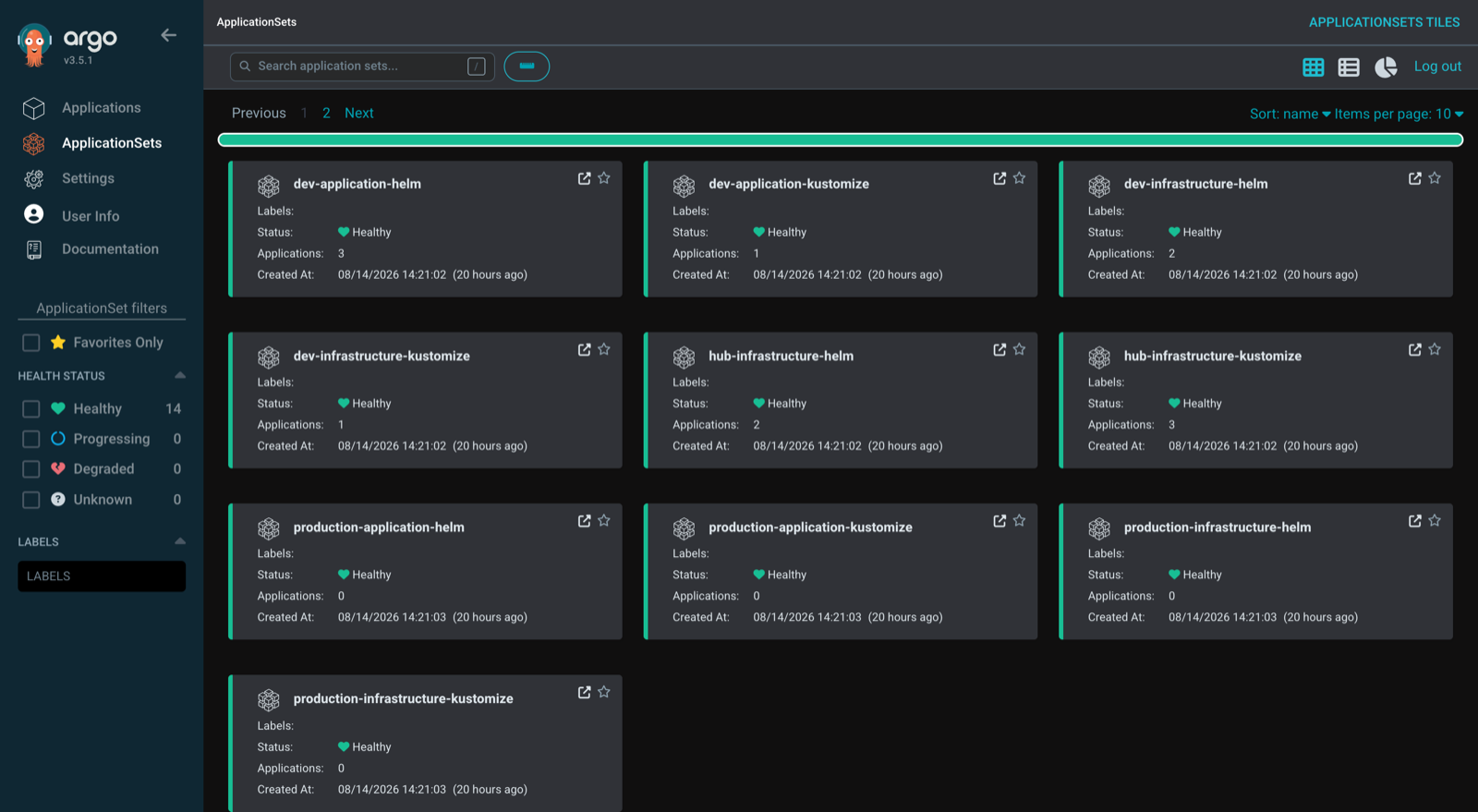
Structure of the Spoke repos
The spokes tree is a reduced version of the hub tree. There is no root-app-of-apps.yaml, no apps/, and no appsets/, only workloads/. The reason is that developers do not need to know Argo CD, so this repo contains no Argo CD manifest other than app.yaml.
Each ApplicationSet under appsets/<env>/workloads/ in the Hub repo points into this repo and then matches the glob workloads/*/charts/<env>/app.yaml. That is how the Hub knows which app is switched on in which environment without anyone declaring it anywhere else.
One hub can serve many repos of this kind. One repo per team, and each repo adds one ApplicationSet in the hub with a different repoURL, while the directory conventions stay the same. I covered that in detail in Split repositories by owner above, and the permissions that come with it are in Self-service within the bounds of AppProject.
spokes-apps/
└── workloads/
    ├── backend/                   # Helm app, a wrapper chart around the real chart
    │   ├── charts/
    │   │   ├── dev/{Chart.yaml,app.yaml}
    │   │   ├── staging/{Chart.yaml,app.yaml}
    │   │   └── production/{Chart.yaml,app.yaml}
    │   └── values/
    │       ├── common.yaml         # Shared values for every environment
    │       ├── dev/values.yaml     # dev-only overrides
    │       ├── staging/values.yaml
    │       └── production/values.yaml
    ├── homepage/                  # Same shape, same shop namespace
    ├── webhook/
    └── whoami/                    # Kustomize app, base plus overlay
        ├── base/{deployment.yaml,service.yaml,kustomization.yaml}
        └── envs/
            ├── dev/{kustomization.yaml,app.yaml}
            ├── staging/{kustomization.yaml,app.yaml}
            └── production/{kustomization.yaml,app.yaml}
The spokes repo uses exactly those two directory shapes, backend following Helm and whoami following Kustomize. That is how the generator knows which engine to render with.
You might ask why not use one branch per environment. The shortest reason is that both Helm and Kustomize separate environments by file rather than by branch, exactly as charts/<env>/ and envs/<env>/ do in the two trees above. Using branches works against the render tooling itself. The weightier reason is that under GitOps the branch is the running state, so a merge stops being a deploy proposal and becomes a deploy.
The conventions
The seven conventions below are everything you need to know to work out where a newly defined application will live.
| Task | Convention | Who decides |
| Helm app | workloads/<app>/charts/<env>/Chart.yaml is the wrapper chart, values compose values/common.yaml then values/<env>/values.yaml | Developer |
| Kustomize app | workloads/<app>/envs/<env>/kustomization.yaml is an overlay of base/ | Developer |
| Switch an app on in an environment | Place app.yaml next to that environment's chart or overlay | Developer |
| Destination namespace | Workloads take it from app.yaml, infrastructure takes the app name | Developer, or inferred for infrastructure |
Generated Application name | {env}-{app}, derived from the path segments | Nobody, the generator assembles it |
AppProject | Infrastructure goes to {env}-infra, workloads to {env}-apps | The template in the hub |
| Cluster selection | The env label on the cluster secret | DevOps team |
Read the last column top to bottom and you see the ownership boundary. The first four rows belong to the developer, and all four are file operations inside their own repo. The last three rows belong to the hub, and developers cannot reach them.
Notice that no row in the table asks you to edit an ApplicationSet. Adding an app, switching that app on in a new environment, or adding a cluster are all just adding a file or adding a label, and none of them requires editing a generator. This is exactly the criterion I use to judge a directory structure. The moment an everyday task forces me to edit a generator, the convention is wrong somewhere.
The price of running on convention is that a misnamed path generates nothing at all. If the glob does not match, the generator silently skips it, no Application appears, and no error is raised. missingkey=error only catches the missing-key case, it has no idea where you meant to put a file.
Turning manifests into Applications
Generators decide which Application exists, while the render engine is what turns a directory into Kubernetes manifests. This architecture uses both Helm and Kustomize at the same time, and that is a deliberate choice.
Helm with a wrapper chart
A Helm app contains no templates. It is an umbrella chart that only declares a dependency pointing at the real chart.
# workloads/backend/charts/dev/Chart.yaml
apiVersion: v2
name: backend
version: 0.1.0
appVersion: 6.14.1
dependencies:
  - name: podinfo
    version: 6.14.1
    repository: https://stefanprodan.github.io/podinfo
This keeps the upstream version on a single line, and helm dependency handles updating the remote chart. The values come from a different source. The second source sets ref: values to create the $values variable pointing at the repo root, and this variable only works at the start of a value file path (Argo CD docs). That is what makes common.yaml and <env>/values.yaml two separate files rather than one block repeated per environment.
The order inside valueFiles is what decides which value wins. Helm loads them one after another from the top down and later files override earlier ones, so common.yaml sets the defaults for every environment while <env>/values.yaml only has to declare what that environment does differently. A key that does not appear in the environment file takes its value from common.yaml. That is why swapping these two lines changes behaviour rather than appearance.
By this point every piece is on the table, so you can read a complete ApplicationSet. This is the Helm workload generator for dev, and the other three differ from it in exactly the environment name.
apiVersion: argoproj.io/v1alpha1
kind: ApplicationSet
metadata:
  name: dev-application-helm
  namespace: argocd
spec:
  goTemplate: true
  goTemplateOptions: ["missingkey=error"]
  generators:
    - matrix:
        generators:
          - clusters:
              selector:
                matchLabels:
                  env: "dev"
          - git:
              repoURL: https://github.com/nh4ttruong/argocd-gitops-spokes.git
              revision: HEAD
              files:
                - path: workloads/*/charts/dev/app.yaml
  template:
    metadata:
      name: "{{index .path.segments 3}}-{{index .path.segments 1}}"
    spec:
      project: "{{index .path.segments 3}}-apps"
      sources:
        - repoURL: https://github.com/nh4ttruong/argocd-gitops-spokes.git
          targetRevision: HEAD
          path: "{{.path.path}}"
          helm:
            valueFiles:
              - $values/workloads/{{index .path.segments 1}}/values/common.yaml
              - $values/workloads/{{index .path.segments 1}}/values/{{index .path.segments 3}}/values.yaml
            ignoreMissingValueFiles: true
        - repoURL: https://github.com/nh4ttruong/argocd-gitops-spokes.git
          targetRevision: HEAD
          ref: values
      destination:
        server: "{{.server}}"
        namespace: "{{.namespace}}"
ignoreMissingValueFiles: true lets an environment override nothing at all. The price is that a misnamed values file gets skipped silently instead of raising an error. missingkey=error catches that class of mistake at the template layer, but not at this one.
Kustomize with base and overlay
A Kustomize app keeps the real manifests in base/, and each environment is an overlay patching on top of it.
# workloads/whoami/envs/dev/kustomization.yaml
apiVersion: kustomize.config.k8s.io/v1beta1
kind: Kustomization

resources:
  - ../../base

labels:
  - pairs:
      env: dev

patches:
  - target:
      kind: Deployment
      name: whoami
    patch: |-
      - op: replace
        path: /spec/replicas
        value: 1
The staging and production overlays differ by exactly one number. That is the ideal shape of an overlay, and it is also the sign that you are using the right engine.
Why use both
Each engine is a property of the application rather than a verdict on why you would use one and not the other. So why not use both?
- Helm wrapper: You only need one upstream chart or one template, you configure values, and you are done. We use these as the standards-compliant engine, and they need no ApplicationSet edits either.
- Kustomize: As the name suggests, use it as the engine for customizing everything that falls outside the "standard" of a Helm wrapper. With its patch mechanism, Kustomize turns everything that would have been ad hoc into definitions in a YAML file.
No field in the configuration declares the engine, because the generator infers it from the shape of the path, as in the two directory trees above, together with the spec.template.spec.sources configuration (Helm) and resources (Kustomize).
You could also use a different pattern instead, Kustomize's helmCharts, which inflates the chart and then patches the rendered output. The price is losing the control path through values (3 patterns for deploying Helm charts with Argo CD), and --enable-helm has to be turned on in Argo CD's own kustomizeBuildOptions. Exactly one place in this architecture pays that price.
The only exception is Argo CD itself
By the rule above, Argo CD ought to be a Helm wrapper, because an upstream chart is available from the https://argoproj.github.io/argo-helm repo. Bootstrap is the process of standing Argo CD up. After that, though, you have to operate and administer it through GitOps. Take adding ExternalSecrets, or AppProject objects, or the cluster secrets that join spoke clusters to the hub cluster, or adding a repository. You cannot put a plain token into the Argo CD chart's values.yaml. All of it has to be added as external resources or through existingSecret and existingConfigMap. That is the one place helmCharts is worth using.
# workloads/argocd/envs/hub/kustomization.yaml
helmCharts:
  - name: argo-cd
    repo: https://argoproj.github.io/argo-helm
    version: 10.3.3
    releaseName: argocd
    includeCRDs: true
    namespace: argocd
    valuesFile: argo-cd-values.yaml
resources:
  - ../../base
  - app-projects/
  - in-cluster-registration.yaml
From commit and sync to Application
However many generator layers it passes through, the chain below is the whole path from a commit, through a manifest sync, to a rendered Application. This process is called reconciliation.
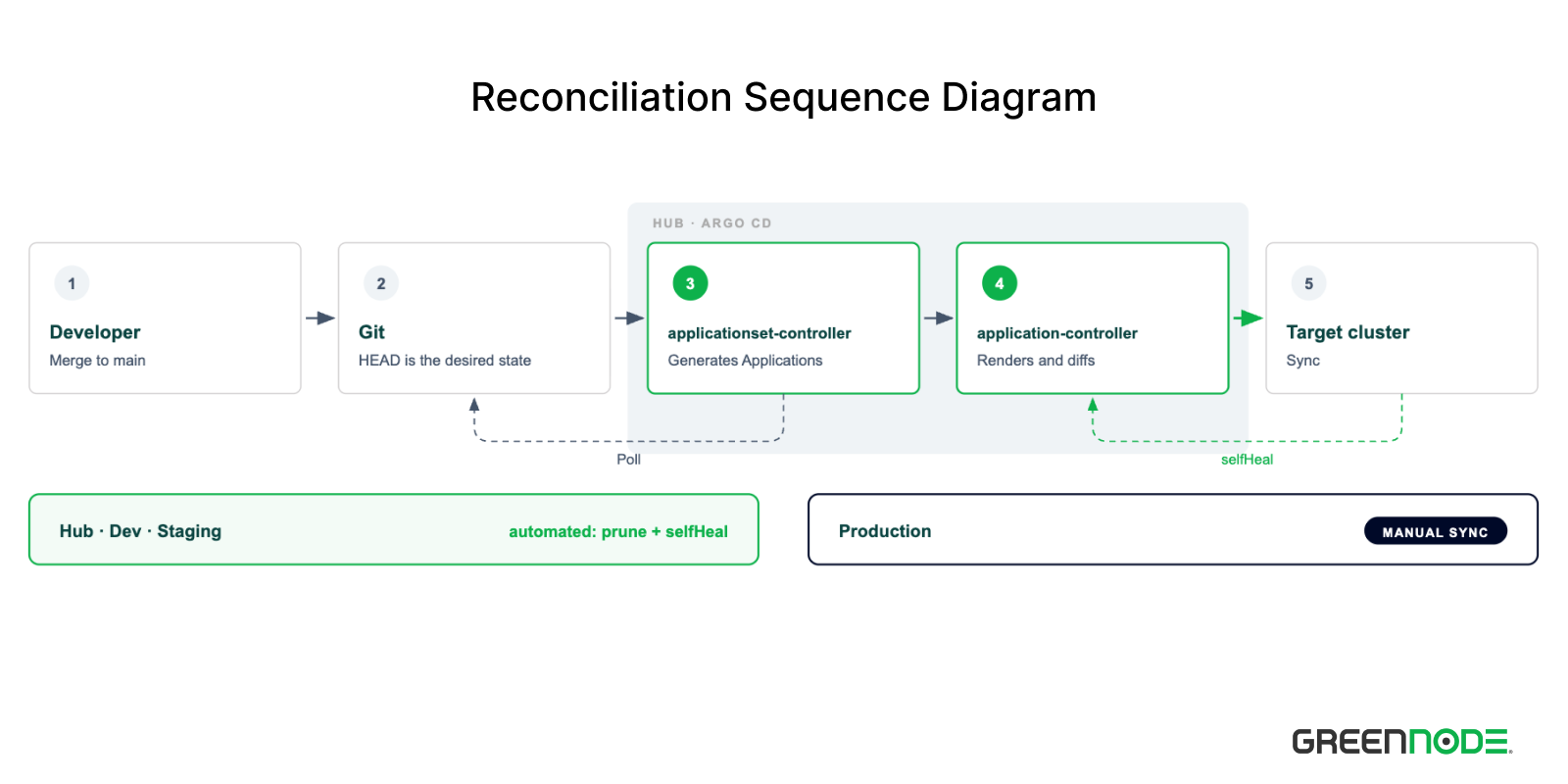
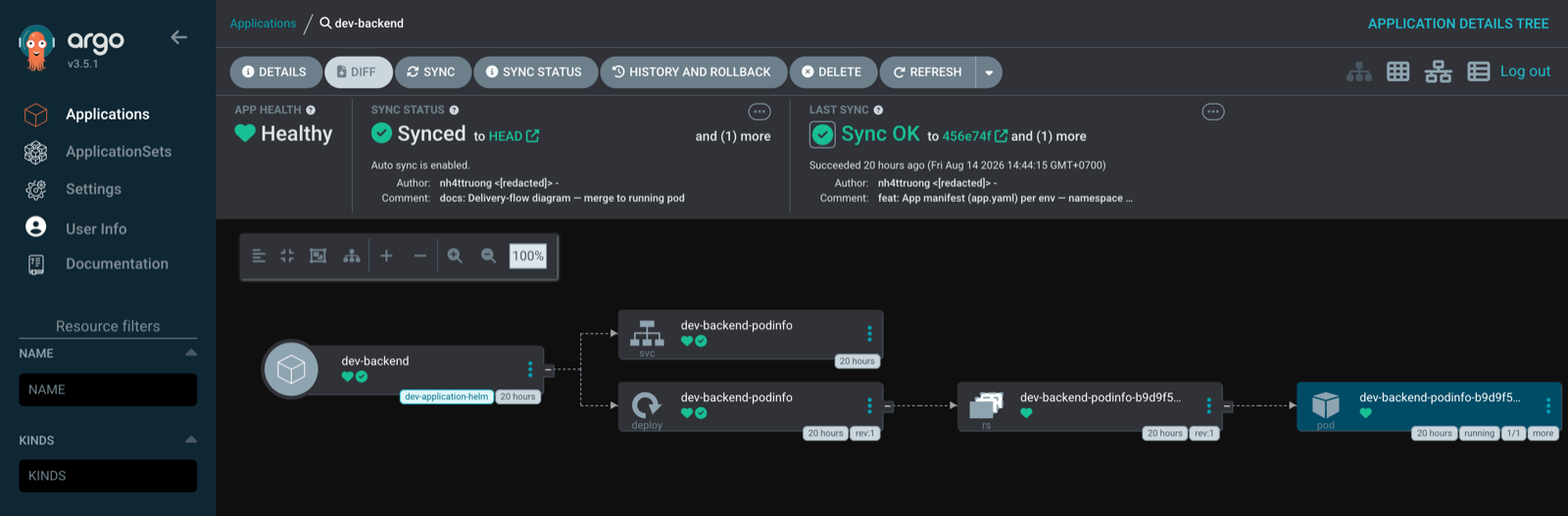
What touches the cluster at the end of the chain is an ordinary Application. It has a resource tree, health, and a diff, and you debug it exactly as you would a hand-written app, with one extra badge naming the ApplicationSet that generated it.
GitOps promotion between environments
In this architecture, promotion needs no dedicated pipeline. Each environment already keeps its full configuration in its own folder, so moving a release to the next environment comes down to changing exactly the piece of declaration worth carrying over. So what do we need to carry over to the target environment?
Only the version needs promoting
Open a real values file and it is immediately clear. Not one line in it should follow you to another environment.
# workloads/backend/values/production/values.yaml
podinfo:
  replicaCount: 3        # production-only
  logLevel: info         # production-only
  resources:             # production-only
    requests: {cpu: 100m, memory: 64Mi}
    limits: {cpu: 500m, memory: 256Mi}
Replica count, log level, and resource limits are all properties of the environment, so carrying them across will accidentally break the destination environment. The only thing worth promoting is the image version, and it has to live somewhere separate.
For a Helm app that means a file holding nothing but the version, placed last in the valueFiles list.
# workloads/backend/values/production/version.yaml
podinfo:
  image:
    tag: 6.14.1
valueFiles:
- $values/workloads/{{index .path.segments 1}}/values/common.yaml
- $values/workloads/{{index .path.segments 1}}/values/{{index .path.segments 3}}/values.yaml
- $values/workloads/{{index .path.segments 1}}/values/{{index .path.segments 3}}/version.yamlThe order here is mechanism, not decoration. The version layer has to come after values.yaml, because reversing them means the version gets overwritten with no warning at all. ignoreMissingValueFiles: true covers the apps that do not have a version.yaml yet.
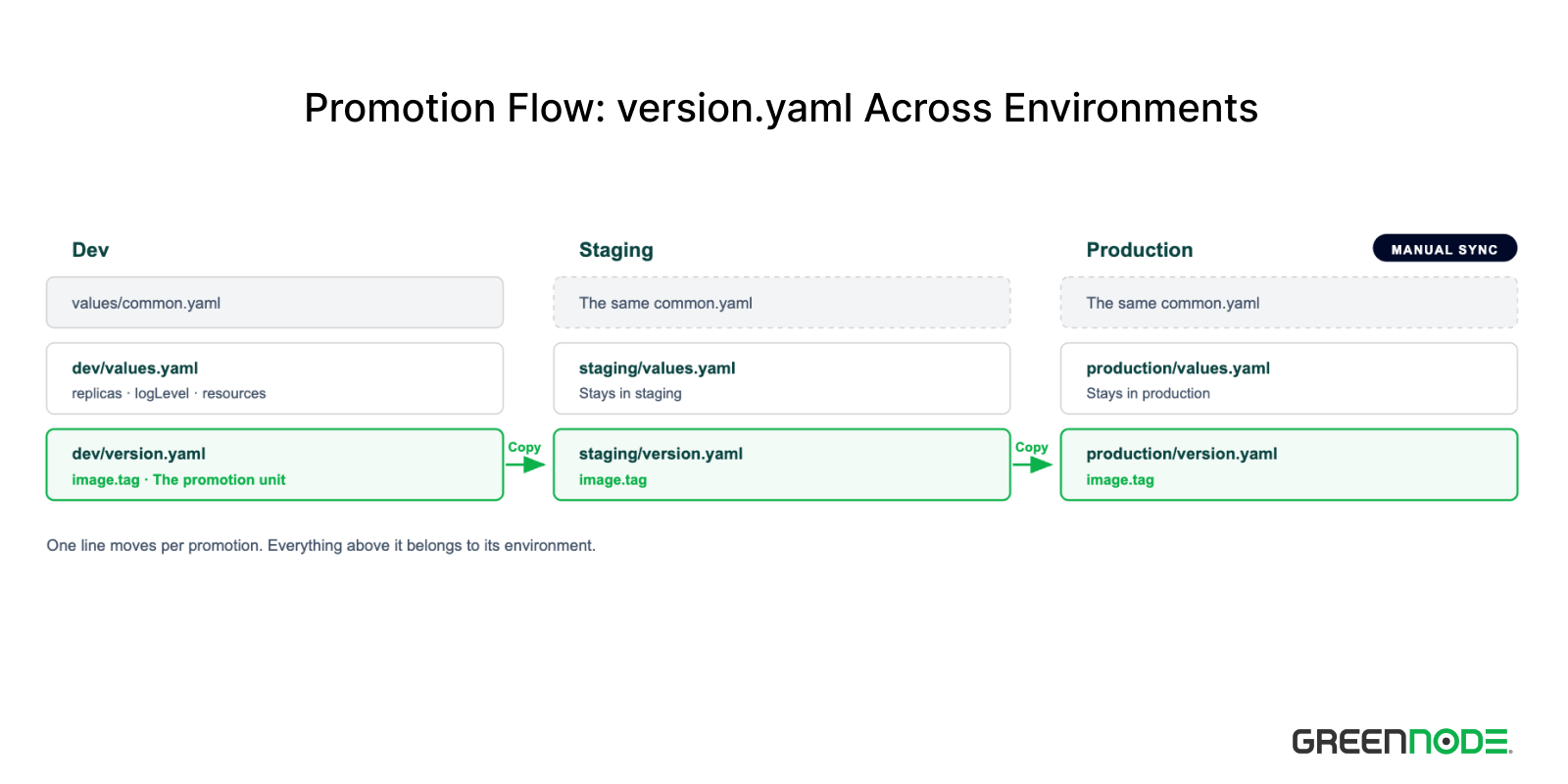
For a Kustomize app there is no equivalent file, because Kustomize has no mechanism for stacking extra files the way valueFiles does. The promotion unit lives in the overlay's kustomization.yaml, and the tag has to leave base/ so each environment declares it itself.
# workloads/whoami/envs/production/kustomization.yaml
images:
  - name: traefik/whoami
    newTag: v1.10.1
This gap is why I encourage Helm wrappers for the workloads in the spokes. The version.yaml file gives promotion its own clean, reviewable unit, while Kustomize is best saved for the workloads that genuinely need free-form patching, as covered in Why use both.
There are plenty of ways to promote on a file basis, whether cp of the version file between two directories, kustomize edit set image, a one-line sed, or editing by hand, as long as every change becomes a reviewed PR. The point is only to change that one tag.
What is valuable is the property they all share. Because the promotion unit sits on its own, every promotion leaves a diff of exactly one line, and that commit states for itself which version is moving to which environment. Reading git log for the production directory shows you the promotion history, with no need to reread an entire config file.
Shipping an application cluster-to-cluster
Moving an application to another cluster is not a migration. Because destination.server in the template comes from the cluster generator, which cluster an application lands on is decided entirely by the labels on the cluster secret. Change a cluster's label from dev to staging and the dev-* Application objects get pruned while staging-* get generated on that very cluster, with no file in Git changing.
The same holds for adding or removing a cluster. Adding a second dev cluster means creating a cluster secret carrying env: dev, and every dev app appears on it at the next poll. Removing a cluster means deleting the secret.
Note that a single cluster label change will cause Argo CD to prune running workloads en masse. Permission to edit cluster secrets therefore has to be treated as admin over the entire fleet.
Should you split production and non-production
Places like dev, staging, and uat are usually called non-production environments, meaning the places where you are allowed to be wrong and then fix it. The rest is production, where your product and services actually run, serving customers and the business.
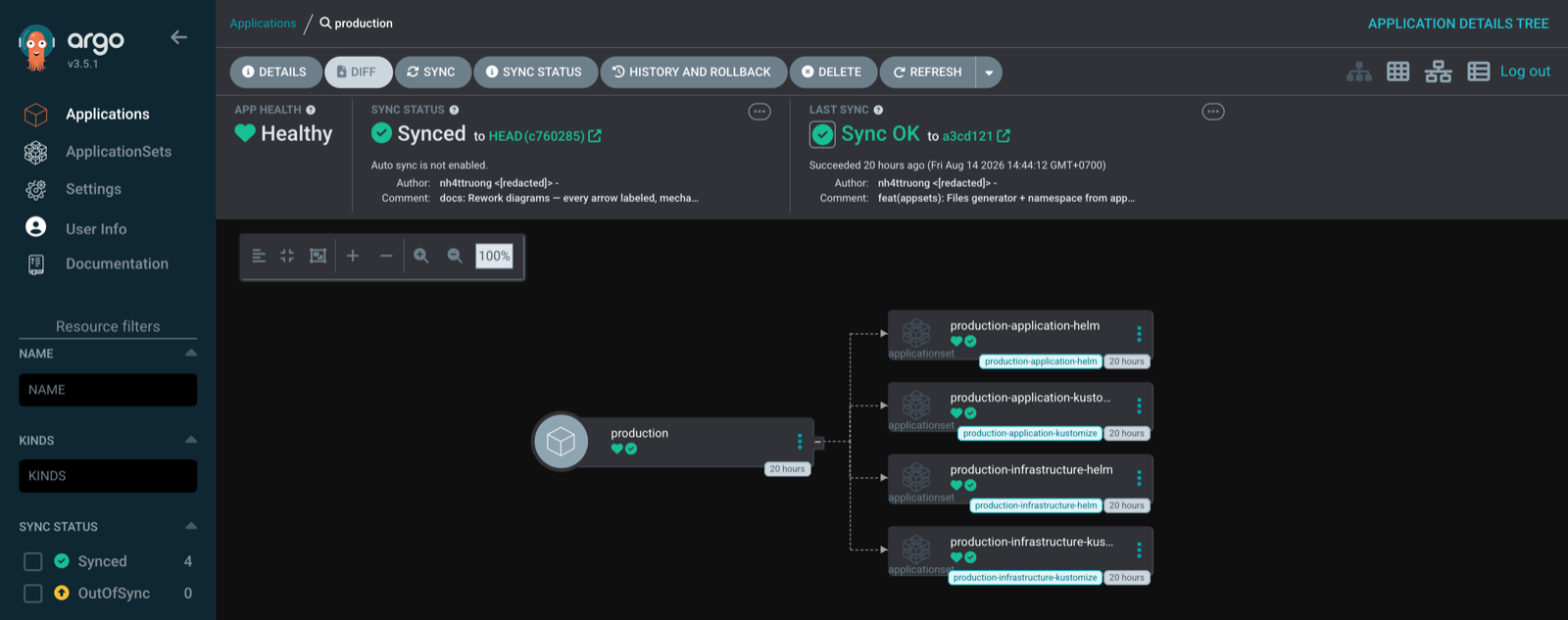
Non-production and production share every mechanism described above. The only difference is the sync policy in the template of the ApplicationSets belonging to the production environment. Every Application generated there only refreshes and reports OutOfSync, and an actual deploy requires the DevOps team to run a Manual Sync.
# appsets/production/workloads/production-application-helm.yaml
      syncPolicy:
        ## production should not be automated
        # automated:
        #   prune: true
        #   selfHeal: true
The apps/production.yaml file, on the other hand, needs no such gate. It only delivers the ApplicationSets from the hub repo, which the DevOps team owns and where every change has already been reviewed at merge time, so one more sync click there is a redundant barrier.
Whether to split manifests into separate repos depends on scale, and there are three usable shapes.
| Model | Use when |
| A single repo | Low blast radius, one team, one product. This is the shape of this demo |
Split non-production and production | Developer teams are fully autonomous in non-production, while production needs review and cross-team work with the DevOps team |
| One repo per team or per product | Large team size, or many teams releasing continuously |
The only price is the number of repos, and in return the DevOps team does not have to weigh up every single non-production deploy. Review and merge rights on the non-production repo go to the Developer Lead, while the developer team only needs to understand the topology plus a few basic Kubernetes concepts to run smoothly on their own. The DevOps team handles policy and cluster operations, and developers no longer have to file the small tickets described at the start of this post.
Limits of this architecture
Here we are, the remaining part of this post. The limits of this topology.
- No progressive sync yet. One config change can sync every cluster in an environment simultaneously, and that is the failure mode of this architecture. This limit is known, and the RollingSync feature has been in beta since Argo CD version 3.3. It allows Applications to be split into groups and synced one group at a time.
- The hub holds the credentials of every spoke cluster. Whoever takes the hub takes the whole fleet. The push model concentrates all of the security risk in one place, so hardening the hub cluster is mandatory rather than optional.
- The hub is also a single point of failure for syncing. If the hub dies the fleet keeps running and no workload is lost. But every new change stops being deployed, and selfHeal stops correcting drift until the hub comes back.
- The label schema is a design commitment. The set of labels on the cluster secret has to be settled up front. The criterion of never editing a generator only holds for the dimensions you anticipated, and adding a new dimension later, for example
env,region, ortier, means editing the ApplicationSets. - The whole fleet follows
HEADof one branch. Merging into non-production is live immediately on every cluster in that environment. That is a feature, but it also means you have to be genuinely careful and understand what you are doing, because every mistake is paid for in time.
Demo
The whole system runs on k3d, and bootstrap is two commands.
kustomize build workloads/argocd/envs/hub --enable-helm \
  | kubectl apply --server-side --force-conflicts -f -
kubectl apply -f root-app-of-apps.yaml
Those two commands are wrapped in bootstrap.sh together with the CRD wait, so the demo runs in three steps, clusters first and spokes last.
./demo/k3d/up.sh hub dev           # Clusters, hub first
./demo/k3d/bootstrap.sh            # Argo CD on the hub, Git credential, root app
./demo/k3d/register-spoke.sh dev   # Join the dev cluster as a spoke
About a minute after registration the chain reaction completes and every dev app is Healthy. Look at which cluster the applications are assigned to, then change one label.
$ kubectl -n argocd get applications -l env=dev
NAME                SYNC STATUS   HEALTH STATUS
dev                 Synced        Healthy
dev-backend         Synced        Healthy
dev-cert-manager    Synced        Healthy
dev-coredns         Synced        Healthy
dev-homepage        Synced        Healthy
dev-ingress-nginx   Synced        Healthy
dev-webhook         Synced        Healthy
dev-whoami          Synced        Healthy

$ kubectl -n argocd get applications -l env=staging
NAME      SYNC STATUS   HEALTH STATUS
staging   Synced        Healthy

# Change one label, edit no file in Git
$ kubectl -n argocd label secret cluster-dev env=staging --overwrite
secret/cluster-dev labeled
Tens of seconds later, the dev-* Application objects get pruned and the staging-* set gets generated on that very cluster. The same directory tree in Git, two different sets of Application, and the only difference is the cluster's label.
$ kubectl -n argocd get applications -l env=staging
NAME                    SYNC STATUS   HEALTH STATUS
staging                 Synced        Healthy
staging-backend         Unknown       Unknown
staging-cert-manager    Unknown       Unknown
staging-coredns         Unknown       Unknown
staging-homepage        Unknown       Unknown
staging-ingress-nginx   Unknown       Unknown
staging-webhook         Unknown       Unknown
staging-whoami          Unknown       Unknown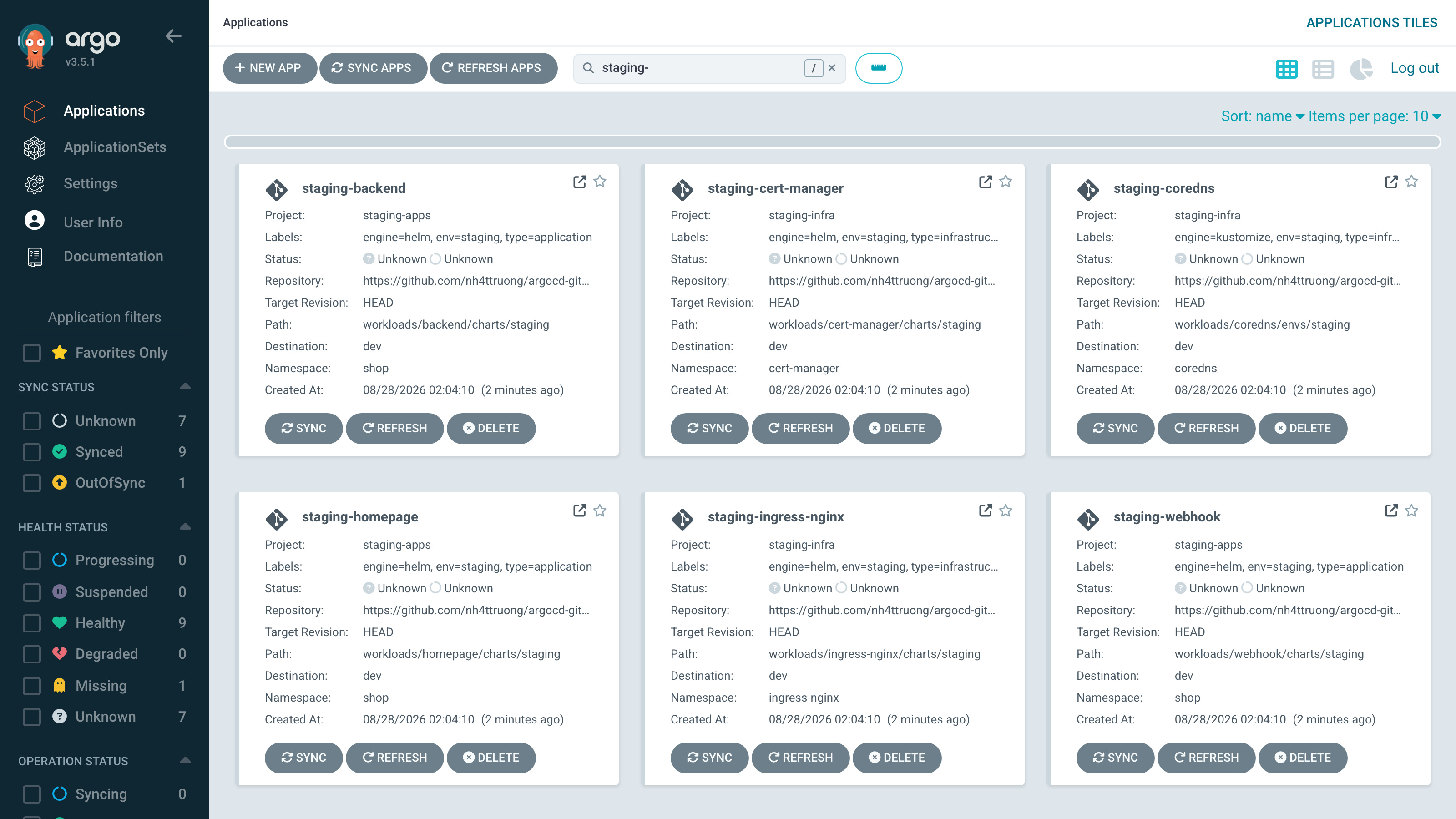
Note the status column. The staging-* apps are generated but sit at Unknown, because the demo's staging-apps AppProject pins its destination to a placeholder for a real staging cluster.
$ kubectl -n argocd get application staging-backend \
    -o jsonpath='{.status.conditions[0].message}'
application destination server 'https://k3d-dev-server-0:6443' and namespace 'shop'
do not match any of the allowed destinations in project 'staging-apps'
The generator relies on the cluster label, the AppProject does not. A mislabeled cluster receives exactly the Application set of its new environment, and gets stopped at the project boundary because it was never declared a valid destination. This is the mechanism from Self-service within the bounds of AppProject working in the wild, and the final backstop for the warning about cluster secret permissions above.
Set the label back to env=dev and the fleet heals itself back to the state declared in Git, with nobody clicking anything, courtesy of the automated sync policy on non-production.
$ kubectl -n argocd label secret cluster-dev env=dev --overwrite
secret/cluster-dev labeled

$ kubectl -n argocd get applications -l env=dev
NAME                SYNC STATUS   HEALTH STATUS
dev                 Synced        Healthy
dev-backend         Synced        Healthy
dev-cert-manager    Synced        Healthy
dev-coredns         Synced        Healthy
dev-homepage        Synced        Healthy
dev-ingress-nginx   Synced        Healthy
dev-webhook         Synced        Healthy
dev-whoami          Synced        Healthy
The full code lives in two repositories, argocd-gitops-hub for the control plane and argocd-gitops-spokes for the workloads.
Conclusion
Developer time and DevOps team workload scale linearly with each other, because every change has to pass through a person. This architecture undoes that knot by turning every piece of operational information into machine-readable data. A cluster is treated as a label, an environment is a folder, workloads and their very existence are YAML files, and the ApplicationSet is reduced to an engine that joins them together to generate exactly what we need.
Changing the topology changes how your organization operates and delivers software. A Developer adds a folder, opens a PR in their own repo, and the application appears in exactly the environment they need, with no ticket and no write access to Argo CD.
The DevOps team also sheds a large share of the workload spent on tickets and day-to-day operations. Growing the fleet gets leaner, since adding a cluster or an environment is just adding a spoke through a cluster secret. Deploying infrastructure workloads becomes convenient as well, reusing the best practices defined up front. Operating the fleet therefore stops being the operation of separate clusters one by one, and the DevOps team only has to care about the Hub, the Spokes, and effective permissions.
If you want to verify this yourself, run the demo above and change one label on a cluster secret. The fleet rearranges itself with no file in Git changing, and that is the entire spirit of this architecture.
