

You already know OpenClaw – but there's 1 big problem
OpenClaw is an open-source AI agent capable of autonomously completing tasks: web browsing, file management, running terminal commands, writing code, and messaging integrations. It's incredibly powerful – but until 2025, getting OpenClaw up and running was still a major challenge.
If you've read my article OpenClaw Isn't Scary Anymore – 4 Steps to Run an AI Agent Even If You Can't Code, you can see that even with a detailed guide, you still needed to:
- Understand infrastructure – cloud, networking, security
- Create and manage API keys from an LLM provider yourself
- Set up and maintain the runtime environment yourself
- No management tools – no visibility into who uses what or how much it costs
In short: OpenClaw is powerful, but running it in a real-world environment requires a lot of effort.
2026: OpenClaw on AgentBase – Everything Changes
GreenNode AgentBase is an infrastructure platform that enables any AI agent to run – and OpenClaw is its strongest showcase use case.
With OpenClaw 1-Click, you don't need technical knowledge, no manual installation. Everything in 40–60 seconds.
Comparison: Self-Setup vs. AgentBase
| Criteria | Self-Setup OpenClaw | OpenClaw 1-Click on AgentBase |
|---|---|---|
| Setup time | Requires infra knowledge, manual config | 40–60 seconds – no technical knowledge needed |
| Required knowledge | Infrastructure, Networking, Security | None – anyone can use it |
| AI configuration | Create API key, paste into config | Auto-connects to GreenNode MaaS – no copy/paste |
| Runtime environment | Manage your own server, cloud, maintenance | AgentBase Runtime – cloud-ready, scalable |
| Credential management | Handle secrets, encryption yourself | AgentBase Identity – automated management |
| Instance management | Manual – SSH into each machine | My Agents Dashboard – centralized management |
| Multi-instance | Complex – set up each one individually | Unlimited – deploy as many as you want |
| Channel integration | Configure bot, webhook yourself | Telegram, Zalo – configured in 1 click |
| Data | Handle backup, persistence yourself | Auto-persistent – data survives restarts |
| Monitoring | None – no visibility into what the agent is doing | Observability – logs, metrics, dashboard |
How to deploy OpenClaw on AgentBase in 1 minute
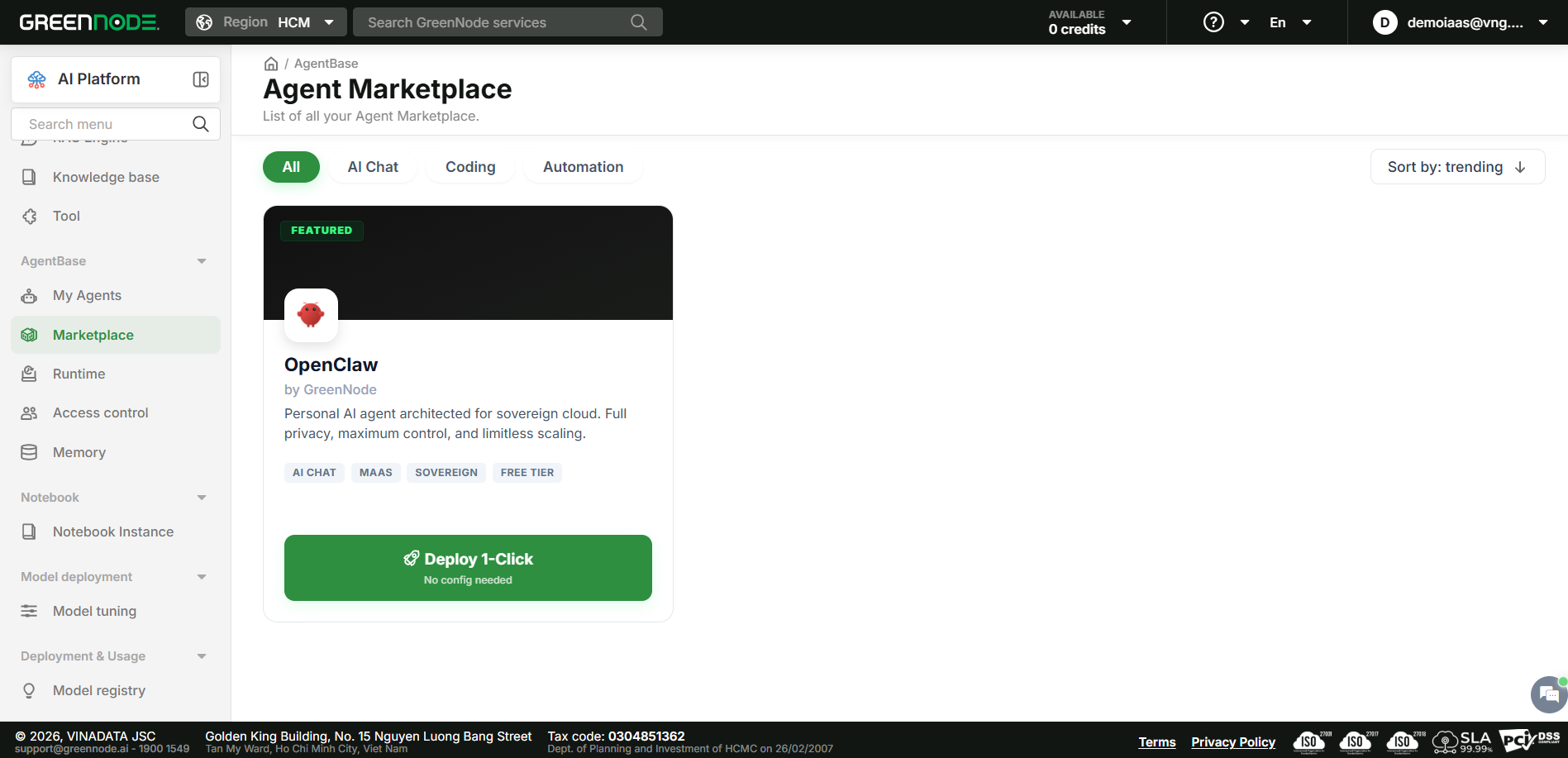
Step 1: Access the Agent Marketplace
Log in to GreenNode AgentBase and you'll see the Agent Marketplace – where AI agents are ready to deploy.
Find the OpenClaw Featured Card or click the "Deploy OpenClaw With 1 Click!" button on the Hero Banner.
Step 2: Basic configuration
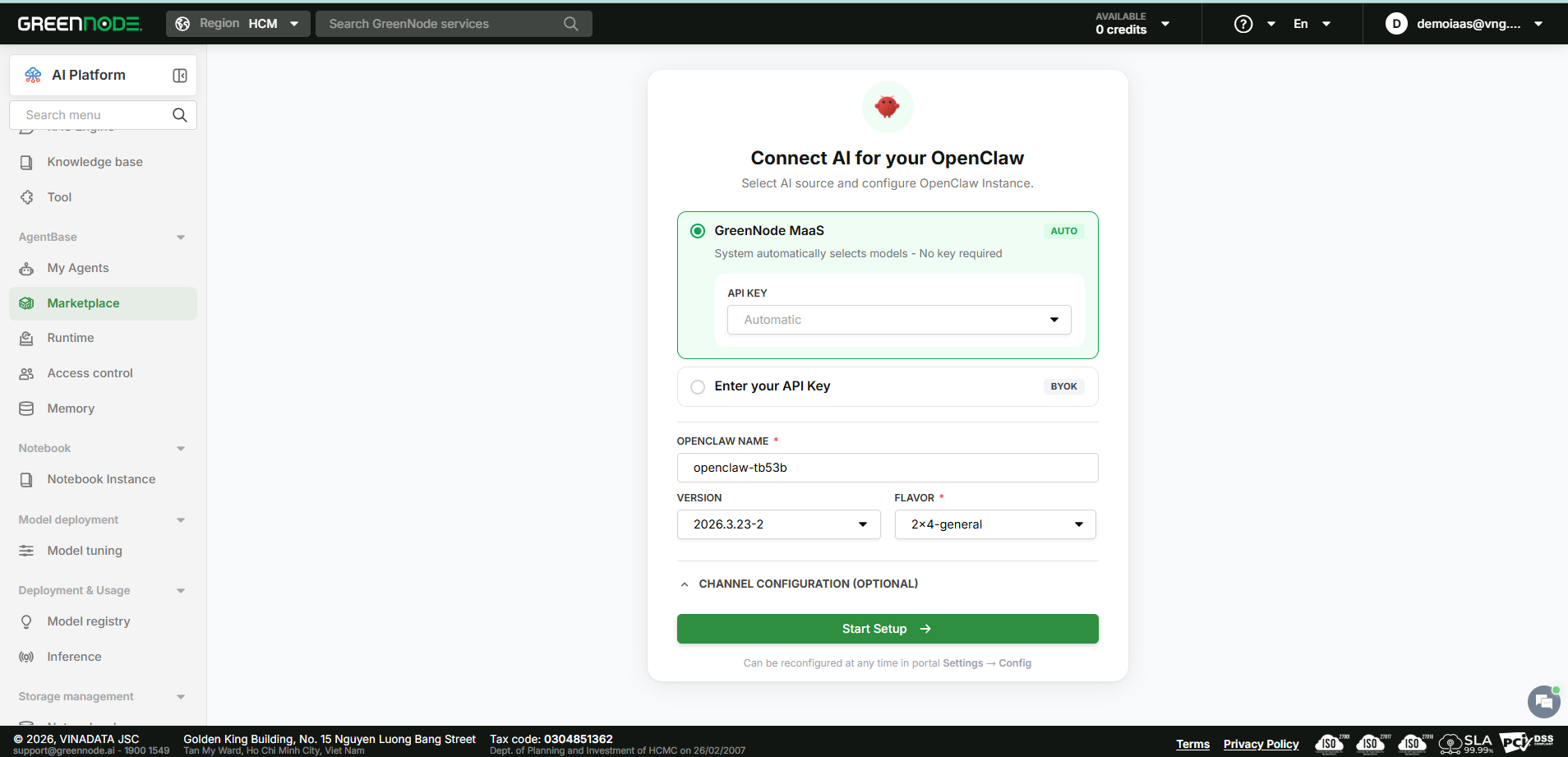
The configuration screen has 3 sections:
Section 1 – AI Source
Choose the AI source for your OpenClaw instance:
- GreenNode MaaS (default): Default model is qwen3-5-27b. The system automatically creates an API key and connects – you don't need to copy/paste any keys.
- BYOK – Bring Your Own Key: For those who want to use a model from an external provider (OpenAI, Anthropic, Gemini, Custom). You provide the API key and the system validates it before proceeding.
Section 2 – Instance Configuration
- Instance name: Auto-filled from username – editable
- Flavor: Choose resource configuration (2×4, 4×8, 8×16) – default is 2×4
Section 3 – Channel Configuration (Optional)
Connect OpenClaw to Telegram or Zalo to start chatting right after deployment. Channels can be configured during the deploy step or later at Settings → Config in the OpenClaw Gateway.
Step 3: Watch provisioning in progress
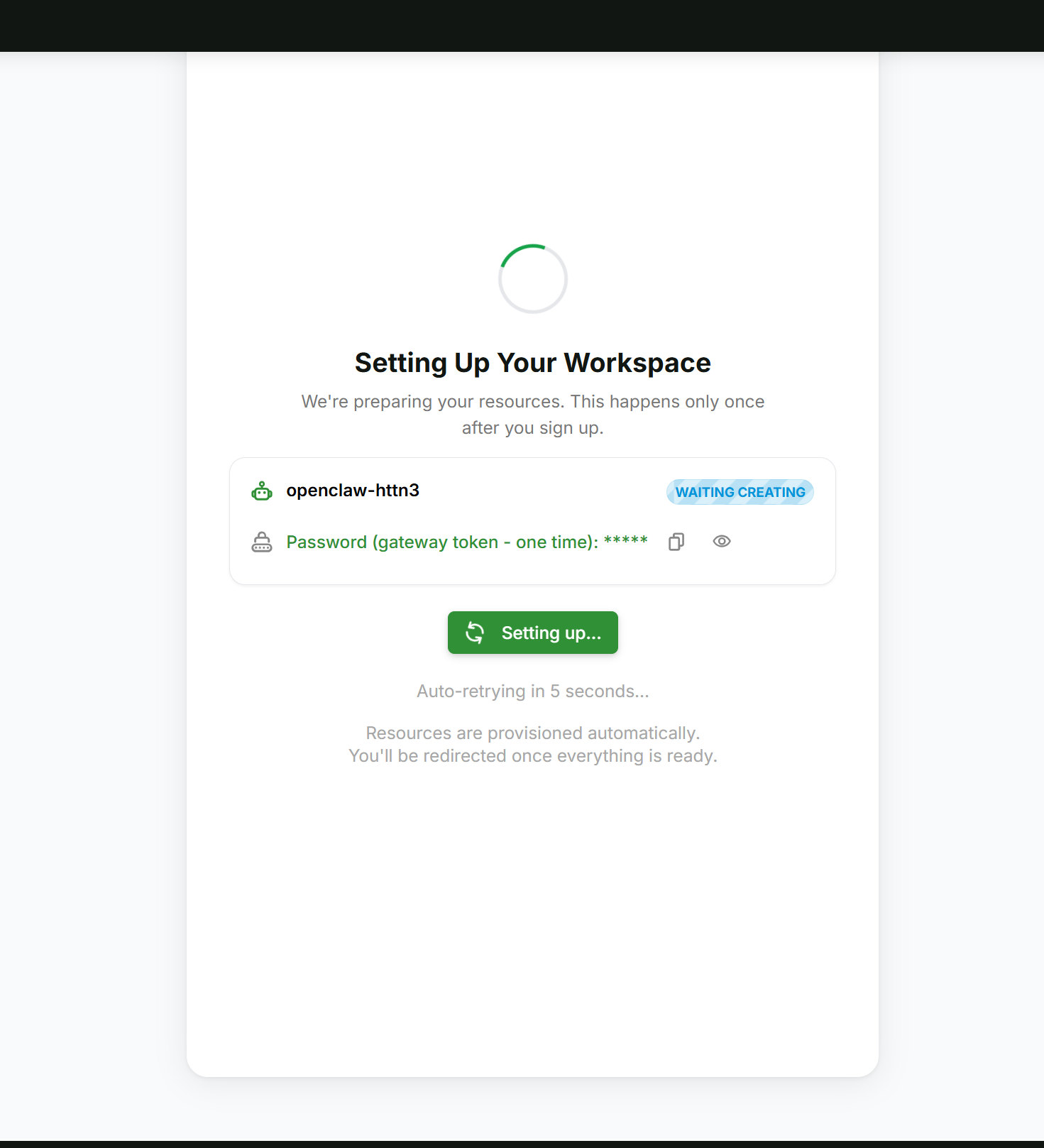
The "Setting Up Your Workspace" screen appears with a spinning icon while the system automatically prepares the environment.
The system completes 4 provisioning steps:
- OpenClaw Token – Creates Identity and authentication token for the instance
- AI Service Account – Creates IAM Service Account to connect to MaaS
- AI Service Token – Retrieves access token for the AI model
- Cloud Computer – Starts the OpenClaw container
If provisioning fails, the system displays an error message with a Retry button.
Step 4: Access the OpenClaw Gateway
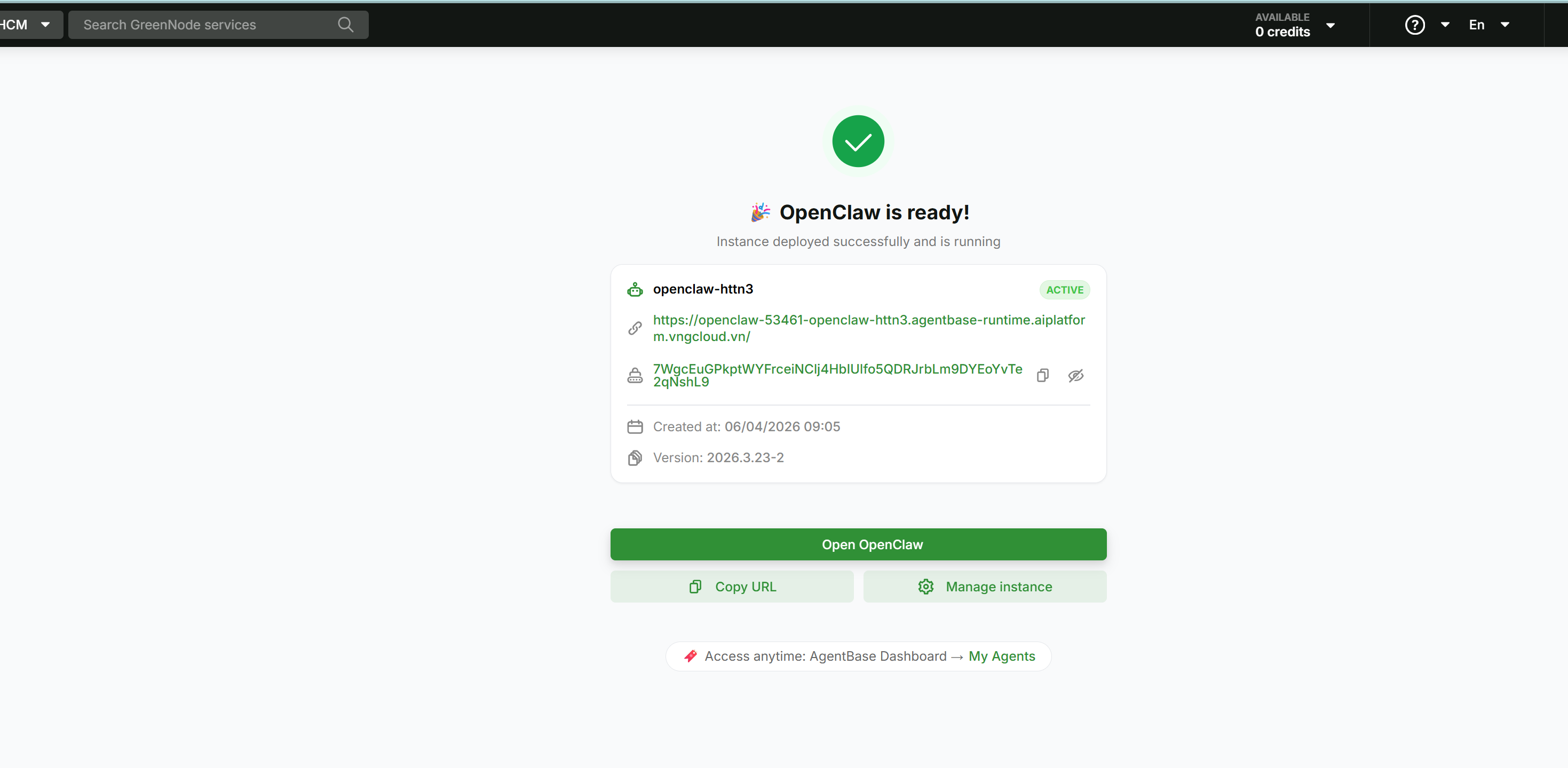
Once provisioning is complete, the Deploy Success screen shows the instance details:
- Instance name and ONLINE status
- AI Model in use
- OpenClaw Gateway access URL
- Gateway Token – one-time token for first login
Click "Open OpenClaw" to access the OpenClaw Gateway Dashboard and start using it right away.
Total time: 40–60 seconds (from clicking Deploy to chatting with the agent).
Why OpenClaw on AgentBase is different
1. No technical knowledge required – anyone can use it
OpenClaw 1-Click is designed for:
- General users: Want to use AI Agents immediately without any installation or technical configuration
- Developers: Want OpenClaw running on the cloud, already connected to an LLM model, without building infra themselves
- Non-GreenNode users: Want to use models from other providers – BYOK supported
2. AgentBase has all the modules an AI Agent needs
Running an AI Agent in the real world doesn't just require code – it requires an entire platform:
Runtime – Deploy agents in minutes, no DevOps needed
Memory – Agent remembers context, extracts facts, semantic search
Identity – Agent identity management, credential management, access control
MaaS – LLM on Vietnamese infrastructure, diverse models (Claude, GPT, Gemini, DeepSeek, Qwen)
Observability – Logs, metrics, dashboard – know what the agent is doing
All ready on AgentBase. OpenClaw is just one of many agents that can run on it.
3. Manage multiple instances easily
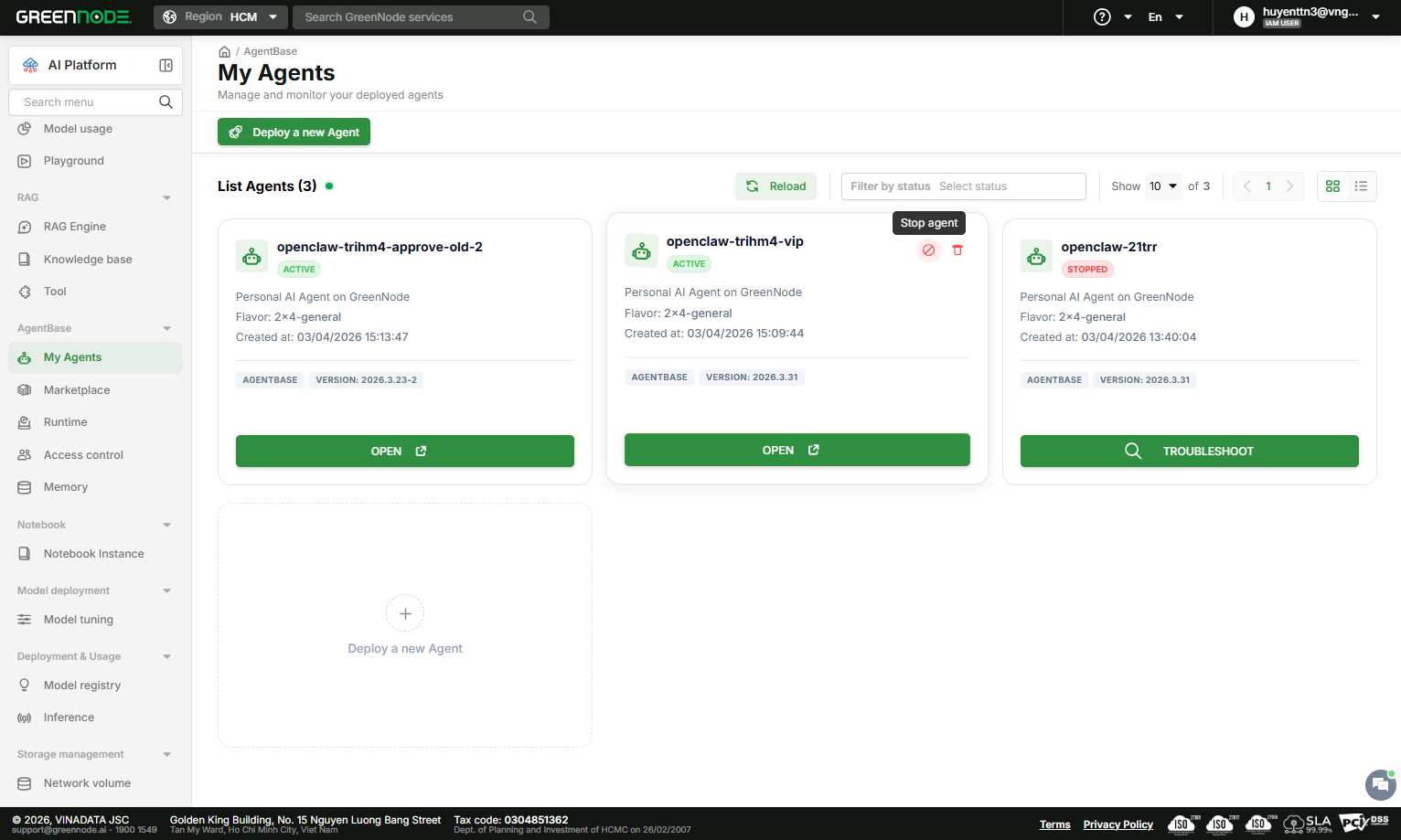
From the My Agents Dashboard, you can:
- View all Active instances
- View Stopped instances – can be Restarted at any time
- Open – Go directly to the Gateway Dashboard
- Stop – Stop the instance, URL becomes inaccessible
- Restart – Restart a stopped instance
- Delete – Permanently delete the instance (irreversible action, all data will be deleted)
Multi-instance support: A single user can deploy as many instances as they want – all managed centrally from one dashboard.
4. Data is never lost
When an instance auto-shuts down, the instance's data is retained. Simply Restart from the My Agents Dashboard to continue using it.
Two supported AI sources
GreenNode MaaS (Default)
For users with a GreenNode account. The system automatically creates an API key and connects to GreenNode Model-as-a-Service – you don't need to copy/paste any keys.
Default model: qwen3-5-27b
BYOK – Bring Your Own Key
For those who want to use models from external providers:
- OpenAI – GPT-4, GPT-4o...
- Anthropic – Claude 3, Claude 3.5...
- Gemini – Google Gemini
- Custom – Any provider compatible with the OpenAI API
You provide the API key during configuration. The system validates the key before allowing you to proceed.
AgentBase – Benefits for Enterprises
AgentBase isn't just a place to run OpenClaw – AgentBase is the platform layer that enables any AI agent to run in an enterprise environment with full control.
Already available – use now
- Runtime – Deploy agents in minutes, scalable, auto-recovery
- Memory – Agent remembers long-term context, extracts facts, semantic search
- Identity – Credential management, agent identity, access control
- MaaS – Multi-model support, data hosted in Vietnam, AI Gateway with PII filtering
- Observability – Logs, metrics, dashboard, alerts
Aimed at enterprise benefits,
In the future, AgentBase will expand to deliver even more value for enterprises:
Control & Compliance
- Control who can use agents, which tools, and which data
- Audit trail – every action is logged, searchable, exportable for compliance
- Private skill registry – approve/reject skills for security
Cost Management
- Quota per team, per user – no surprise bill shocks
- Cost dashboard – realtime spending, budget alerts
- Usage analytics – know who uses the most, optimize when needed
Collaboration
- Multi-user workspace – multiple people working in the same agent instance
- Approval workflow – agent requires approval for critical actions
- Team-based access control – permissions organized by department
Reliability
- Auto-recovery – agent recovers automatically on failure
- Version pinning – control when agents get updated
- A/B testing – test new agents before rolling out
AgentBase is where enterprises manage their Agents. OpenClaw is the strongest showcase to prove it.
Who should use OpenClaw on AgentBase?
1. General users who want to use AI Agents
- Deploy in 1 minute
- No technical knowledge required
- Chat via Telegram/Zalo right after deployment
2. Developers who want to test AI Agents quickly
- No infrastructure management needed
- Multi-model support – switch models in seconds
- Built-in observability – easy debugging
3. Teams who want to use AI Agents together
- Multi-instance – each person has their own agent
- Centralized management – manage everyone from 1 dashboard
- Data persistence – no data loss on restart
4. Businesses who want to explore AI Agents
- Low barrier to entry – try immediately, no setup needed
- Easy to scale – from 1 person → entire team
- Cost control – quotas and dashboards help manage costs
Conclusion: AgentBase makes AI Agents accessible
OpenClaw solves the individual's problem – automating everyday tasks.
AgentBase solves the enterprise's problem – making AI agents run in the real world – with management, control, and observability.
By 2026, the question is no longer "How do I get an AI Agent running?" – the question now is "How do I run an AI Agent for my team without spending effort on setup and maintenance?"
AgentBase is the answer.
Frequently Asked Questions
1. I don't have a GreenNode account, can I still use it?
Yes. Choose BYOK during configuration and enter your API key from an external provider (OpenAI, Anthropic, Gemini...).
2. Can I deploy multiple OpenClaw instances?
Yes. A single user can deploy multiple instances. You manage all of them from My Agents Dashboard.
3. My instance stopped on its own – will I lose my data?
Instance data is retained after auto-shutdown. Just Restart from My Agents Dashboard to continue using it.
4. Can I integrate Telegram or Zalo?
Yes. You can configure it during the deploy step or afterwards at Settings → Config in the OpenClaw Gateway. Or follow GreenNode to get the tutorial article right away!
References
- OpenClaw Isn't Scary Anymore – 4 Steps to Run an AI Agent Even If You Can't Code – OpenClaw setup guide
- OpenClaw 1-Click – Official Documentation – Overview, architecture, FAQ
- Deploy and Manage OpenClaw – Detailed Guide – Step-by-step deploy and management
- GreenNode MaaS Documentation – Model as a Service API
Get started now
Join AgentBase Alpha and click "Deploy OpenClaw With 1 Click!"
40–60 seconds later, you have an AI agent ready to work for you.
