

AI coding tools have moved past the “try it for fun” phase. For many developers, the question is no longer “should I use AI?”, but “where should I plug it into my workflow so I ship faster without tanking code quality?”.
This article is for developers who work on real production code every day: fixing bugs, adding features, refactoring services, writing tests, reviewing diffs, and keeping the system from blowing up after merges. The focus is not on AI hype, but on the practical value of AI coding agents in engineering environments that care about quality, stability, and delivery speed.
Context & Business Problem
Inside most engineering teams, the bulk of time is not spent “typing new code”. It’s spent on context‑heavy work:
- Reading execution flows before you dare to change anything, often stepping through four or five layers just to understand enough to start.
- Tracing all the related files when a change cuts across multiple layers at once.
- Checking whether a change breaks backward compatibility or introduces new race conditions.
- Reviewing diffs while worrying about which edge cases you might have missed.
- Adding tests around old code that never had good coverage in the first place.
These problems hit delivery directly: cycle times grow because “prep time” before a change is too long; review quality is inconsistent across pull requests; and “important but not urgent” work like hardening or improving coverage keeps getting pushed from sprint to sprint.
Autocomplete or chat inside your IDE speeds you up at the snippet level, but usually isn’t enough when changes span multiple files and layers. At that point, what developers need is not “write this snippet for me”, but an agent that can work task‑first: read the scope, keep the task goal in mind, keep digging through related files, and then help you review the result.
That gap is exactly where AI coding agents are starting to fit.
What Is an AI Coding Agent, and How Is It Different from a Traditional Code Assistant?
An AI coding agent is a layer of tooling that can work on multi‑step tasks inside a real codebase: reading files, following execution flows, inspecting diffs, running commands, suggesting changes, helping with review, and bootstrapping tests, all within one working context
| Tool type | Core strength | Best used when… |
| Traditional code assistant | Local suggestions, autocomplete, rewriting a single method | You already know exactly what to change |
| AI coding agent | Exploring the codebase, keeping task goals, helping with implement → review → test | You need to understand the impact area before coding |
Put simply: a code assistant helps you type faster. A coding agent helps you handle structured work better.
A good example is Claude Code — Anthropic’s CLI tool that lets you call an agent directly from the terminal, working inside your actual project directory instead of copy‑pasting code into a chat window.
Notable capabilities when working with Claude Code include:
- Project instructions (CLAUDE.md). You drop an instruction file into the repo describing coding conventions, naming rules, which tests to run, and areas the agent should avoid touching. The agent reads this file before each task and keeps that context throughout. This turns the agent from “a chatbot that knows code” into “a tool that understands how your team works”.
- Sub‑agents and context isolation. For larger tasks, Claude Code can spawn sub‑agents to run in parallel — one to explore the codebase, one to review diffs, another to write tests — then aggregate results. Each sub‑agent gets its own context window so the main conversation doesn’t get polluted.
- Skills. When a task pattern repeats often enough, you can wrap it into a reusable skill — e.g., review a diff using a fixed checklist, analyze an execution flow before refactoring, or scan validators and side effects. Skills reduce randomness and keep output quality more consistent run‑to‑run.
- CLI‑first workflow. Running in the terminal makes the workflow feel close to how developers actually work — reading files, inspecting diffs, running tests, checking command output — instead of juggling copy‑paste in a chat box.
Value Drivers: Why Should Developers Adopt AI Coding Agents?
1. Cut Down the Time to Understand a Codebase Before You Touch It
The clearest benefit, at least for me, is not “faster code generation” but “faster context acquisition”.
In backend codebases that use workflow orchestration, a small surface change often pulls a long chain across multiple layers. If you do everything manually, just scoping the change properly can eat a lot of time before you write a single line of code.
Claude Code shortens this step by listing likely‑related files, describing the current execution path, pointing out coupling and race‑condition–prone spots, and suggesting what to verify after the change.
In practice, this is where I see the biggest productivity gains. Not because the agent always writes better code than I do, but because it shrinks the prep time before I start coding.
2. Make Refactors More Structured, Especially When Changes Span Multiple Layers
On a recent commit, I added a batch delete workflow and updated ACL behavior per user. The commit touched 17 files, with 321 added lines and 61 deletions, across endpoints, request objects, services, activities, workflow implementations, and validators.
For this kind of change, the value of an agent is not “have it write everything for me”, but:
Grouping the change set into sensible clusters.
Suggesting a separate workflow instead of cramming new logic into an existing one.
Reminding me to check state persistence order and workflow startup sequence to avoid race conditions.
Keeping naming and flow consistent across multiple files.
Used correctly, the agent makes refactors more deliberate. It feels like someone is reading the diff alongside you, constantly nudging: “this part is carrying too many responsibilities” or “you should double‑check the state lifecycle before starting the workflow”.
3. Tighten Code Reviews and Bootstrap Unit Tests
I often use an agent as a first‑pass reviewer before I review my own diff. With large multi‑file changes, humans are prone to missing small but important issues: leftover imports, inconsistent error handling, uncovered null paths, or naming that breaks local patterns.
In modules with low test coverage, the agent is also useful for suggesting the most important test cases first, generating skeleton unit tests for happy and failure paths, and calling out edge cases the author may have missed.
It does not replace an engineer who understands the domain, but it gives me a structured starting point, especially when I’m adding coverage to older code.
4. Make Progress on Work You Usually Skip Because of Bandwidth
This is an underrated but important value driver. Many tasks don’t get delayed because of lack of skill, but because the context‑switch cost is too high. Onboarding into an old module just to add validation, going back to add tests to a long‑neglected service, or revisiting complex business logic for a review are all “important but not urgent” tasks that slide from sprint to sprint.
Claude Code significantly reduces the startup cost for this class of work. Instead of spending a morning just to re‑load context, I can delegate exploration and summarization to the agent, then focus on the actual decisions.
Use Cases
Use Case 1: Refactoring Backend Logic in an Existing Codebase
This is the use case where I rely on an agent the most. I don’t ask it “please implement feature X for me”. I usually start with: read the files related to this task, describe the current execution flow, highlight where logic is smeared across layers, and suggest a cleaner responsibility split.
Another example is a commit that introduced shared ACL handling for users in an API gateway service. That commit touched only three files with 105 added lines and 12 modifications, but it changed highly sensitive behavior: how ACL plugins are built, how they’re attached to paths, and how to avoid deleting a shared ACL when only a single path is removed.
This is the type of change that looks small by file count but carries high logical risk. The agent was especially helpful in forcing me to re‑check hidden assumptions in the old flow — for example, what happens when a user is removed from one path but still shares ACL with others.
Use Case 2: Code Review and End‑to‑End Verification Before Opening a Pull Request
I use Claude Code as a pre‑PR review and verification pass. My usual flow:
- Have the agent read the current diff.
- Ask it to highlight bug risks, regression risks, missing validation, and test gaps.
- Keep only the comments that truly relate to correctness, maintainability, or behavior.
The key is to make the review prompt specific. If you just say “please review this code”, the output is usually noisy. If you specify “prioritize correctness, backward compatibility, workflow lifecycle, and missing validators”, the review quality is much better.
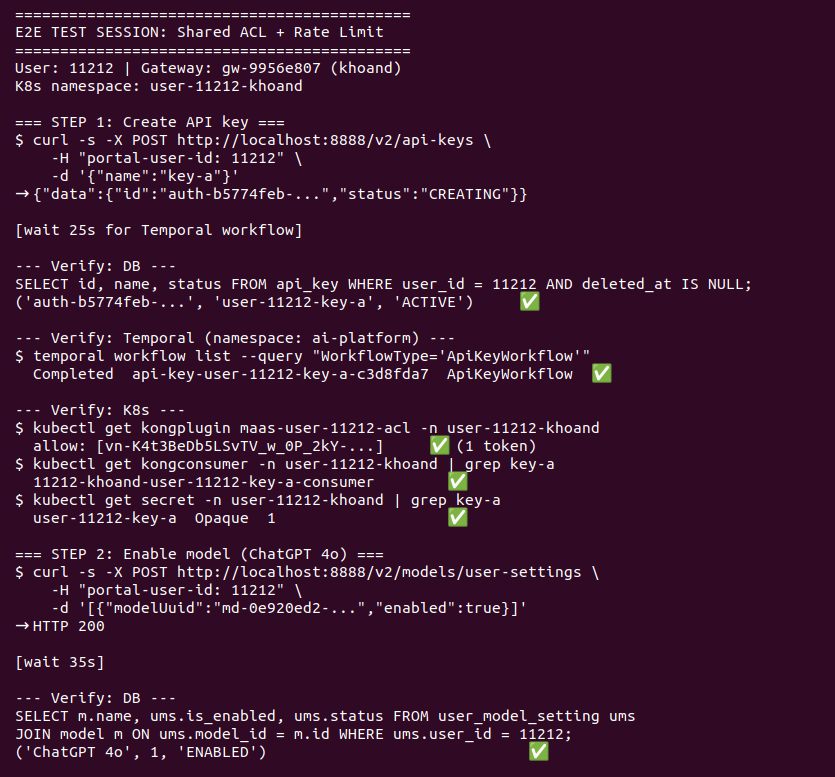
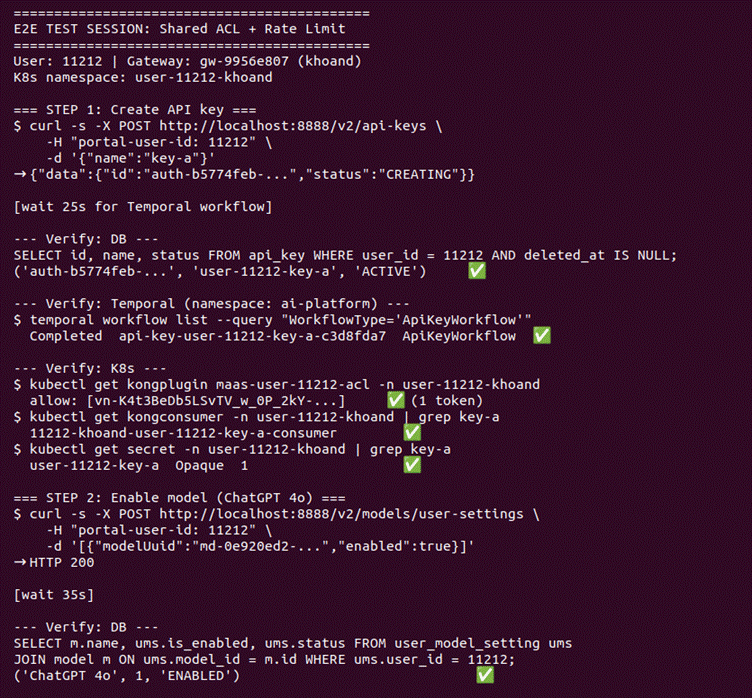
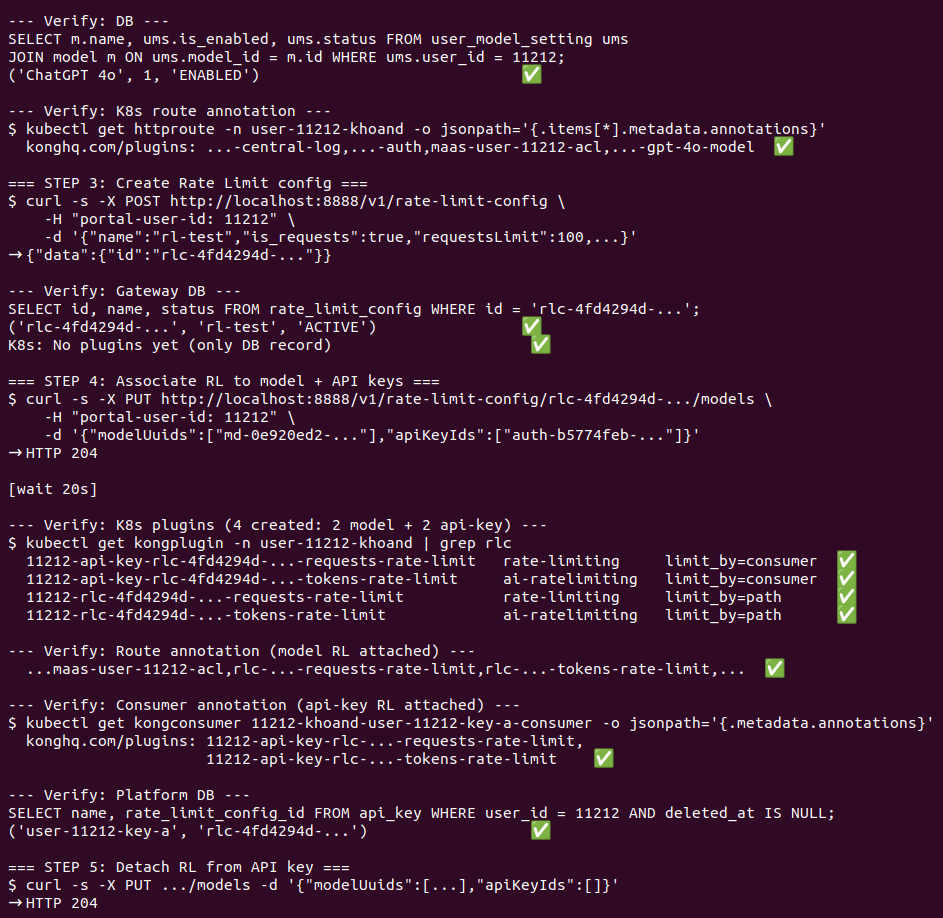
Beyond review, I also use the agent for end‑to‑end verification before opening a PR: it reads the full diff and confirms that end‑to‑end behavior matches expectations. This catches many issues that per‑file reviews alone do not surface.
Use Case 3: Bootstrapping Unit Tests for Low‑Coverage Modules
In many backend codebases, insufficent tests aren’t about lack of skill — it’s about lack of time to go back and cover old modules. I once split a validator out of a service layer — four files, 47 added lines, 13 deletions — with a clean separation into its own class, but test coverage there was still thin.
For tasks like that, I ask the agent to read the implementation first, list branches that should be tested, categorize must‑have vs. nice‑to‑have cases, and generate skeleton tests so I can adjust assertions and setup.
The critical point: I don’t blindly trust the agent’s tests. I treat them as a first draft that shortens my startup time, then edit them based on domain knowledge and the actual expected behavior.
How to Start
To make use of the following steps, you’ll need:
- An active codebase: agents deliver the most value when there’s real code to read, not a greenfield toy project.
- Basic familiarity with the terminal/CLI: Claude Code runs entirely from the terminal.
- Claude Code installed: see the official setup guide.
Step 1: Identify Real Pain Points in Your Current Workflow
Goal: Find where you’re actually losing time or quality, not just “adopt AI because it’s trendy”.
Main activity: Look back at tasks from the last one or two sprints. For me, the clearest signal is any task where most of the time is spent understanding context rather than writing code — long multi‑file diffs, cross‑layer refactors, or revisiting old modules to add validation.
If you regularly spend a whole morning just to scope the impact of a single change, that’s a strong indicator an agent could help.
Step 2: Pick a Small Pilot and Define Success Metrics
Goal: Run a trial in a controlled scope with measurable results within one sprint.
Main activity: Choose one of three low‑risk pilot types:
- Use an agent to explore the flow before a specific refactor.
- Let the agent review your diff before opening a pull request.
- Have the agent bootstrap tests for a specific under‑covered module.
A simple metric to track is the time from “task assigned” to “you’re ready to make deliberate changes”. For me, this prep phase used to take at least a full workday; with an agent handling exploration, it dropped to under two hours.
Step 3: Set Up Tooling and Project Instructions
Goal: Make sure the agent operates inside a clear framework from day one, not drifting based on ad‑hoc prompts.
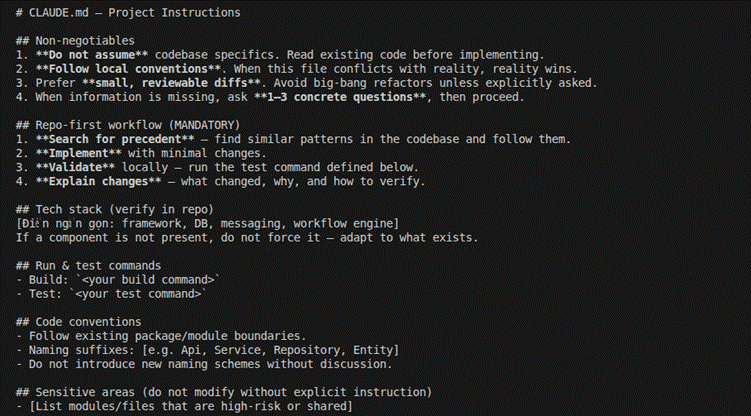
Main activity: Install Claude Code and write a CLAUDE.md file for your project — include coding conventions, test commands, sensitive areas to avoid, and key review principles. The agent reads this file before each task, and this one step dramatically improves output consistency
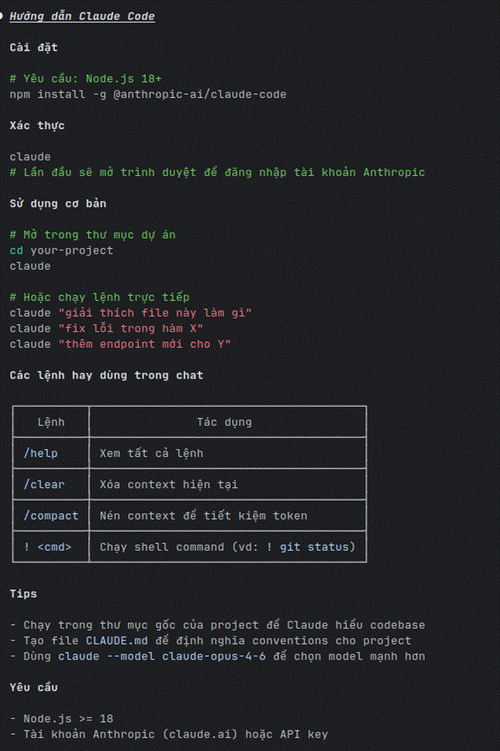
Guide to download and use Claude Code:
Sample CLAUDE.md:
Step 4: Run the Pilot, Measure, and Iterate
Goal: Validate whether the agent actually helps in your workflow before rolling it out further.
Main activity: Use the agent on 3–5 real tasks in a sprint. Keep prompts consistent, split tasks into explore → implement → review → test phases, and record where output falls short of expectations so you can refine prompts or CLAUDE.md.
In practice, a single sprint is enough to see whether an agent fits your tasks and codebase. You don’t need to wait longer for an initial verdict.
Step 5: Standardize and Roll Out to the Team
Goal: Turn individual experience into a repeatable workflow, instead of everyone using the agent in an ad‑hoc way.
Main activity: Package good prompts into reusable skills, update CLAUDE.md with proven instructions, and align as a team on when to use the agent and when not to. Share concrete examples — both strong outputs and outputs that needed heavy verification — so the team can learn from real experience instead of starting from scratch.
Risks, Constraints & How to Mitigate Them
Adopting AI coding agents is not all upside. Used without discipline, they can make you “faster” exactly where you shouldn’t rush.
1. Lack of Domain Knowledge → “Syntactically Correct, Systemically Wrong” Refactors
An agent can produce clean‑looking changes that violate system assumptions — e.g., deleting a shared resource when only part of it should be removed, or kicking off an async process before state has been safely persisted.
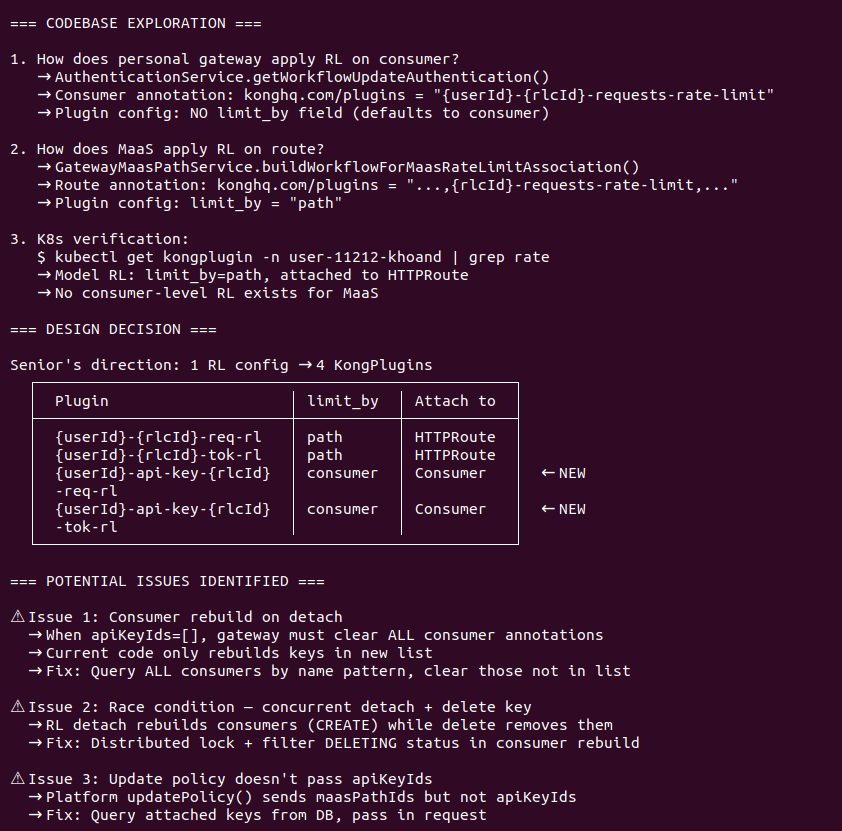
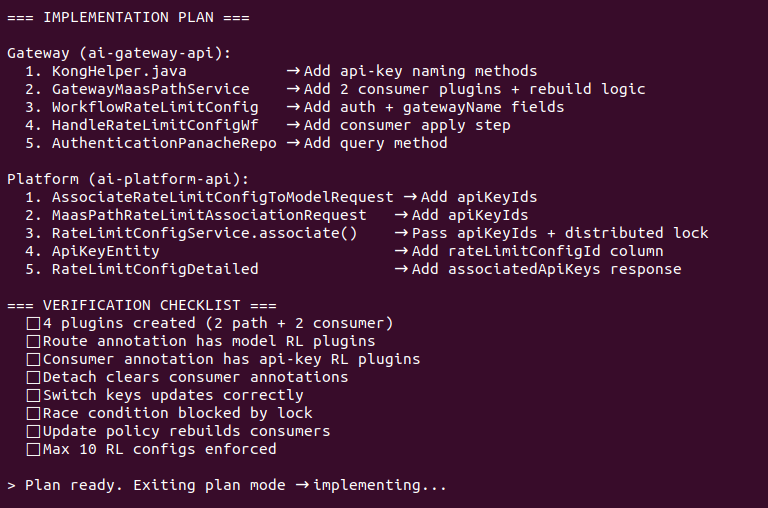
Mitigation. My approach is to control risk before implementation, not just by reviewing harder afterwards. For high‑impact changes, I use plan mode so the agent proposes a plan first, then open a separate conversation to critique that plan — several times, informed by real business context. Most severe issues get filtered out at this stage, not after code is already written.
2. Smooth Output ≠ Correct Output
Beautiful code can still be wrong on edge cases.
Mitigation. Treat verification as mandatory — and preferably verify against the real system, not just by reading code. Define expected behavior up front, then have the agent run end‑to‑end checks against that expectation. Code that “looks right” and code that “runs right” are two different things.
3. Agent‑Generated Tests May Miss Crucial Cases
Agents are usually good at happy‑path skeletons. But domain‑specific cases, backward compatibility constraints, or dirty‑data scenarios still need engineers to identify.
Mitigation. Treat agent‑generated tests as a starting draft, not as completed coverage.
4. Overloading a Single Conversation Pollutes Context
If you use one conversation for exploration, implementation, and test review, the model can drift.
Mitigation. Use project instructions in CLAUDE.md, keep prompts goal‑oriented, and separate exploration from implementation once a task becomes complex.
5. Over‑delegating Decisions Engineers Should Own
Not every decision belongs with a tool. Architectural choices, long‑term trade‑offs, or business‑critical behavior must still be owned by people who understand the system.
Mitigation. Decide up front that the agent is there to accelerate execution and technical reasoning, not to outsource judgment.
Conclusion
AI coding agents do not replace developers. But for developers working on real codebases, they are a very pragmatic layer of tooling to reduce context‑loading time, make refactors more structured, tighten reviews, and get tests off the ground faster.
From my experience, the biggest value of Claude Code is not “how many lines of code it wrote for me”, but how it helps me maintain speed without dropping too much quality. Used as a technical partner with clear boundaries, AI coding agents genuinely deserve a place in your day‑to‑day workflow.
If you want to start, don’t begin with the hardest task you have. Pick a small pilot that sits right inside your daily work: let the agent review a diff before a PR, explore a flow before a refactor, or bootstrap tests for an old module. After one or two sprints, look at how your cycle time, review quality, and the actual usefulness of the output have changed. That’s the most realistic way to tell whether AI coding agents fit your workflow.
Read more: OpenClaw Isn’t Scary Anymore – 4 Steps to Run an AI Agent Even If You Can’t Code
