

Key Takeaways
- LLMs are stateless by defauldefault, without a deliberate memory layer, agents restart from zero every session. Stuffing full history into the context window is not a solution; a selective, fact-based memory architecture can reduce token costs by over 90% and cut latency by 91% compared to full-history prompting.
- Production-grade AI agents need a four-layer memory architecture: working memory (current session), episodic memory (activity logs), semantic memory (extracted facts and preferences), and procedural memory (workflows and best practices), each serving a distinct role that no single vector database can replace alone.
- Memory is an infrastructure problem, not just an application onone, session leakage, context truncation, embedding drift, and memory bloat are production pitfalls that must be designed for from day one, covering data residency, retrieval latency, and tenant-level access controls.
Have you ever been annoyed when an AI agent asks you for the exact same information you already gave it last week? Or when a customer support bot drops your entire order history the moment the session ends? In most cases, that is not a model problem – it is a memory architecture problem.
At its core, an LLM is stateless. Every model call is effectively a fresh start, except for whatever you explicitly pack into the context of the current turn. That means without a deliberate memory layer, an agent has no way to reliably carry important information across sessions.
At the consideration stage, the question is no longer “Do we need memory?” but rather: How should we design persistent memory so that agents remember the right things, retrieve them fast enough, and keep total run cost under control?
Why a context window is not a replacement for long‑term memory
Context windows and long‑term memory solve two very different problems. A context window gives the model visibility into what is happening in the current session, while long‑term memory lets the agent retain facts, preferences, history, and workflow context across many sessions.
| Criteria | Context window | Long‑term memory |
|---|---|---|
| Scope | Within a single session | Across multiple sessions |
| Storage | RAM / in‑process | Vector DB / structured DB |
| Cost | Grows with tokens in prompt | Selective retrieval, cheaper |
| Durability | Lost when session ends | Persistent, updatable |
This is why many teams hit a cost ceiling very quickly when they try to “stuff” the entire history into the prompt. The 2025 Mem0 paper shows that a selective, fact‑based memory architecture can reduce token cost by more than 90% and cut p95 latency by 91% compared to full‑history prompting, while preserving or improving answer quality.
A four‑layer memory architecture for production‑grade AI agents
In real‑world agent systems, memory is typically split into multiple layers with different roles instead of being dumped into a single vector database. This layered design makes the system easier to scale, easier to debug, and easier to govern in an enterprise environment.
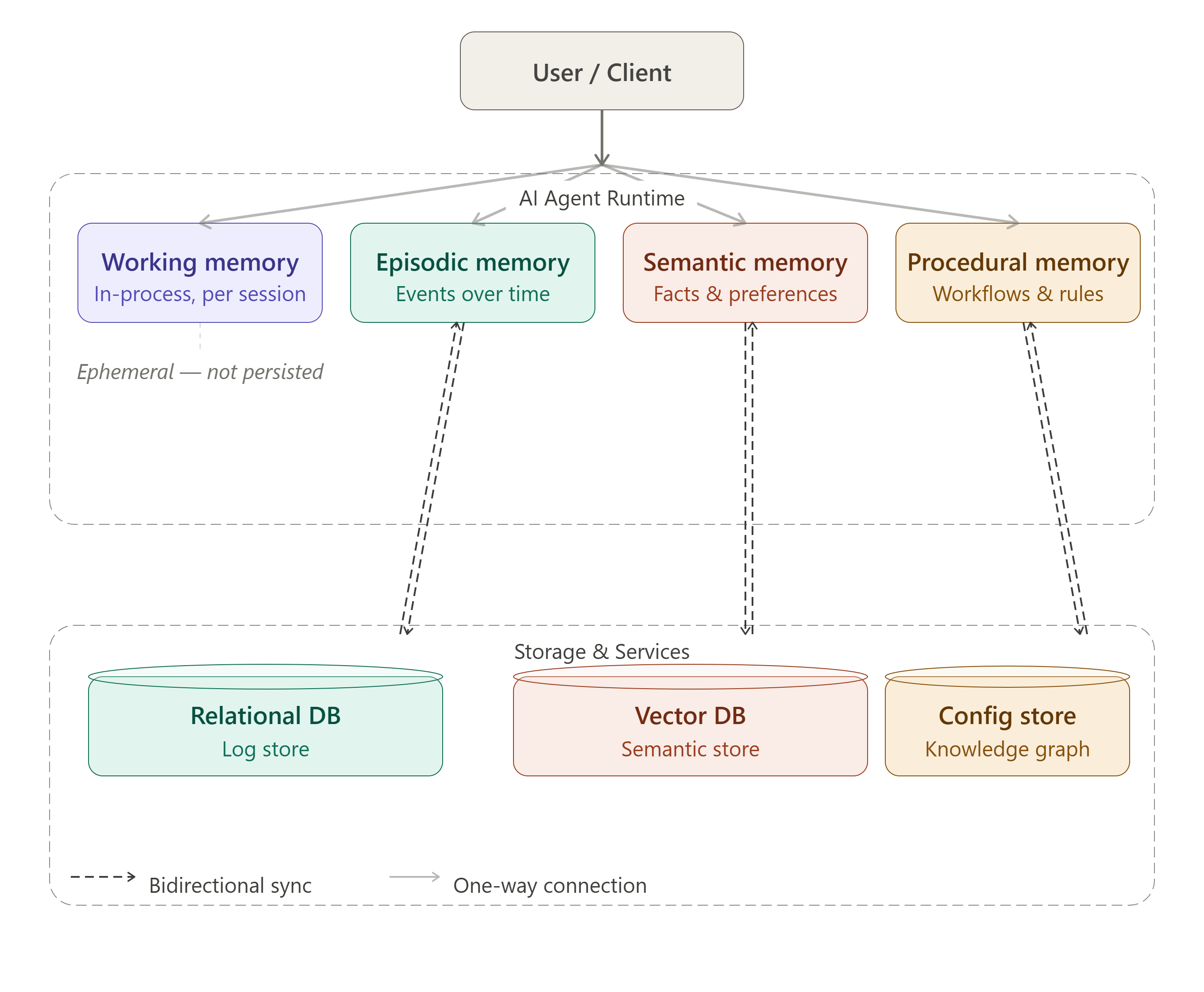
1. Working memory
Working memory is the short‑term state for the current session. It includes the last few conversational turns, recent tool call outputs, current task state, and any temporary variables the agent needs for immediate reasoning.
This layer usually lives in the agent process (RAM) and is cleared when the session ends. It is essential for handling the current interaction, but it is not enough to deliver a “this agent remembers me” experience across sessions.
2. Episodic memory
Episodic memory records what has happened over time: what the user asked, what the agent did, what the outcome was, and what errors occurred. You can think of it as the agent’s activity log across sessions.
This layer is extremely useful for audit, debugging, and replay. However, if you feed raw episodic history directly into the model for reasoning, you will drag a lot of noise into every call.
3. Semantic memory
Semantic memory is the most important layer if you want your agents to stop “forgetting”. Instead of storing raw conversations, the system extracts key facts and preferences, then stores them as structured data or semantic facts for future retrieval. [web:141]
For example, the agent might remember that a specific user prefers reports in Vietnamese, that a project is currently in a Q3 migration phase, or that a particular customer has a special SLA. These are long‑lived signals that directly influence how the agent should respond next time.
4. Procedural memory
Procedural memory stores the “how‑to” rather than “what happened”. It can encode battle‑tested workflows, stable tool‑call patterns, or fallback and recovery steps when things go wrong.
For enterprise agents, this layer is critical because it keeps agent behavior consistent across sessions and across teams, instead of letting each interaction drift into a different ad‑hoc path.
A more detailed breakdown of this four‑layer model – and when to introduce shared team memory across multiple agents – is covered in the article on memory architectures for multi‑agent systems.
The pipeline for extracting and consolidating memory
Simply dumping raw conversations into a vector database is one of the most common mistakes. Every chat turn is full of noise: filler phrases, repetition, meta commentary – most of which has no long‑term semantic value.
A production‑ready memory pipeline typically has three steps:
Fact extraction. At the end of each session, you run a dedicated prompt or a small helper model to extract key entities and facts. For example: {"user_preference": "likes tabular reports", "project": "Q3 cloud migration", "constraint": "budget < 500M VND"}. Only facts with real downstream impact are persisted.
Vectorization. Each fact is embedded using a model such as text-embedding-3-small or nomic-embed-text, then tagged with metadata like user_id, timestamp, topic, confidence_score. That metadata is essential for scoping and filtering later.
Deduplication and update. When new facts conflict with old ones (for example, the user changes a requirement), your pipeline needs logic to overwrite instead of endlessly stacking. Mem0, for instance, uses contradiction detection to update facts and reports strong gains on long‑term memory benchmarks like LoCoMo.
Architectures for RAG and Agentic RAG with low latency show how this fact pipeline can sit next to your retrieval pipeline so you can keep memory accurate without blowing up latency.
Good retrieval is what makes memory useful
An agent should not load its entire memory store into the prompt at the start of every session. The right pattern is to retrieve only the most relevant facts for the current intent, then inject them into the system prompt as a clearly structured block.
In practice, many systems use dense retrieval for semantic queries and hybrid retrieval when queries mix keywords with intent. The goal is not to store as much as possible, but to pull the right slice at the right time for the right user scope.
[MEMORY CONTEXT]
- User: Nguyen Van A, DevOps team at Company B
- Current project: Kubernetes migration to managed VKS, deadline Q3/2026
- Preferences: Vietnamese reports, table format
- Last session: reviewed network policy, storage class still pending
[/MEMORY CONTEXT]
Common pitfalls when bringing persistent memory into production
- Session leakage: data from user A is surfaced into user B’s session because retrieval is not properly filtered by
user_idortenant_id. - Context truncation: the right memory is retrieved but the prompt exceeds token limits, so the most important facts get chopped off at the end.
- Embedding drift: you swap embedding models but never re‑index existing vectors, so retrieval quality slowly degrades over time.
- Memory bloat: without retention policies or pruning jobs, the vector store accumulates millions of outdated facts that are rarely, if ever, used.
This is why memory should not be treated as a small add‑on at the end of a project. If you expect AI agents to participate in real workflows, memory needs to be part of the runtime architecture from day one, not a patch you apply later.
Consideration‑stage view: what should enterprises evaluate up front?
If your team is currently evaluating options, there are four questions worth answering early. The answers will tell you whether you can get by with a simple memory layer or need a more complete architecture.
- Do your agents need to remember across sessions, or is a per‑session context sufficient?
- Which types of data need to persist: facts, preferences, events, workflows, or all of the above?
- Does your memory layer need auditability, retention policies, and role‑based access by team or tenant?
- Can you meet your latency and token‑cost budgets with the memory design you have in mind?
For use cases like customer support, sales assistants, enterprise copilots, or internal operations assistants, you almost always need at least semantic and episodic memory. For more complex use cases with multiple tools and internal workflows, procedural memory quickly becomes important as well.
What to watch for when deploying memory on cloud infrastructure
Persistent memory is not just an application‑level concern; it is also an infrastructure problem. Your vector database needs low latency, your embedding pipeline needs enough throughput, and the memory store must live inside a network, governance, and data‑residency model your organization can actually sign off on.
GreenNode AgentBase ships a managed Memory module that provides conversation history and semantic facts as first‑class memory layers for AI agents. That lets engineering teams focus on business logic instead of building and operating the entire memory infrastructure stack from scratch.
Good memory is the foundation of a trustworthy AI agent
An AI agent is only genuinely useful when it knows who the user is, what they are trying to do, and how far along they are in the workflow. Without persistent memory, every session starts over from zero – and in an enterprise setting, that experience is hard to justify.
A multi‑layer memory architecture – working, episodic, semantic, and procedural – is a more robust path for teams that want to move from prototype to production. The real question is not whether you should use memory, but how to design it correctly from the start so you do not accumulate technical debt later.
Frequently asked questions (FAQs)
1. How do I stop my AI agents from forgetting between sessions?
A common approach is to separate memory into layers: working memory for the current context, episodic memory for past interactions, semantic memory for durable facts and preferences, and procedural memory for workflows and best practices. At the start of each session, the agent retrieves only the most relevant semantic facts and injects them into the prompt, instead of replaying the entire history.
2. Is a large context window enough to replace long‑term memory?
No. A larger context window helps within a single session, but it does not give you durable, queryable state across sessions. Costs and latency also grow with prompt size, whereas persistent memory lets you retrieve a small, targeted set of facts at a much lower cost.
3. How is semantic memory different from storing raw chat logs in a vector database?
Semantic memory stores distilled facts and relationships that have long‑term value – such as user preferences, project constraints, or important decisions – along with metadata. Raw chat logs, by contrast, are full of noise. Modern systems usually run fact extraction, vectorization, and deduplication before writing to the store, which keeps retrieval precise and prevents uncontrolled memory growth.
4. When does it make sense to invest in a persistent memory architecture?
Persistent memory becomes important when agents handle multi‑step work, repeated over time, or anything that requires personalization – such as customer support, internal copilots, or DevOps/data/BI assistants. For one‑off, single‑turn tasks, a full memory stack may be overkill, but as soon as agents need to remember users and projects across sessions, a proper memory layer stops being optional.
If you are building agents that depend on persistent memory and want to go deeper into production architectures, or you prefer to deploy on infrastructure with SLAs and 24/7 support, GreenNode AgentBase is a practical place to start.
