

Key takeaways
- IDP (Intelligent Document Processing) goes far beyond traditional OCR. It uses AI, NLP, and machine learning to not just read text, but automatically classify, extract, and validate data from complex, unstructured documents at scale.
- Manual data entry and basic OCR tools break down when document volumes grow or formats vary; IDP solves this by adapting to any document type, from invoices and contracts to banking forms, with over 99% accuracy and processing speeds under 1.5 seconds per page.
- Businesses that adopt IDP can cut data entry errors by up to 70%, reduce processing workload threefold, and save thousands of workdays annually, turning document chaos into a streamlined, auditable workflow.
In most organizations, documents are still the “lifeblood” of operations: contracts, invoices, declarations, customer records, internal forms… yet the majority of them are handled in a very manual way. Staff open each PDF, scan line by line, then retype everything into Excel, CRM, or ERP. Some teams already use OCR to scan and “read” text, but they still have to review, copy, paste, and fit the data into the right forms.
In that context, the term “IDP – Intelligent Document Processing” is appearing more and more as a promise of “smart document processing”. Many people, however, still think IDP is just a slightly upgraded version of OCR. This article explains what IDP actually is in simple terms, how it differs from manual data entry and traditional OCR, and how GreenNode IDP brings this concept to life for Vietnamese businesses.
What is Intelligent Document Processing (IDP)?
Put simply, Intelligent Document Processing is a family of technologies that enables computers to read, understand, and process documents almost like a human operator, instead of just seeing an image or a meaningless block of text.
A typical IDP platform is built on three core technology layers:
- OCR (Optical Character Recognition): detects text from images, scanned PDFs, and paper documents. This is the “eyes” that turn pixels into characters.
- AI/ML + NLP + LLM/VLM: machine learning models, large language models, and vision-language models that understand document structure (what is a heading, a table, a data field) and context (is this an “ID number”, a “tax ID”, an “amount”, a “loan term”, and so on).
- Workflow & integrations: tooling to build end-to-end flows (classify → extract → validate → approve) and push data into systems such as ERP, CRM, core banking, and accounting software.
If OCR is the “eyes” that see characters, then IDP is the combination of brain + workflow that can take on tasks like “read 500 invoices this month, check for duplicates, flag anomalies, and post valid entries into the accounting system”.
How is IDP different from manual data entry and traditional OCR?
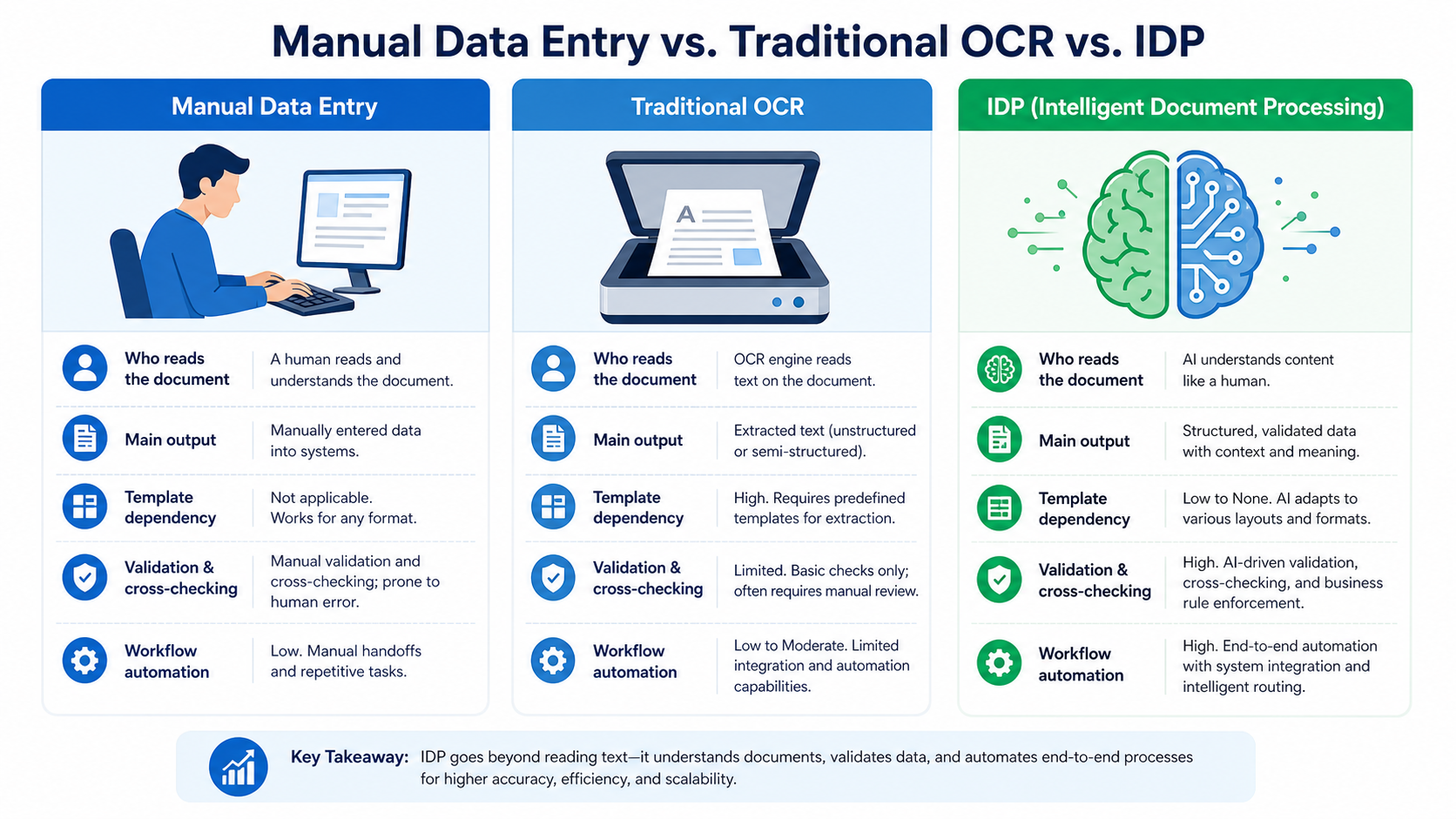
Manual data entry: flexible but people-intensive
Traditionally, staff open each document file, read it by eye, then type the required fields into a spreadsheet or line-of-business system. Whenever they need to verify something, they open multiple files, cross-check everything manually, and jot their notes down.
This approach is flexible — people can handle unusual cases — but it has major downsides:
- It consumes a lot of time and headcount, especially as document volumes grow.
- Fatigue leads to mistakes: wrong numbers, wrong rows, missed fields.
- It is hard to measure and optimize the process because most of it lives “in people’s heads”.
Traditional OCR: fast digitization, no real “understanding”
OCR can scan images, PDFs, and paper documents and turn them into machine-readable text. It is very useful to convert paper into digital data that applications can technically work with.
However, traditional OCR has some clear limits:
- It has no idea which part of the text is the “customer name” and which part is the “date of birth”.
- The output is usually just a block of text or a raw table with no business meaning, so humans still need to read, interpret, extract, and re-enter it into systems.
- Many OCR solutions are template-based: they only work well with fixed forms, and you need to reconfigure them when layouts change.
IDP: the “brain layer” built on top of OCR
IDP does not replace OCR — it builds on OCR and adds “understanding” and “action” on top:
- Document classification: automatically recognizes whether a file is a national ID, a VAT invoice, a customs declaration, an employment contract, or a financial statement.
- Field extraction: pinpoints exactly where “Full name”, “ID/Passport number”, “Customer ID”, “Subtotal”, “Tax rate”, etc. are located.
- Validation & cross-checking: compares data across documents in the same case file, and flags missing, incorrect, or inconsistent information.
- Feeding downstream processes: outputs structured data (JSON, XML, tables) that can be synchronized into ERP, CRM, and accounting systems for further automated processing.
As a result, IDP does not just “scan faster” — it actually replaces most of the repetitive data entry and verification work in document-heavy processes.
Inside a modern IDP platform: 4 core capabilities of GreenNode IDP
GreenNode IDP is an intelligent document processing platform built for Vietnamese businesses. It combines traditional OCR with LLM/VLM technologies to deliver an end-to-end pipeline: from document verification and digitization, through data extraction, all the way to deep business process automation (invoices, KYC, loan files, insurance claims, trade documents, and more).
You can think of GreenNode IDP as having four major capability blocks:
1. Document verification
This is the first layer — making sure the case file contains the right types of documents and that they are trustworthy.
- Automatically classifies mixed batches of files into national IDs, business registration certificates, land titles, contracts, invoices, customs declarations, medical records, and so on.
- Verifies signatures and stamps, detects potential tampering, and raises fraud alerts for underwriters and reviewers.
2. Document digitization
From a technical perspective, this is where traditional OCR is combined with language models to produce “clean” data for later stages.
- Converts images and scanned PDFs into text and/or editable DOC files while preserving key layout elements (tables, paragraphs, headings).
- Optimized for non-uniform input quality: skewed photos, blurry scans, glare, and aged documents — which are very common in real-world Vietnamese scenarios.
3. Data extraction
This is where end users feel the most tangible value from IDP.
- Automatically extracts fields from a wide range of forms, including:
- Identity documents: national ID cards, passports, household registration books.
- Business documents: business registration, VAT invoices, financial reports.
- Domain-specific paperwork: loan applications, insurance claims, import–export documents, medical records.
- Combines a general-purpose extraction model (to handle many document types) with specialized models fine-tuned for Vietnamese document formats, achieving very high field-level accuracy, including in many handwritten scenarios.
4. Business process automation
Once the data is available, the goal is not just to “export a CSV” but to embed it into the company’s business logic.
- Applies validation rules: cross-checks information between documents, enforces logical constraints (date of birth must precede issue date, totals must match line items, etc.), and automatically assigns case statuses.
- Integrates into concrete business workflows, such as:
- Automating accounts payable and cost posting from incoming invoices.
- Loan underwriting and KYC in banking and consumer finance.
- Processing insurance claims and medical reimbursement files.
- Extracting and reconciling trade documentation and customs declarations.
This “business layer” is what takes IDP far beyond a simple “scan & OCR” tool.
Real-world benefits of Intelligent Document Processing for businesses
When IDP is applied in the right place — typically document-heavy, highly repetitive processes — organizations tend to see some very concrete changes:
- Shorter processing times: many implementations report significant reductions in turnaround time compared to manual data entry, depending on the use case and the level of automation.
- Fewer errors and higher data quality: AI follows defined rules, does not get tired, and does not “fat-finger” numbers. Built-in cross-checks help keep data consistent across systems.
- Scaling without linearly adding headcount: when document volumes double, you can mostly scale infrastructure instead of doubling the size of the data entry team.
- Better control and compliance: every interaction with a document is logged, review rules are explicit, and it becomes easier to audit processes and meet regulatory or internal compliance requirements.
What’s next: explore GreenNode IDP for your document workflows
If you:
- Want to dramatically cut the time spent retyping data from invoices, contracts, and customer files.
- See your operations team bogged down in copy–paste work and side-by-side document checks.
- Need to accelerate processes while still maintaining strong control, audit trails, and compliance with Vietnamese data regulations,
then a platform like GreenNode IDP is a much better lever to pull than hiring an additional data entry team.
GreenNode IDP is built for the Vietnamese document and regulatory landscape. It can be deployed on in-country cloud or fully on-premises, and it already includes specialized models for key use cases such as invoices, KYC, loan files, insurance, and logistics, which helps shorten “go live” times to days rather than months.
If this sounds relevant, a good next step is to pick the most document-heavy process in your organization (for example, incoming invoices or loan applications), design a small pilot with IDP, and measure the impact. Get in touch to discuss your technical requirements and explore what a pilot could look like.
