

We’ve all been swept along by the flood of information on social media: you only mean to scroll for a couple of minutes, but then a pile of topics and debates makes the time slip away before you know it.
The same thing happened to me. One afternoon, five minutes of “scrolling the city of threads” quickly turned into forty - yet most of the information I took in wasn’t really necessary.
So I decided to build a “chatty little agent” of my own: to cut down my time scrolling social media while still keeping up quickly with the news and trends worth noting, on exactly the topics I care about.
This article shares how I built my AI news-aggregation agent on GreenNode AgentBase - from the system architecture and how it evaluates trends, to the token-optimization techniques that keep operating costs under control.
Where does the idea start? Three decisions that shaped the AI agent
On the infrastructure side, GreenNode AgentBase already provided the essentials I needed, so the important part left to me was designing the logic and architecture at a higher level to fit the use case. The three decisions below shaped my entire AI agent architecture.
Choosing the device and the interaction platform
To get news updates quickly, the phone was the natural choice: always by my side, easy to access, and well suited to receiving real-time notifications.
From there, my choice of OpenClaw came naturally too. OpenClaw supports interaction across many messaging platforms, letting users access and control the agent directly from familiar apps like Telegram or Zalo.
In this architecture, Telegram is used as the main interaction interface between the user and the system.
How do I make the agent “chatty”?
A news-aggregation AI agent doesn’t just need to know how to read information. It also has to be able to:
- Access the social platforms the user cares about.
- Search for content by topic.
- Filter out irrelevant posts.
- Assess which posts are getting high attention.
- Aggregate and deliver the most noteworthy information to the user.
Not every post with a lot of engagement is actually worth reading. A noteworthy post may show through high view counts, a large number of shares, or a comment section drawing heated debate.
Instead of building an entire crawling and data-collection system from scratch, the solution here is to leverage existing services. After some research and taking suggestions from Claude, ChatGPT, and Gemini, I chose SocialCrawl as the main tool, while Zernio serves as an alternative for certain specific use cases.
Keeping compute at a reasonable level
A personal news-aggregation agent doesn’t need an overly complex architecture.
The goal is to build a system that is fast enough, smart enough, and economical enough for real-world needs. Because if running a “little agent” ends up costing more than a cup of milk tea, then… perhaps the architecture is worth reconsidering.
From the three decisions above, the overall architecture took shape as follows.
Overall architecture of the news-aggregation AI agent
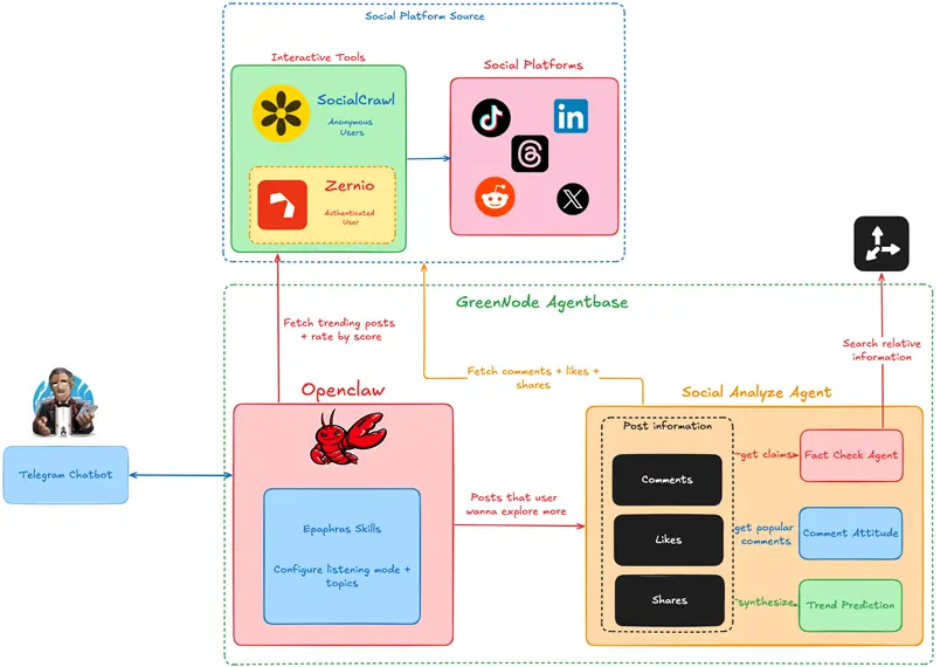
The system has four main components:
- Datasource: Social platforms: X, Reddit, Threads, LinkedIn, TikTok… These are the main data sources the agent can collect from. Depending on their needs, each user can choose a different set of platforms.
- Messaging Platform: Interaction layer: Telegram, one of the messaging platforms supported by OpenClaw.
- Gateway: GreenNode AgentBase OpenClaw Runtime, which connects the messaging platform with the agents behind it.
- Workload: GreenNode AgentBase Runtime, where the agents carry out data processing and analysis.
Why separate OpenClaw and the runtime?
A natural question comes up: why not run the sub-agents directly on OpenClaw?
In practice, running and managing many sub-agents directly on OpenClaw becomes more complex as the workload grows. So in this design, OpenClaw mainly takes on the role of a gateway - connecting users, through the messaging platform, with the group of agents behind it.
The AI agent workloads are deployed and controlled on the GreenNode AgentBase Runtime.
This separation makes the architecture clearer and leaves room to scale the workload as the use case expands in the future.
How does the AI agent know which posts are worth reading?
Collecting posts from social platforms is relatively simple. The harder part is determining which post is truly worth the user’s time to read.
Is the post related to the topic being followed? Is it a scam? How much does the community care right now? Is this really a trend, or just momentary content?
To solve this problem, each post has to pass through two processing gates: preprocessing and trend evaluation.
Gate 1: Preprocessing
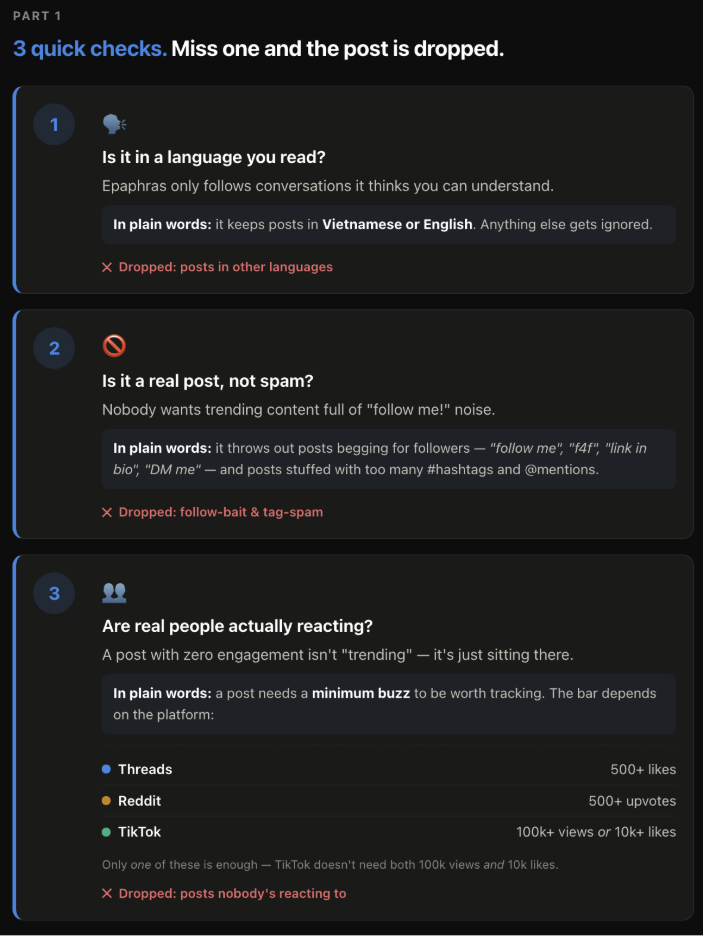
In the first step, the system filters out posts unrelated to the topics the user has set.
The goal of this step is fairly simple: don’t feed junk data into the more resource-intensive steps that follow.
The suitable posts then move on to the trend-evaluation step.
Gate 2: Trend evaluation
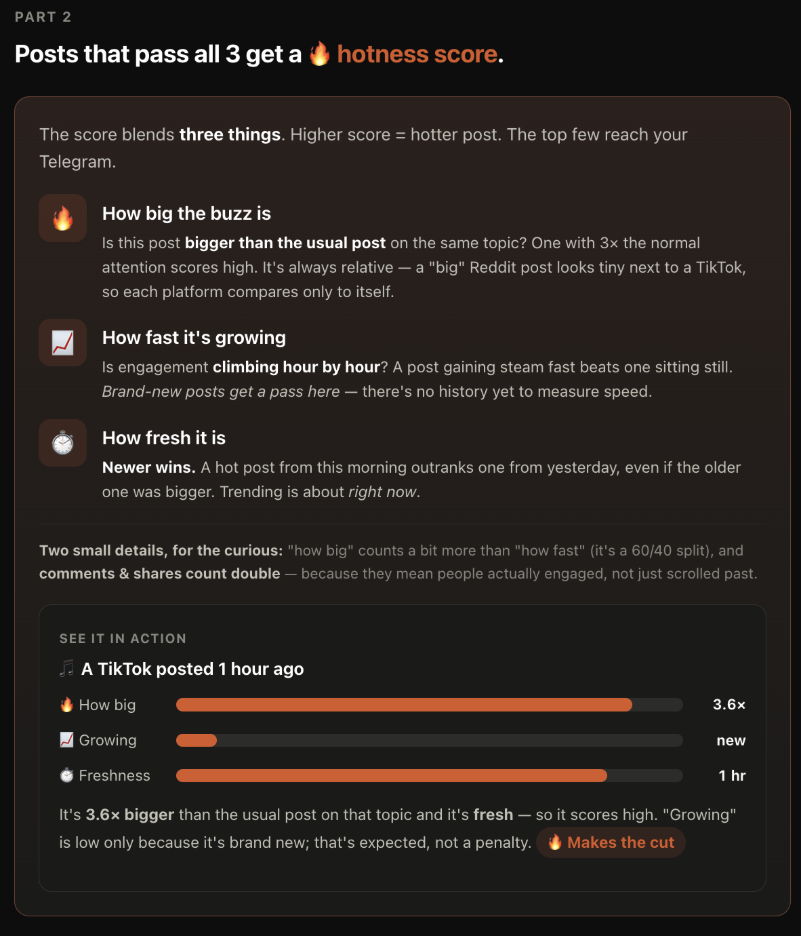
Here, the system looks at signals such as:
- View count and engagement level.
- Number of shares.
- The number and content of comments.
- The level of discussion around the post.
Based on these signals, the agent determines how noteworthy each post is.
In the end, only the top 3 standout posts pass both gates and are sent to the user.
Explore More - a feature that helps users dig deeper into a social media trend
Knowing that a post is trending is sometimes still not enough. The user may want to know more:
- Is this really an ongoing event?
- How is the community reacting?
- What information is being mentioned the most?
- Is this trend cooling down, or likely to keep climbing?
That’s when the Explore More feature is activated.
When the user requests a deeper analysis, the models process additional data collected from the post, including engagement, comment content, and related information sources across the Internet.
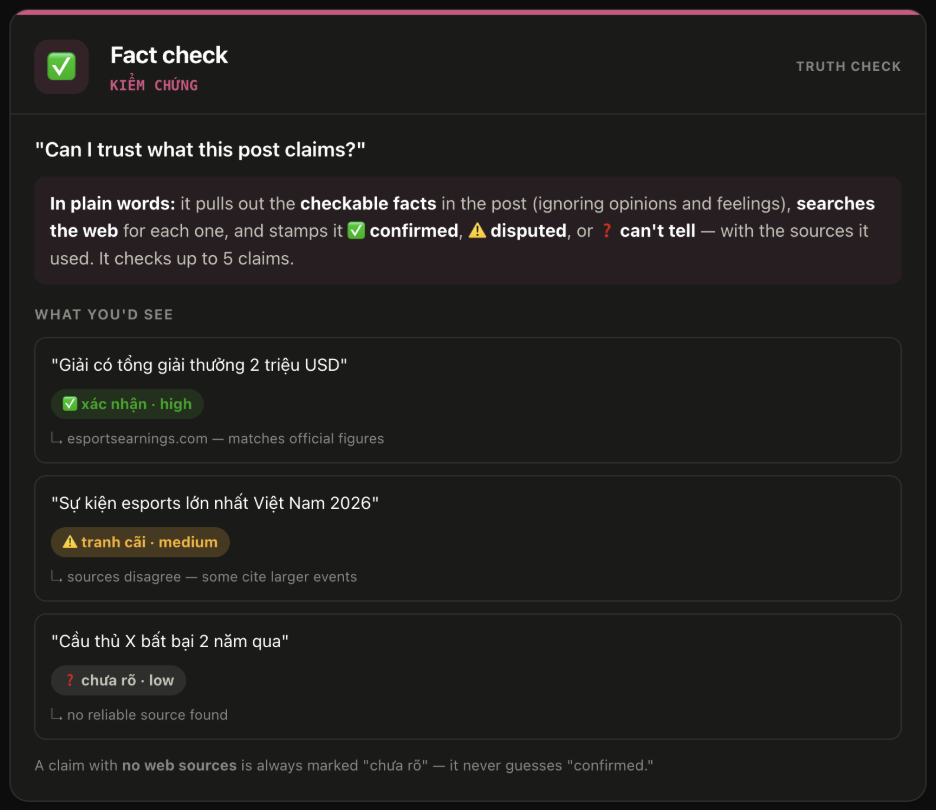
From engagement data to trend evaluation
Instead of relying on a single metric such as engagement count, the agent aggregates many signals to get a fuller picture of a trend.
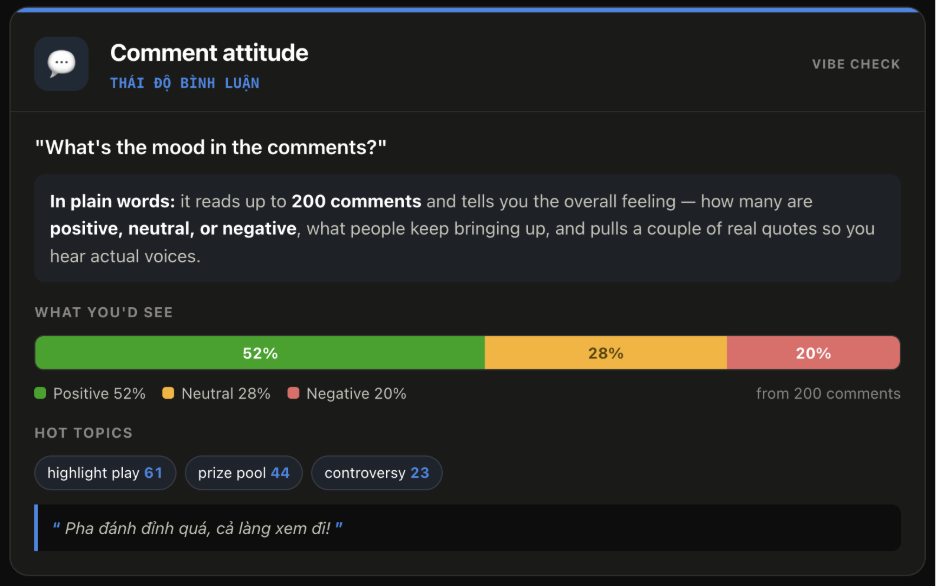
The agent then continues analyzing how the discussion evolves to determine whether the trend is:
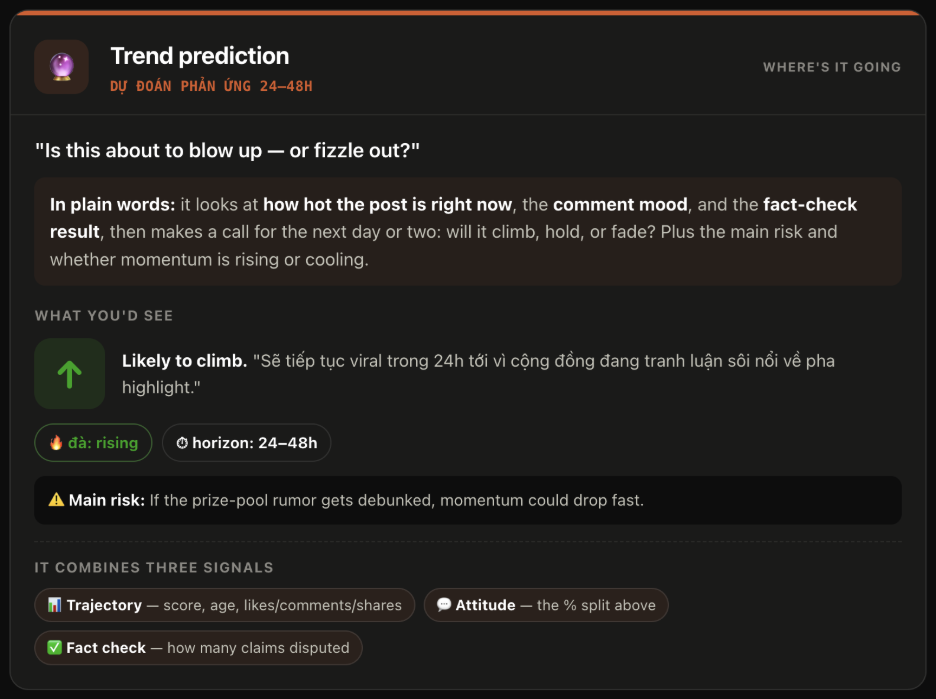
Thanks to this, the user not only knows “what’s hot,” but also gains more context to understand “why it’s hot” and “what might happen next.”
Token optimization: How do you keep the agent from “burning money”?
One of the important problems when building an AI agent is controlling inference cost.
Especially with a chatbot used frequently on Telegram, routing every single interaction through the LLM can generate unnecessary tokens.
In this system, two techniques are applied to reduce unnecessary model calls.
LLM Bypass: Skipping the LLM for pure-logic tasks
The first thing to note is that every interaction on Telegram can potentially pass through the LLM inside OpenClaw. Without control, even simple operations can consume tokens.
The solution is to build a routing skill that classifies requests:
- Tasks that can be handled with logic → run directly.
- Tasks that need reasoning → call the LLM/agent.
For example, operations such as setting the topic for a social platform, moving to the next post within the same group, or toggling notifications… are all pure-logic tasks and don’t necessarily need to call the LLM. The figure below shows the independent execution flow of the two different data types.
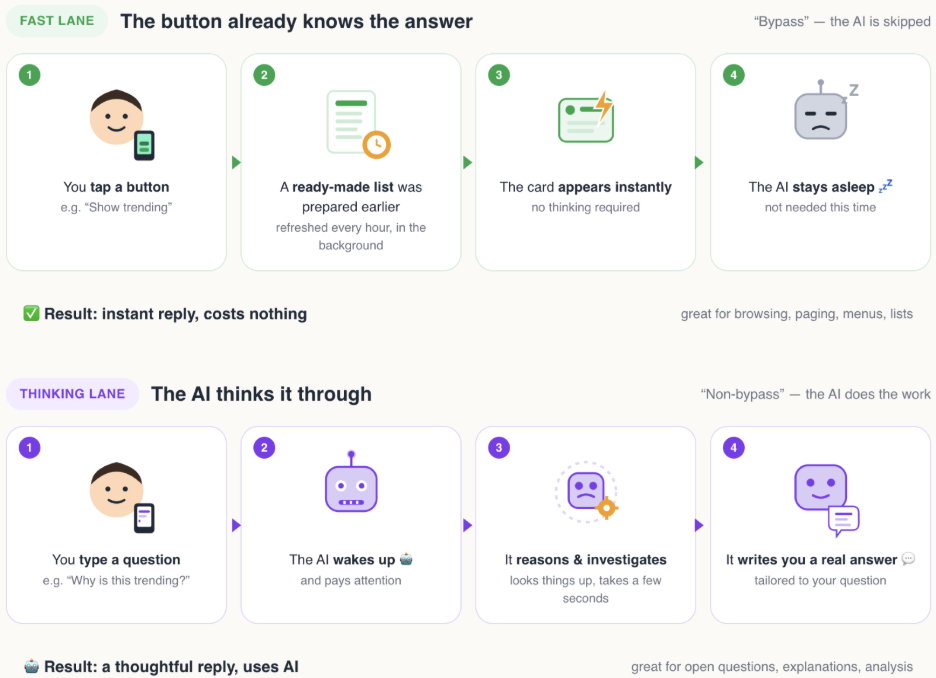
This approach reduces model calls that add no extra value, while making the interaction experience faster.
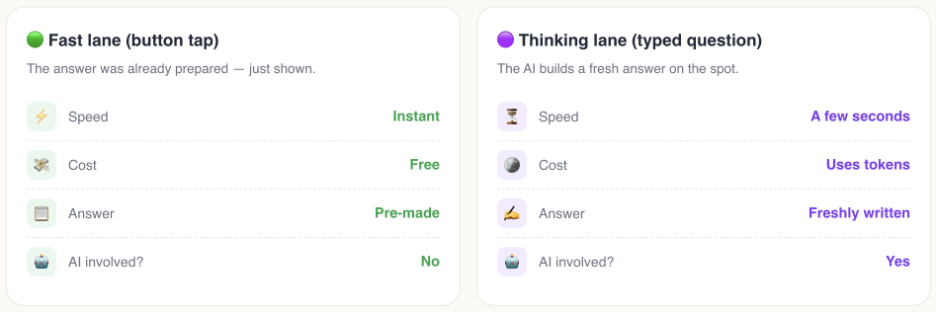
Lazy Agent: Only call the agent when it’s truly needed
Another technique applied is the Lazy Agent. Instead of letting the agent run continuously, the workload is split into two layers.
The first layer handles basic logic without needing the LLM. Only when the user requests a more complex task — such as Explore More - does the system trigger the agent-related workloads.
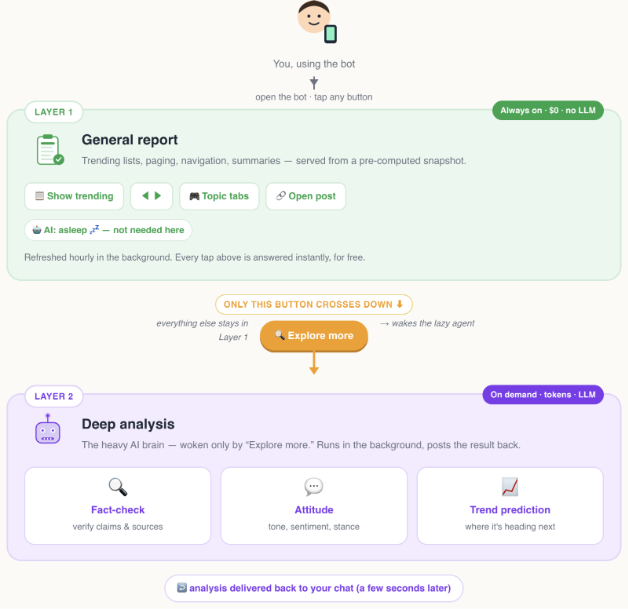
This keeps the system from spending AI resources on simple tasks, while giving better control over operating costs.
Conclusion
A cute little “agent,” just enough for the use case of aggregating news by topic from personal social platforms. That said, the potential of social platforms is far larger — especially for businesses that need to listen to public sentiment, track trends, and mine social media data.
Finally, and most importantly, ever since I got my “little one,” those relaxing afternoons with a cup of milk tea have become lighter too.
