

Key takeaways
- OpenClaw is moving from personal productivity into serious business automation, handling workflows like inbox and ticket triage, customer onboarding, CRM updates, and back‑office tasks end to end instead of just drafting replies.
- The most valuable OpenClaw use cases run on secure servers or cloud instead of laptops, with tight scoping, approvals, and logging so teams get 24/7 “agent workers” without losing control of customer data or processes.
- For businesses, the sweet spot is using OpenClaw as a delegated executor for repetitive, clearly defined workflows (support, sales ops, content and SEO pipelines), freeing humans to focus on strategy and high‑value decisions.
OpenClaw started as an open-source “personal AI agent” that runs on your own infrastructure and connects directly to your real tools: browser, terminal, messaging apps, CRMs, and internal web apps.
By 2026, teams increasingly use it as a system-wide automation layer that can execute multi-step workflows end-to-end instead of just suggesting next steps.
Under the hood, OpenClaw combines a reasoning model with skills: browser automation, shell access, API connectors, and memory search, plus multi-channel messaging (Slack, Teams, WhatsApp, Telegram, Discord).
This makes it a fit for both solo knowledge workers and enterprises that want self-hosted, controllable automation instead of pure SaaS black boxes.
In this article, we will look at five pragmatic OpenClaw use cases that automate both individual workflows and enterprise-grade operations.
1. Communication, Inbox, and Customer Support Automation
Triage your inbox without burning out
For individuals, the first obvious win is turning OpenClaw into a “communications chief of staff”. Connected to Gmail or Outlook, it can watch your inbox, classify messages, and draft replies automatically.
Typical personal workflow includes auto-labeling and prioritizing messages by urgency and topic, unsubscribing from low-value newsletters, archiving noise, and drafting responses for follow-ups and scheduling so you only review and send.
Because OpenClaw maintains memory, it can learn your tone and preferences over time instead of starting from scratch with every email.
Enterprise support desk and ticket triage
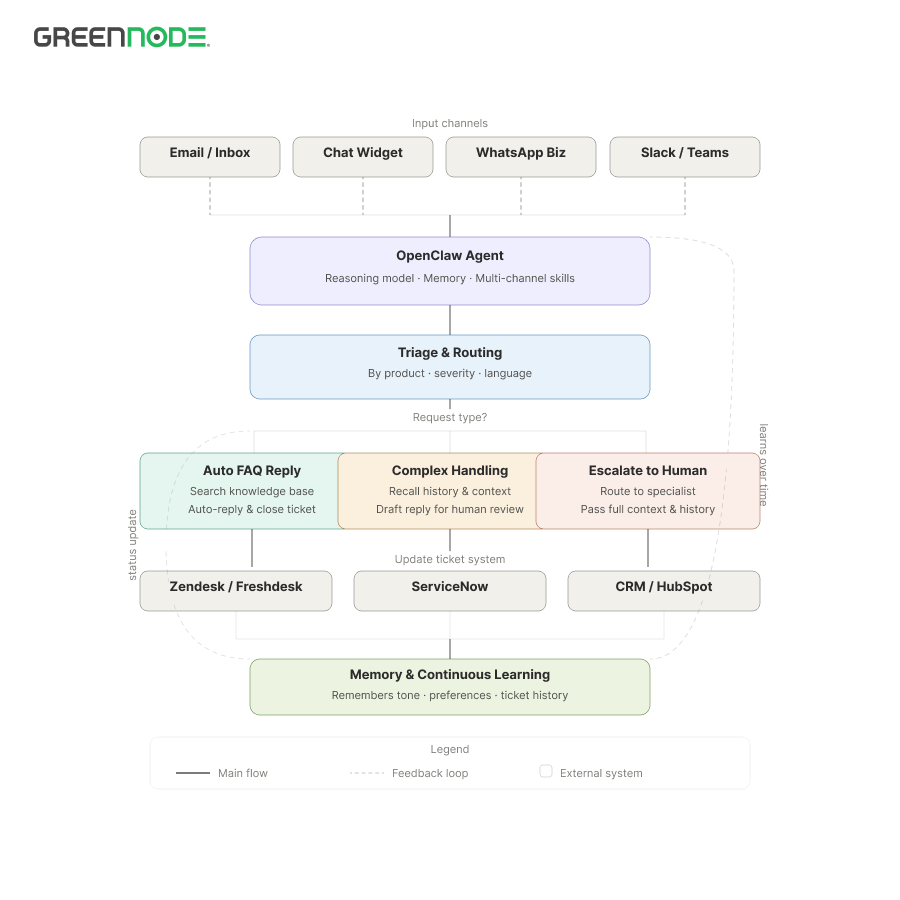
At the enterprise level, the same pattern extends to full customer support and service operations. OpenClaw can monitor support inboxes, chat widgets, and WhatsApp Business, then triage and respond to tickets in tools like Zendesk, Freshdesk, or ServiceNow.
Common enterprise workflows include auto-classifying and routing tickets by product, severity, and language, answering FAQs from a knowledge base with human escalation for complex issues, and keeping customers updated on status changes.
A well-configured OpenClaw agent can handle a large share of repetitive level-one tickets while keeping humans focused on edge cases and relationship work.
2. Meetings, Knowledge Capture, and Internal Documentation
Never lose another decision or action item
OpenClaw is well-suited for turning chaotic conversations into structured knowledge. You can feed it meeting recordings, chat logs, or ad-hoc notes and ask it to summarize key points, decisions, risks, and next steps.
A typical knowledge-capture loop looks like this: you send a link to a call recording or paste a transcript, OpenClaw extracts topics, decisions, owners, and deadlines, and then posts structured notes to Notion, Confluence, or a Git repository.
This is valuable for solo users but becomes essential in enterprises where institutional memory and audit trails matter.
Enterprise-grade knowledge base and incident history
For operations, SRE, and security teams, OpenClaw’s memory and search capabilities provide a persistent layer of “what happened, when, and why”. After every incident, teams can debrief with the agent; it stores root causes, remediation steps, and timelines for fast retrieval later.
Months later, you can ask whether you have seen a specific error pattern before or request similar incidents where a certain service failed after a deployment, and the agent will surface relevant history in seconds.
This is critical for regulated industries and large engineering organizations that need reliable incident history and postmortem data.
3. Coding, DevOps, and IT Operations on Autopilot
From “build this” to a live service
Developers use OpenClaw as more than a code generator; it behaves like a junior DevOps engineer that can plan, modify code, run tests, and deploy. Because it has shell and Git access, it can run commands, inspect logs, and interact with CI/CD systems.
For example, you might request a simple landing-page service and ask for it to be deployed. OpenClaw can scaffold the project, commit to Git, set up CI, deploy to a platform like Vercel or a cloud VM, and post the live URL and deployment status back to your chat.
This does not replace engineers, but it significantly reduces repetitive toil and bootstrap work.
Enterprise IT and incident response assistant
Enterprises are experimenting with OpenClaw as an IT and SRE sidekick integrated with Slack or Microsoft Teams. The agent can watch monitoring systems, analyze alerts, and draft remediation steps, while humans remain in the loop for final approval.
Concrete patterns include first-response for CI failures with log summaries and suggested fixes, chat-based runbooks where the agent executes pre-approved steps, and IT helpdesk flows that reset passwords and create tickets through secure automation.
Security teams emphasize strict identity isolation, role-based access control, and comprehensive logging, but when implemented correctly this setup can accelerate incident handling dramatically.
4. Sales, CRM Hygiene, and Revenue Operations
Personal sales assistant for founders and reps
On the go-to-market side, OpenClaw shines as a pipeline hygiene and research agent. For individuals, it acts as a personal sales operations assistant that keeps your CRM from decaying.
After each customer call, you can paste bullet notes and let the agent update Salesforce or HubSpot with stage, deal size, and next steps. It can also draft follow-up emails and send you a daily digest of deals at risk and tasks due today.
This reduces manual admin work so salespeople can spend more time actually selling.
Enterprise-level revenue operations and enrichment
For larger organizations, OpenClaw can orchestrate broader revenue operations across CRMs, marketing automation platforms, and data warehouses. Connected to tools like Salesforce, HubSpot, Outreach, and internal data lakes, it can enrich leads with firmographic data and usage insights.
The agent can flag accounts with declining engagement or usage for churn-risk reviews and prepare weekly pipeline, conversion, and forecast summaries for revenue leaders.
Instead of exporting CSVs and building one-off spreadsheets, revenue operations teams can ask natural-language questions and receive narrative answers backed by data.
5. Personal Life, Shared Operations, and Smart Routines
Let your “life operations” run on autopilot
Outside of work, many users run OpenClaw on a small VPS or home server and treat it as a personal operations assistant accessible via WhatsApp or Telegram. With browser automation and API access, it can handle many mundane tasks end-to-end.
Common examples include paying routine bills and renewing subscriptions, managing travel planning and bookings, and planning meals and groceries based on your calendar while placing orders via supermarket or delivery apps.
Because it is self-hosted, you retain more control over sensitive financial and personal data compared to pure SaaS solutions.
Shared “Ops bot” for small teams and businesses
Small businesses and teams often blur the line between personal and enterprise use. A shared OpenClaw instance can function as an operations bot that prepares weekly reports, updates shared spreadsheets or inventory, and posts daily stand-up updates and reminders.
This gives non-technical teams access to automation leverage without building a custom platform or hiring dedicated engineering staff.
People also read: OpenClaw Isn’t Scary Anymore – 4 Steps to Run an AI Agent Even If You Can’t Code
How to Adopt OpenClaw Safely in the Enterprise
Start small: pilot, guardrails, then scale
Analysts and vendors recommend that enterprises adopt OpenClaw in phases: start with a low-risk workflow, enforce guardrails, and only then scale.
A typical rollout path includes a controlled pilot workflow, strong guardrails such as role-based access and network isolation, clear governance for approvals, and then scaling to multi-team use once ROI and safety are proven.
This staged approach helps enterprises benefit from autonomous agents while aligning with security, compliance, and change-management requirements.
Meet AgentBase’s seamless OpenClaw integration, designed to turn complex AI operations into a few simple clicks. Effortlessly launch your AI agents with just one click: AgentBase’s 1‑click deploy for OpenClaw lets you go from idea to production‑ready automation in seconds.
FAQs
1. Is OpenClaw only for developers?
No. While developers and power users were early adopters, OpenClaw now ships with higher-level skills and templates that let operations, support, and sales teams use it through chat interfaces and simple configuration.
2. How does OpenClaw differ from tools like Zapier or n8n?
Zapier and n8n rely on predefined flows, while OpenClaw uses reasoning to decide which tools to call and in what order. This makes it better suited for messy, multi-step workflows that change over time.
3. Is it safe to connect OpenClaw to production systems?
It can be safe if you treat OpenClaw like any powerful automation platform: run it in isolated infrastructure, enforce least-privilege access, log all actions, and require approvals for sensitive operations.
4. What is a good first enterprise use case?
Experts recommend starting with low-risk but high-volume workflows like IT helpdesk triage, CRM note-sync after calls, or internal reporting digests before moving to production deployments or financial automations.
