

The NVIDIA GeForce RTX 5090 and RTX PRO 6000 Blackwell are both built on the Blackwell architecture and deliver strong compute performance for AI. But despite sharing the same architecture, the two GPUs are designed for different deployment needs.
The RTX 5090 has 32GB of VRAM, suited to development, testing and inference of mid-sized AI models. The RTX PRO 6000 Blackwell comes with 96GB of ECC memory and MIG support for partitioning GPU resources, aimed at workloads that need large memory and stable operation in production.
So which one fits your business needs and budget? This article compares the two GPUs on specifications, AI performance, LLM deployment and cost, to help you choose the right option for each workload.
RTX 5090 or RTX PRO 6000 Blackwell: Which One Fits?
| Choose the RTX 5090 when | Choose the RTX PRO 6000 when |
|---|---|
| Models up to 32B (4-bit) or around 13B (FP16) | Models of 70B and above, or 30B models at FP16 |
| Development, testing, LoRA fine-tuning of small models | Fine-tuning larger models, large batches |
| Image generation with SDXL or Flux | Multi-user inference, long context |
| Budget is the top priority | You need ECC, MIG partitioning, 24/7 operation |
The most important difference between the two GPUs is VRAM capacity and the ability to handle large-scale AI workloads. When a model fits entirely in 32GB of VRAM, the RTX 5090 can deliver inference performance comparable to the RTX PRO 6000 in several benchmarks, at a lower cost.
When you need to deploy larger models, scale the number of concurrent requests or run AI systems continuously, the RTX PRO 6000 Blackwell offers clear advantages in memory capacity and professional features.
RTX 5090 vs RTX PRO 6000 Specifications
Both the RTX 5090 and RTX PRO 6000 use the NVIDIA Blackwell architecture with fifth-generation Tensor Cores. However, they differ significantly in VRAM capacity, resource management features and intended use.
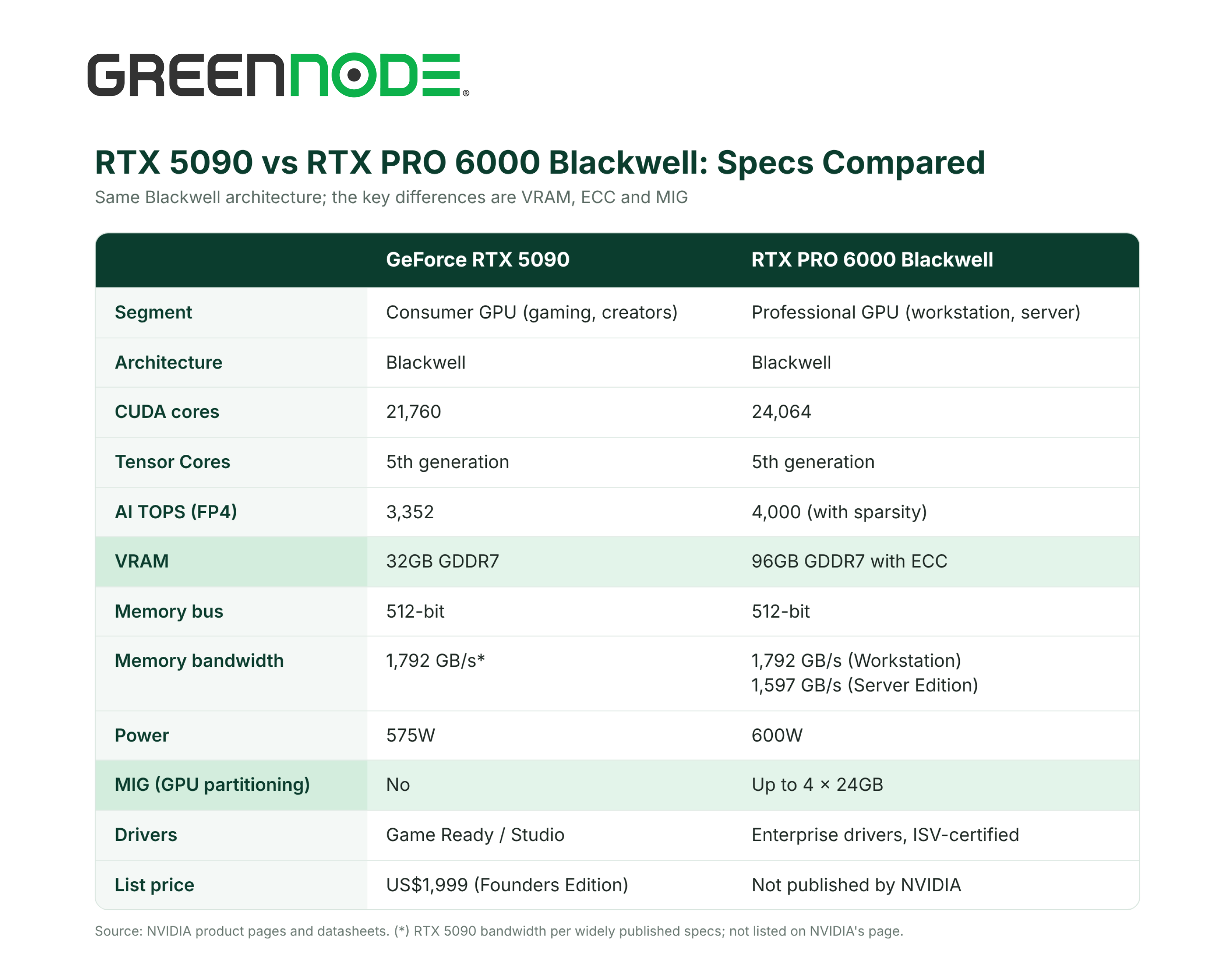
In compute terms, the RTX PRO 6000 has only about 10% more CUDA cores and the same memory bandwidth (Workstation Edition). So for models that fit in 32GB, the two cards run at almost the same speed. The real gap lies in VRAM capacity and enterprise features.
32GB vs 96GB VRAM: Which AI Models Can Each GPU Run?
For AI, VRAM determines whether a model can be loaded onto the GPU at all. Beyond model weights, the GPU also needs memory for the KV cache: the longer the context and the more concurrent users, the larger the KV cache.
| Model and precision | Weights (estimate) | RTX 5090 (32GB) | RTX PRO 6000 (96GB) |
|---|---|---|---|
| 7–8B, FP16 | ~16GB | Runs well | Runs well, plenty of room for KV cache |
| 13–14B, FP16 | ~28GB | Tight fit, little room for context | Runs well |
| 32B, 4-bit | ~18–20GB | Runs | Runs well |
| 32B, FP16 | ~64GB | Does not fit | Runs |
| 70B, 4-bit | ~40GB | Does not fit | Runs well |
| 70B, FP8 | ~70GB | Does not fit | Runs, limited context |
| 100–120B, 4-bit | ~60–70GB | Does not fit | Runs |
Estimates cover weights only (FP16 ≈ 2 bytes, FP8 ≈ 1 byte, 4-bit ≈ 0.5 bytes per parameter). Real requirements are higher because of the KV cache and inference engine overhead.
Two things to note: the RTX 5090 has no NVLink, so the VRAM of two cards cannot be pooled into one shared memory space; and offloading part of a model to system RAM slows it down sharply, so it is only suitable for testing.
ECC, MIG and Running AI in Production
Beyond VRAM, the RTX PRO 6000 has two features the RTX 5090 lacks. They matter little during testing, but they matter when the GPU runs a real service:
- ECC memory: automatically detects and corrects bit errors in VRAM. For training jobs that run for days or inference services running 24/7, ECC reduces the risk of wrong results or processes stopping midway without a clear reason.
- Drivers and enterprise support: the RTX PRO 6000 uses drivers built for workstations and servers, certified with many professional applications. The Server Edition uses passive cooling, designed for data center servers.
The RTX 5090 still runs popular AI frameworks such as PyTorch, vLLM and Ollama well. For development, testing and workloads that do not run continuously, the lack of ECC and MIG is usually not a major issue.
Real-World AI Performance: RTX 5090 vs RTX PRO 6000
In benchmarks published by ComputingForGeeks in June 2026, running 4-bit quantized models with Ollama in a single generation stream, the RTX 5090 and RTX PRO 6000 performed very similarly on models that fit entirely in 32GB of VRAM.
LLM Inference: How Much Do Tokens per Second Differ?
The ComputingForGeeks results (Ollama, 4-bit models, single-stream token generation) show the two cards almost level when the model fits in 32GB. Differences appear only when the model exceeds 32GB:
| Model (4-bit, Ollama) | RTX 5090 | RTX PRO 6000 |
|---|---|---|
| Qwen2.5 7B | 228.2 tokens/s | 238.6 tokens/s |
| Qwen2.5 14B | 131.5 tokens/s | 134.1 tokens/s |
| Qwen2.5 32B | 67.8 tokens/s | 68.1 tokens/s |
| Llama 3.1 70B | Does not load | 34.2 tokens/s |
| Qwen2.5 72B | Does not load | 31.0 tokens/s |
Source: ComputingForGeeks, measured June 2026. Results differ with other inference engines, precisions or batch sizes.
For services that serve many users at once (for example with vLLM), the larger VRAM of the RTX PRO 6000 can hold the KV cache of more requests, so it usually serves more users or longer contexts on the same model.
AI Image Generation with SDXL and FLUX
Popular image models such as SDXL and Flux.1 fit within 32GB, so image generation speed is similar on both cards. The RTX 5090 is the cost-effective choice; the RTX PRO 6000 only has an advantage when running several models at once or generating video and very high-resolution images.
Fine-Tuning Performance
The RTX 5090 can handle LoRA or QLoRA fine-tuning for 7B–13B models, depending on the training configuration, sequence length and batch size.
As model size grows, however, memory requirements for weights, gradients and optimizer states increase significantly.
With 96GB of VRAM, the RTX PRO 6000 gives more memory headroom to fine-tune larger models, increase batch size or try more resource-intensive training methods.
RTX 5090 vs RTX PRO 6000 Cost: Buy GPUs or Rent GPU Cloud?
When investing in AI infrastructure, businesses should evaluate total cost of ownership (TCO) rather than comparing the upfront price of the GPU alone.
Beyond the hardware, running GPUs on-premises adds the cost of servers, power, cooling, data center space, maintenance and operations staff.
Renting GPU cloud, by contrast, gives access to compute without investing in the full infrastructure upfront.
Bottom line: for most businesses, renting GPU cloud makes more sense than buying cards, unless the GPU will run almost continuously for several years and you already have a data center. Here’s why:
- No upfront cost: buying means paying upfront for cards, servers, power and cooling infrastructure; renting means paying only for the time you use.
- Faster access to GPUs: buying depends on supply, while cloud GPUs can be provisioned quickly.
- Easy to change configuration: when workloads change, you can switch between the RTX 5090, RTX PRO 6000 or H100 instead of buying more cards.
- No hardware to operate: the provider handles infrastructure, power and incidents.
- Test before you invest: you can run real workloads on rented GPUs, measure memory and performance, and then decide whether to invest in hardware.
For reference, public rental prices on GreenNode GPU Instances (November 2026): RTX 5090 from US$769/30 days, RTX 4090 from US$610/30 days, H100 from US$2,803/30 days. RTX PRO 6000 is quoted per configuration.
The most meaningful comparison is cost per result, such as cost per million tokens generated: measure the real throughput of your model on each GPU, then divide the rental cost by the number of tokens processed. A more expensive card that serves more requests can deliver a lower cost per token.
RTX 5090 or RTX PRO 6000: Which GPU for Each AI Workload?
No single GPU is optimal for every AI problem. The right choice depends on model size, memory requirements, concurrency and operational goals.
| Workload | Recommendation | Why |
|---|---|---|
| Chatbots, internal assistants with 7B–32B models (4-bit) | RTX 5090 | Fits in 32GB, as fast as the RTX PRO 6000, lower cost |
| 70B models, 30B models at FP16 | RTX PRO 6000 | Needs more than 32GB VRAM |
| Multi-user inference, long context | RTX PRO 6000 | More VRAM for KV cache |
| Image generation with SDXL, Flux | RTX 5090 | Fits in 32GB, similar performance |
| LoRA fine-tuning of 7B–13B models | RTX 5090 | Enough memory, lower cost |
| Fine-tuning large models, large batches | RTX PRO 6000 | Needs memory for gradients and optimizer |
| Multiple teams sharing a GPU | RTX PRO 6000 | Partition the card with MIG |
| Services running 24/7 | RTX PRO 6000 | ECC, enterprise drivers |
| Large-scale, multi-GPU training | Consider H100 / H200 | Needs NVLink and HBM bandwidth |
The RTX 5090 fits businesses that prioritize cost efficiency for small and mid-sized AI workloads. The RTX PRO 6000 Blackwell is worth considering when deployment needs exceed 32GB of VRAM or call for professional resource management and operation.
For large-scale AI training, businesses should also evaluate data center GPUs such as the NVIDIA H100 or H200.
GreenNode GPU Instances
Rent RTX 5090 and RTX PRO 6000 in Southeast Asia
Blackwell GPUs for inference, fine-tuning and image generation, rented on demand.
GreenNode Now Offers RTX 5090 and RTX PRO 6000 GPU Instances
Choosing the right GPU is the first step. To deploy AI effectively, businesses also need infrastructure that provides flexible resources, scales with demand and removes the burden of operating hardware.
GreenNode GPU Instances offers a range of NVIDIA GPUs for AI workloads, including the RTX 5090, RTX PRO 6000 Blackwell, H200, H100, L40S, A40 and RTX 4090.
With infrastructure in Hanoi, Ho Chi Minh City and Bangkok, GreenNode gives businesses serving users in Vietnam and Southeast Asia a regional option for GPU deployment.
Depending on the workload, you can choose:
- RTX 5090 (32GB GDDR7): from US$769/30 days, for development, inference of models up to 32B, and image generation.
- RTX PRO 6000 Blackwell (96GB GDDR7 ECC): for 70B models, multi-user inference and fine-tuning; contact us for a quote.
Rent on demand with no long-term commitment: start with the RTX 5090 for testing, then move to the RTX PRO 6000 as your models or traffic grow. Read more: GreenNode adds NVIDIA H200 and RTX PRO 6000 Blackwell.
Frequently Asked Questions
Is the RTX PRO 6000 faster than the RTX 5090?
For models that fit in 32GB, the two cards run at almost the same speed because they share the Blackwell architecture and the same memory bandwidth. The RTX PRO 6000 pulls ahead when the model or context needs more than 32GB of VRAM.
Can the RTX 5090 run a 70B model?
Not on one card using VRAM alone. A 70B model at 4-bit needs about 40GB for its weights, more than 32GB. You can offload part of it to system RAM, but speed drops sharply.
Can two RTX 5090 cards replace one RTX PRO 6000?
Not entirely. The RTX 5090 has no NVLink, so when a model is split across two cards, data has to travel over PCIe and performance is lower than a single card with 96GB. Two cards also draw nearly twice the power.
When should I choose the H100 or H200 instead of the RTX PRO 6000?
When training large models across multiple GPUs, when you need NVLink and high HBM memory bandwidth, or when you need more than 96GB of VRAM on one GPU (the H200 has 141GB).
Should I buy or rent the RTX PRO 6000?
Buying makes sense when the GPU will run almost continuously for several years and you already have the infrastructure. Renting makes sense when demand is not yet stable, you need to start right away, or you want to test workloads before investing.
Get Started with Blackwell GPUs on GreenNode
If you are not sure which card fits, run your model on the RTX 5090 first and measure how much memory it actually needs. When you need more VRAM, the GreenNode team can help you move to the RTX PRO 6000.
