

For most enterprises, a managed ML platform is a sensible starting point. It provides notebooks, training jobs, model tuning and inference endpoints out of the box, so teams can develop models without operating the infrastructure themselves. GreenNode AI Platform is one example. Costs are usually billed by usage, which suits the experimentation and POC stage.
Once a model moves into production, the workload changes. Datasets grow, jobs run longer, inference runs around the clock, and security and compliance requirements tighten. At some point, the question is no longer "can the platform handle this?" but "should we take direct control of the GPU infrastructure?"
This article covers six signs that it is time to move from a managed ML platform to dedicated GPU instances, the cases where moving is premature, and a checklist and roadmap to help you make the call.
How does a managed ML platform differ from a dedicated GPU instance?
The core difference is the level of control: a managed ML platform runs the infrastructure for you, while a dedicated GPU instance gives your team full control of the GPU server.
In this article, a "dedicated GPU instance" means GPU resources reserved for you on cloud infrastructure: you control the software, while the provider still operates the hardware. This is not an on-premises model, where a company buys its own GPUs and hosts them in its own data center.
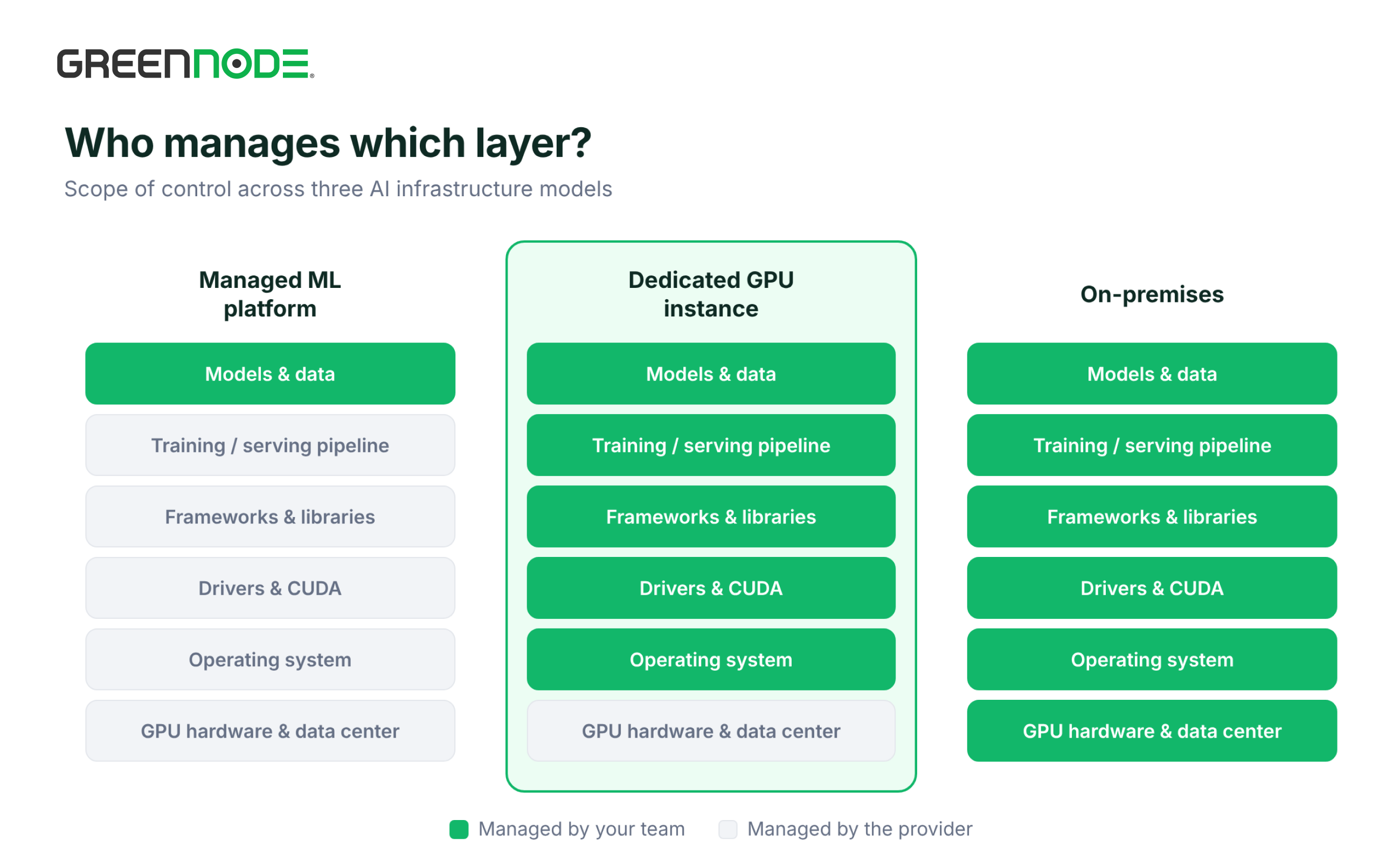
| Criteria | Managed ML platform | Dedicated GPU instance |
|---|---|---|
| Level of control | Limited to the components the platform provides (notebooks, training jobs, tuning, registry, endpoints) | Full control: operating system, drivers, CUDA, frameworks, scheduler |
| Operations | The platform manages the infrastructure | Your team operates it (optionally with Kubernetes) |
| Cost model | Pay-as-you-go, based on usage | Monthly rental with fixed, predictable costs |
| Best for | Experiments, POCs, periodic fine-tuning, small ML teams | Continuous workloads, multi-day training, deeply customized stacks |
| Initial effort | Low, you can start right away | Higher, requires infrastructure expertise |
In the market, dedicated GPU instances usually come in two forms: virtual machines with dedicated GPUs attached (GPU VMs) and dedicated physical servers (GPU bare metal). Both give you direct access to GPU resources and full control over how the environment is configured.
The two options are not mutually exclusive. Many enterprises run both in parallel to match each workload across the AI development lifecycle.
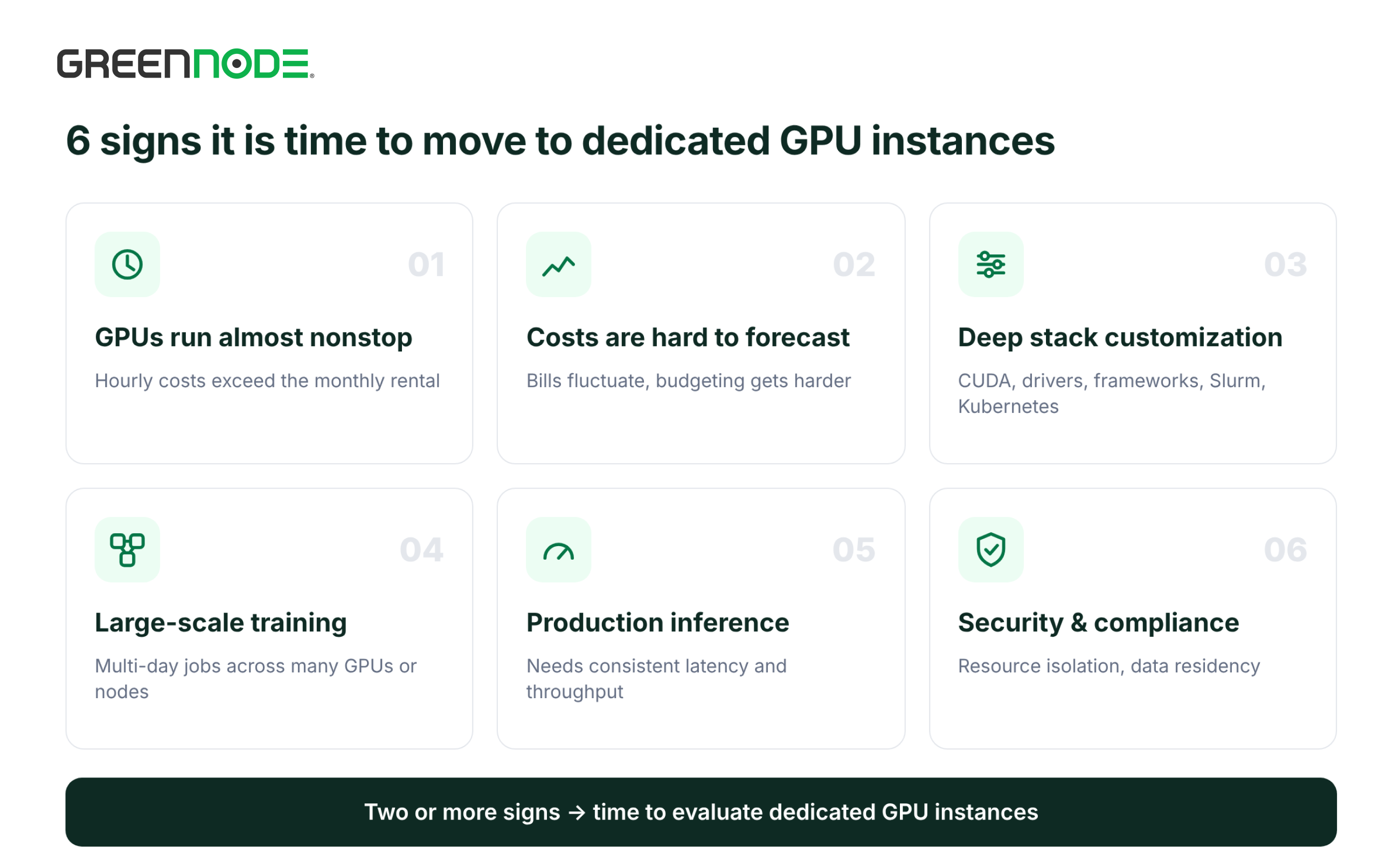
6 signs it is time to move to dedicated GPU instances
As AI applications scale, the infrastructure model that worked during experimentation may no longer be optimal for cost, performance or control. If you see two or more of the signs below, it is time to seriously evaluate renting dedicated GPU instances.
1. GPU usage is high and continuous
The pay-as-you-go model of a managed ML platform pays off when GPUs are only used in bursts or for short periods.
However, once training, fine-tuning or inference takes up most of the month, usage-based costs can exceed the monthly rental price of a GPU instance.
Compare your total GPU hours and actual spend over the last 2–3 months against the cost of renting a GPU instance with an equivalent configuration, and factor in any additional operating costs.
If GPU demand has stabilized at a high level, dedicated GPU instances can be more cost-effective in the long run.
2. AI infrastructure costs are getting harder to forecast
Once AI becomes part of day-to-day business operations, predictable infrastructure costs matter for budgeting and for controlling return on investment.
On a managed ML platform, costs can fluctuate with training time, inference volume or resource usage. This makes budgeting harder as workloads expand.
Renting GPU instances monthly stabilizes GPU spend, so you can plan budgets and forecast infrastructure costs as your AI applications scale.
3. Workloads need deep customization of the GPU environment
As AI applications grow more complex, engineering teams may need configurations beyond what the platform supports out of the box, such as:
- Specific CUDA or GPU driver versions.
- Customized AI frameworks and libraries.
- Inference performance optimization tools.
- Resource orchestration systems such as Slurm or Kubernetes.
When a pre-managed environment starts to limit how you deploy and optimize models, dedicated GPU instances let you build a software stack that fits the technical requirements of each workload.
4. Large-scale, long-running training
Training large AI models or fine-tuning on enterprise datasets can run for days and use many GPUs or nodes at once.
These workloads typically need stable compute resources, high-speed interconnects between GPUs, and the ability to manage checkpoints and recover training jobs after an interruption.
Dedicated GPU instances, with dedicated resources and high-performance interconnects such as NVIDIA NVLink and InfiniBand (on supported configurations), help you optimize distributed training and gain more control over the training process.
5. Production inference needs consistent performance
When AI models power real customer-facing applications such as chatbots, document processing or credit scoring, inference performance directly affects user experience and service quality.
You need to maintain metrics such as latency, throughput and responsiveness during peak hours.
Dedicated GPU instances let you allocate GPU resources yourself, reduce resource contention with other workloads, and tune model serving configurations to real performance requirements. This is a meaningful advantage for production AI applications with steady traffic and high performance requirements.
6. Security and compliance requirements are rising
Enterprises in banking, financial services and insurance (BFSI) and healthcare often face strict requirements for data security and AI infrastructure governance.
They need to know not only where data is stored and processed, but also control access, the level of resource isolation, and the environment where models are deployed.
Dedicated GPU instances provide GPU resources reserved for you, so you can set up security, access control and monitoring according to internal policies. Combined with the right deployment location, this gives you more control over your AI infrastructure and makes it easier to meet data residency and compliance requirements.
When is it too early to move to dedicated GPU instances?
Although dedicated GPU instances offer more control and room to optimize infrastructure, moving too early can add unnecessary cost and operational burden. Stay on a managed ML platform if:
- Workloads are not yet stable: GPUs run only a few days a month for experiments or periodic fine-tuning.
- You have no infrastructure operations team: dedicated GPU instances require a team to manage drivers, security, monitoring and incident response.
- The use case is not yet proven: committing to fixed costs before a POC delivers results increases budget risk.
- You mainly need to call existing models: if you only need to call LLMs via API, a serverless inference service may fit better than either option.
Decision checklist and migration roadmap
Answer these five questions before deciding. The more "yes" answers, the stronger the case for dedicated GPU instances.
| Question | Who answers |
|---|---|
| Are GPUs in use for most of the month? | ML Engineer |
| Has GPU spend over the last 3 months exceeded the total cost of renting a GPU instance with an equivalent configuration? | CTO / Finance |
| Do workloads require customizing drivers, CUDA, frameworks or the scheduler? | ML Engineer |
| Do you have stricter requirements for resource isolation, security or data residency? | CTO / IT Architect |
| Is there a team responsible for operating and managing the GPU environment? | CTO |
A recommended migration roadmap that minimizes disruption:
- Measure the current state: record GPU hours, GPU types, costs and bottlenecks over the last 2–3 months.
- Pick the first workload to move: prioritize the most continuous and stable workloads, usually production inference or large recurring training jobs.
- Choose the right GPU: H200 for training large models and long-context LLMs; H100 for mainstream training and inference; RTX PRO 6000 Blackwell for inference and fine-tuning 13B–70B models at lower cost.
- Run in parallel: keep the managed ML platform for experiments, gradually move stable workloads to dedicated GPU instances, and compare performance and cost.
- Standardize operations: set up monitoring, access control, checkpoint backups and incident response procedures.
Conclusion: move when workloads are stable, not when you are starting out
A managed ML platform is the right fit for fast experimentation and proving value. Dedicated GPU instances fit when workloads are stable, run continuously and need deeper control over performance, cost or compliance. The right time to move is when you see two or more of the signs above and have a team in place to run the infrastructure.
GreenNode AI Platform is GreenNode's managed ML platform, supporting the full model development lifecycle on NVIDIA H100 and A100 GPUs: GPU-enabled notebooks, training from a single GPU to multi-node clusters, model tuning with automated hyperparameter search, a model registry, and deployment of models as REST API endpoints with autoscaling. You pay by usage and do not need to manage the infrastructure yourself.
GreenNode GPU Instances offers NVIDIA H200, H100, RTX PRO 6000 Blackwell and other GPUs, with direct GPU access and NVLink and InfiniBand interconnects. The infrastructure runs across 6 availability zones in Ho Chi Minh City, Hanoi and Bangkok, and is certified ISO 27001/27017/27018, SOC 2 and Tier III. Pricing is monthly, with no long-term commitment.
Customers already on GreenNode AI Platform can keep their experimentation environment and gradually move individual workloads to GPU Instances within the same ecosystem.
Talk to the GreenNode team to assess your current workloads and choose the right GPU configuration.
Frequently asked questions
Is renting dedicated GPUs more expensive than using a managed ML platform?
It depends on usage. For bursty workloads, pay-as-you-go is usually cheaper. For workloads that run almost continuously, the monthly rental of a dedicated GPU instance is usually more cost-effective.
How is bare metal H100 different from a regular GPU instance?
Bare metal gives you the entire physical server, with no virtualization layer. A GPU instance attaches dedicated GPUs to a virtual machine, offering more flexibility in configuration and deployment. Both give you direct access to the GPU.
Can I use a managed ML platform and dedicated GPU instances together?
Yes. A common approach is to keep the managed ML platform for experiments and periodic fine-tuning, and use dedicated GPU instances for multi-day training or production inference.
Should I choose H100 or H200?
H200 has 141GB of HBM3e memory and suits training models with 100B+ parameters and long-context LLMs. H100 (80GB HBM3) handles most of today's training and inference workloads well. See our H100 vs H200 comparison.
