

When working with PostgreSQL, we usually focus on schema, indexes, or tuning queries to run fast. But there’s a question that rarely comes up, until the system has many users accessing it at the same time: when two transactions read and write the same row, which version are you actually seeing?
In this article, I’ll walk you through MVCC (Multi-Version Concurrency Control) - the mechanism behind that answer. The goal isn’t just to know what MVCC is, but to understand why PostgreSQL shows you exactly that version of the data: through xmin/xmax, snapshots, and isolation levels, along with the price you pay - dead tuples and VACUUM. All demos in this article run on GreenNode’s vDB PostgreSQL Cluster.
1. The problem: many sessions reading and writing one row
Suppose the users table has a row with id = 1, name = 'Bob'. Two sessions operate on this row at the same time.
Session A updates the name from Bob to Alice, but has not COMMITted the transaction:
BEGIN;
UPDATE users SET name = 'Alice' WHERE id = 1;
-- Not COMMITted yet
Session B wants to read this user’s name at the same moment:
SELECT name FROM users WHERE id = 1;Two questions need to be answered here:
- Does Session B have to wait for Session A to finish its transaction?
- If it doesn’t wait, which value will Session B read: Bob or Alice?
1.1. Naive solution: Lock
A simple approach to controlling conflicts between sessions is to use a lock.
- Session A updates a row and holds the lock until the transaction ends.
- Session B that wants to read that row may have to wait for A to release the lock.
Pros: Locks control conflicting operations and protect data consistency.
Cons: Transactions can block one another. As the number of concurrent operations grows, lock-wait time can become a bottleneck, reducing the system’s throughput.
So is there a way for Session B to still read the data without waiting for Session A to finish its update?
1.2. MVCC
PostgreSQL implements MVCC (Multi-Version Concurrency Control). Instead of forcing reads and writes to wait on each other in every case, MVCC lets multiple versions of the same row coexist.
The core idea:
- A single row can exist in multiple versions.
- On UPDATE, PostgreSQL creates a new version; the old version is kept for anyone who still needs to read it.
- PostgreSQL relies on transaction state to determine which version each query gets to see.
Sounds a bit abstract, right? Let’s go back to the original example to see how this works.
- Session A updates
namefrom Bob to Alice. A new version is created, but A’s transaction hasn’t COMMITted. - Session B runs the SELECT. Because A’s change isn’t COMMITted, B doesn’t see the Alice version. Instead, B reads the previously COMMITted version, Bob.
- Session B does not have to wait for Session A just to read this row.
For ordinary operations in PostgreSQL, reads generally don’t block writes and writes generally don’t block reads. MVCC reduces conflict between these two kinds of operations, while locks are still used to control operations that genuinely conflict.
2. Which version does PostgreSQL show you?
2.1. Data in a parallel world
First, we need to distinguish three concepts:
- Row: what the application sees. For example, the user with
id = 1. No matter how many times it’s edited, the application still treats it as one row. - Tuple: a stored version of that row. On each UPDATE, PostgreSQL typically creates a new tuple to store the new version of the row.
- Heap: where PostgreSQL stores a table’s tuples. Think of the heap as a notebook, with each tuple a record in it.
So a single row can have many tuples:
Row id = 1 (the application sees only 1 row)
│
├── tuple 1: Bob       (old version)
├── tuple 2: Alice     (version after the first UPDATE)
└── tuple 3: Charlie   (version after the second UPDATE)
Old and new versions of a row can coexist in the heap. PostgreSQL decides the appropriate version to show for each read.
2.2. xmin, xmax
Every tuple carries system information that PostgreSQL uses to manage data versions. Two important ones are:
xmin: the ID of the transaction that created this tuple version.xmax: information about the transaction that deleted or replaced this tuple.
Example 1: Updating data (UPDATE). Transaction 105 updates Bob to Alice:
UPDATE users
SET name = 'Alice'
WHERE name = 'Bob';
In the simple case, PostgreSQL creates a new tuple version and marks the old one:
Old tuple                 New tuple
xmin = 100                xmin = 105
xmax = 105                xmax = 0
name = Bob name = Alice- The old tuple has
xmax = 105: transaction 105 marked this tuple during the update. - The new tuple has
xmin = 105: transaction 105 created the new tuple version. xmax = 0usually means the tuple hasn’t been marked as deleted or replaced.
Example 2: Deleting data (DELETE). Transaction 120 deletes the row named Bob:
DELETE FROM users
WHERE name = 'Bob';
The Bob tuple is marked xmax = 120 but doesn’t immediately disappear from the heap.
Observing the system information. You can verify this yourself using the system columns xmin and xmax.
Step 1: Prepare the data:
CREATE TABLE users (id int PRIMARY KEY, name text);
INSERT INTO users VALUES (1, 'Bob');
Step 2: View the initial tuple:
SELECT ctid, xmin, xmax, * FROM users;
Step 3: UPDATE, then look again:
UPDATE users SET name = 'Alice' WHERE id = 1;
SELECT ctid, xmin, xmax, * FROM users;
xminchanges from 483608 to 483847 because this is a new tuple, created by a different transaction.ctidis the tuple’s position in the heap; it changes from (0,1) to (0,2) because the new tuple is written elsewhere.- The statement only shows the tuples you can see, not the old versions.
2.3. Snapshot
When reading data, PostgreSQL uses a snapshot - think of it as a photo capturing which transactions had COMMITted at that moment and which hadn’t. PostgreSQL compares each tuple’s xmin and xmax against this snapshot to decide which tuple is visible.
Simplified flow:
Query
→ Determine the snapshot
→ Check the transaction state related to the tuple
→ Apply the visibility rules
→ Return the visible version
Applied to the original example:
- The Alice version created by transaction A hasn’t COMMITted, so Session B can’t see this version yet.
- The Bob version hasn’t been replaced by a COMMITted transaction, so Session B can still see this version.
Result: B reads Bob. Once A COMMITs, later queries may see Alice, depending on the isolation level and when the snapshot is taken.
2.4. Isolation level
The isolation level determines how a transaction sees changes made by other transactions. In PostgreSQL, READ COMMITTED and REPEATABLE READ differ mainly in how the snapshot is determined and used.
READ COMMITTED (default):
- Each statement typically uses a fresh snapshot.
- Within the same transaction, two consecutive SELECTs can return different data if another transaction COMMITs in between.
REPEATABLE READ:
- Statements within the same transaction share a single snapshot, taken at the first statement.
- No matter how many times you re-read, you see the same data — even if another transaction has COMMITted new changes.
Example: initially the row id = 1 is named Bob. Session B opens a transaction and reads twice; in between, Session A renames it to Alice and COMMITs.
| Step | Session A | Session B | What B sees (READ COMMITTED) | What B sees (REPEATABLE READ) |
|---|---|---|---|---|
| 1 | BEGIN ISOLATION LEVEL <level>; | |||
| 2 | SELECT name FROM users WHERE id = 1; | Bob | Bob | |
| 3 | UPDATE ... SET name = 'Alice' ...; COMMIT; | |||
| 4 | SELECT name FROM users WHERE id = 1; | Alice | Bob |
- With READ COMMITTED, the SELECT at step 4 takes a fresh snapshot; by now A has COMMITted, so B sees Alice.
- With REPEATABLE READ, B still uses the snapshot taken at step 2, so it still sees Bob.
3. Trade-off: dead tuples and VACUUM
3.1. Where do old versions go?
UPDATE
↓
Create new tuple  +  Mark old tuple
↓
Old tuple no longer needed
↓
VACUUM can clean it up- After an UPDATE or DELETE, the old tuple isn’t removed immediately. PostgreSQL keeps this version if any transaction still needs to read it.
- An old tuple that no transaction needs any more is called a dead tuple. PostgreSQL cleans these up with VACUUM.
- Until they’re cleaned up, old tuples still take space in the heap.
Example: a table has 1 million rows. If you UPDATE all 1 million rows and each row creates a new version, the heap can hold around 2 million tuple versions before cleanup — 1 million old and 1 million new. The table nearly doubles even though the row count is unchanged.
3.2. The cleaner
Dead tuple
↓
VACUUM
↓
Space can be reused
VACUUM:
- Cleans up dead tuples that PostgreSQL determines are no longer needed by active transactions.
- Frees space so PostgreSQL can reuse it for new data.
Regular VACUUM doesn’t shrink the data file on disk. It mainly helps reuse free space, limiting the table from continuously expanding as data is inserted or updated.
Autovacuum is VACUUM that runs automatically, you don’t need to run it manually.
VACUUM FULL differs from regular VACUUM: it rewrites the table to reclaim free space and shrink the data file on disk. However, it needs a lock on the whole table, while it runs, no one can read or write that table.
Demo: table bloat and VACUUM
Step 0: Set up the demo environment. The demos in this article run on GreenNode’s vDB PostgreSQL Cluster. Create a PostgreSQL Cluster in the portal, go to the Connectivity & Security tab to get the Primary (Read/Write) endpoint, then enter the endpoint along with the master user’s name and password into a client (psql or whatever tool you prefer) to connect:
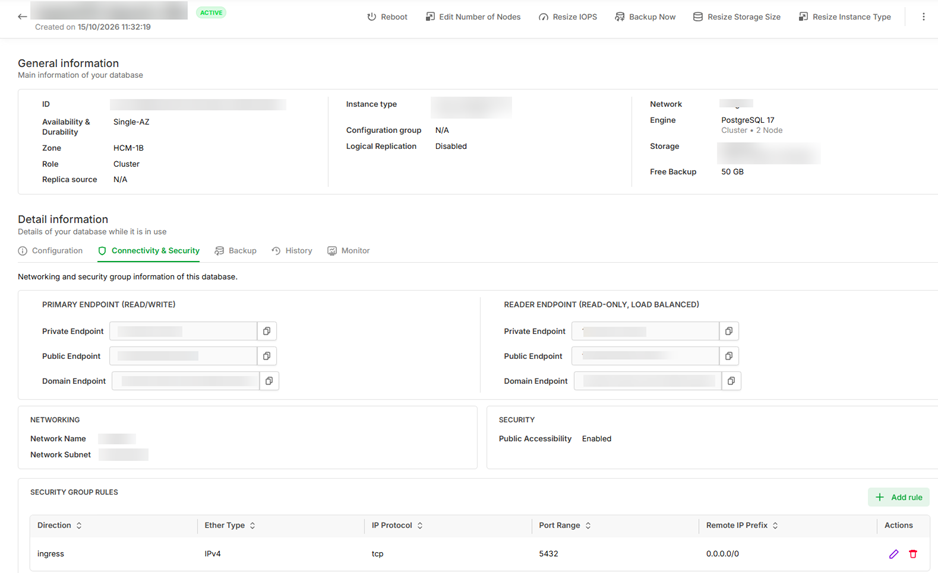
Each endpoint type has Private, Public, and Domain variants. A client on the same network as the cluster uses Private or Domain (if your VPC has DNS enabled); connecting from an outside machine uses Public or Domain.
Step 1: Prepare the data. Create a 1-million-row table and disable autovacuum on it so we can observe dead tuples in time:
CREATE TABLE bloat_demo (id int, val text) WITH (autovacuum_enabled = off);
INSERT INTO bloat_demo SELECT g, 'v' || g FROM generate_series(1, 1000000) g;
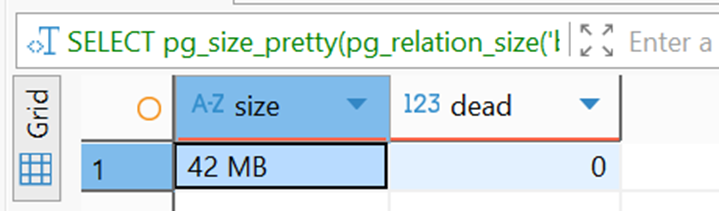
The query below shows the table size and dead-tuple count; we’ll re-run it after each step:
SELECT pg_size_pretty(pg_relation_size('bloat_demo')) AS size,
       (SELECT n_dead_tup FROM pg_stat_user_tables WHERE relname = 'bloat_demo') AS dead;
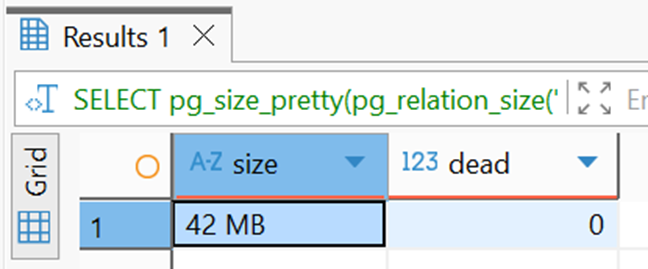
Step 2: Check the initial state. The 1-million-row table takes 42 MB, with no dead tuples.
Step 3: UPDATE the entire table:
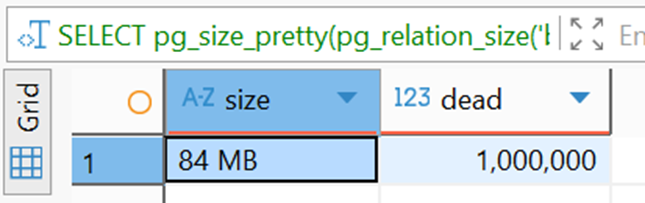
UPDATE bloat_demo SET val = val || '!';Re-run the check query: size grows from 42 MB to 84 MB and 1,000,000 dead tuples appear.
Step 4: VACUUM:
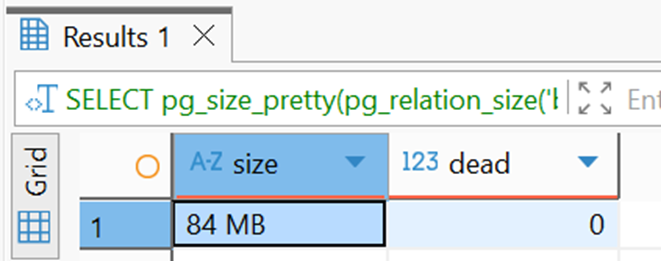
VACUUM bloat_demo;Dead tuples drop to 0 but size stays at 84 MB, the free space is kept for reuse.
Step 5: VACUUM FULL:
VACUUM FULL bloat_demo;Size drops back to 42 MB, as it was originally.
3.3. Long-running transaction
In principle, PostgreSQL can only clean up a tuple version when it’s certain that version is no longer needed by any relevant snapshot.
So a transaction that runs too long can cause problems. Such a transaction holds an old snapshot, so PostgreSQL can’t yet clean up the old tuples that snapshot might need. Autovacuum still runs normally but can’t remove these tuples. Dead tuples pile up, the table bloats, and queries gradually slow down.
Demo: a long transaction blocks VACUUM (reusing the bloat_demo table from section 3.2).
Step 1: Session A opens a long transaction, reads some data, and leaves it open without COMMITting:
BEGIN ISOLATION LEVEL REPEATABLE READ;
SELECT count(*) FROM bloat_demo;
Step 2: Session B creates dead tuples:
UPDATE bloat_demo SET val = val || '?';Step 3: Session B runs VACUUM:
VACUUM VERBOSE bloat_demo;VACUUM VERBOSE output (trimmed):
vacuuming "database_1.public.bloat_demo"
...
tuples: 0 removed, 2000000 remain, 1000000 are dead but not yet removable
...
0 removed: VACUUM couldn’t remove any tuples.1000000 are dead but not yet removable: 1 million dead tuples must still be kept because Session A might still need them.
Step 4: Find the long-running transaction:
SELECT pid, state, now() - xact_start AS duration, query
FROM pg_stat_activity
WHERE xact_start IS NOT NULL
ORDER BY xact_start;
Session A has been idle in transaction for 1 minute 23 seconds. The transaction is still open but doing nothing — and it’s the one holding the old snapshot.
Step 5: Session A COMMITs, Session B runs VACUUM again:
-- Session A
COMMIT;

-- Session B
VACUUM VERBOSE bloat_demo;
VACUUM VERBOSE output (trimmed):
vacuuming "database_1.public.bloat_demo"
...
tuples: 1000000 removed, 1000000 remain, 0 are dead but not yet removable
...
Right after Session A COMMITs, VACUUM removes all 1 million dead tuples.
4. Summary
- MVCC lets a single row exist in multiple versions.
- Snapshots,
xmin, andxmaxhelp PostgreSQL decide which version is visible. - UPDATE creates a new version instead of overwriting the old one directly.
- Dead tuples are old versions that need to be cleaned up once no longer needed.
- VACUUM cleans up dead tuples; Autovacuum does this automatically.
- A long-running transaction can block VACUUM, causing dead tuples to accumulate and the table to bloat.
- MVCC doesn’t replace locks: multiple transactions editing the same row may still wait on each other, but MVCC lets ordinary reads avoid waiting on writes and vice versa.
