

Overview
It’s 9 PM. I get a task: write a new deployment runbook for vStorage. I open docs.vngcloud.vn, read through 15 pages, and copy-paste the important parts into Notion. The next day, my manager asks, “What’s the difference between a VKS multi-AZ cluster and a private cluster?” I reopen the old tabs, read through four more pages, and add more notes.
A week later, there is an OOMKilled incident on VKS. I dig through Notion, but I cannot find anything in the mess of folders. So I open the docs for the third time and start reading from scratch again. Every time I need information, I spend 15 to 30 minutes rebuilding context—and nothing really carries over from one session to the next.
The problem is not that information is missing. The docs are already there. The real problem is that no one is maintaining a living knowledge base for the team. The maintenance burden grows faster than the value it creates. People give up on wikis because they get tired of the bookkeeping.
That is why I built vllm-wiki Agent v1.0—an agent that runs 24/7 on GreenNode AgentBase, automatically reads docs, URLs, and files provided by users, extracts concepts, and creates and maintains interconnected wiki pages using Gemma 4-31B through GreenNode AI Platform. The pattern comes from Karpathy’s LLM Wiki gist: humans curate, LLMs maintain.
What you will build by the end of this tutorial
- An AI agent that takes a URL / file / text input, fetches content through Firecrawl, summarizes it, generates 3–10 detailed wiki pages per source, and stores them persistently in AgentBase Memory.
- Three main modes: ingest (bring knowledge in), query (retrieve answers with citations like [[slug]]), and lint (detect contradictions, orphan pages, and stale content).
- A sitemap-based crawler: give it a root URL, and the agent can discover up to 500 sub-pages and ingest them in parallel with concurrency=4.
- A glassmorphism-style WebUI with sidebar navigation, dashboard stats, a sources list, and a knowledge graph visualization (vis-network)—click any node to query it directly.
- Tool integration: an sre-agent can call vllm-wiki as a LangChain tool for lookups during alert handling.
Prerequisites
- An IAM Service Account on the GreenNode Portal (iam.console.vngcloud.vn) — the agent uses CLIENT_ID + CLIENT_SECRET to call the Memory and Identity APIs.
- A GreenNode AI Platform API key — model: google/gemma-4-31b-it, 128K context window, free tier.
- Docker + Python 3.10+ on your local machine.
- A vCR Container Registry or Docker Hub account to push the image.
- (Optional) Firecrawl self-hosted on K8s or a cloud API key — falls back to httpx if unavailable.
GreenNode AI Platform exposes an OpenAI-compatible endpoint, so code using langchain_openai.ChatOpenAI only needs a different base_url. There is no need to learn a separate SDK.
High-level architecture
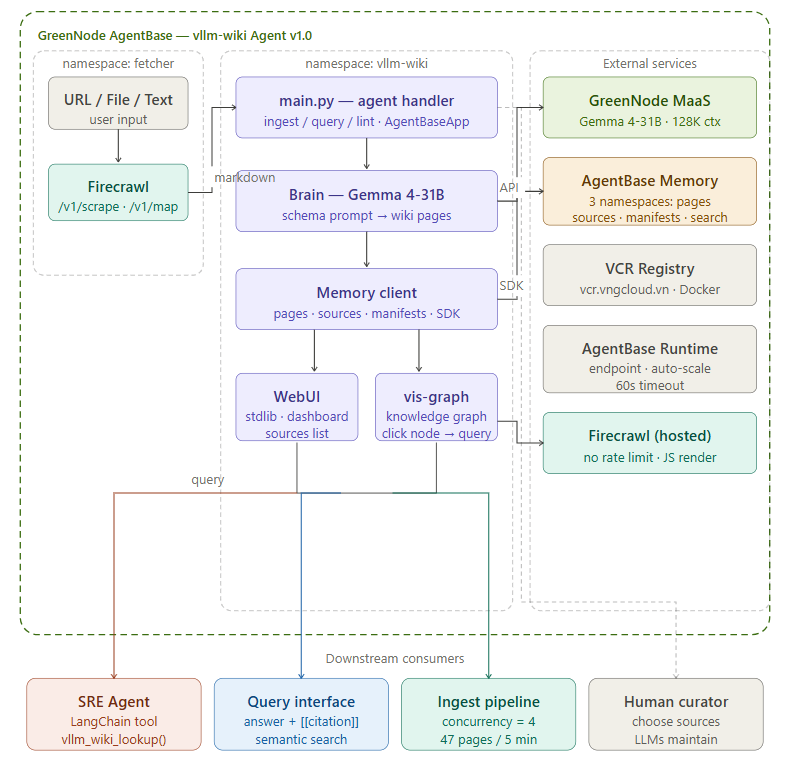
Figure 1: High-level architecture of vllm-wiki Agent v1.0 — four independent layers
Request flow
Flow 1 — Ingest (bringing knowledge in)
Going from a URL to detailed wiki pages takes three steps. AgentBase gateway has a hard timeout of 60 seconds, and the separate two-layer discover + ingest approach is what solves that problem.
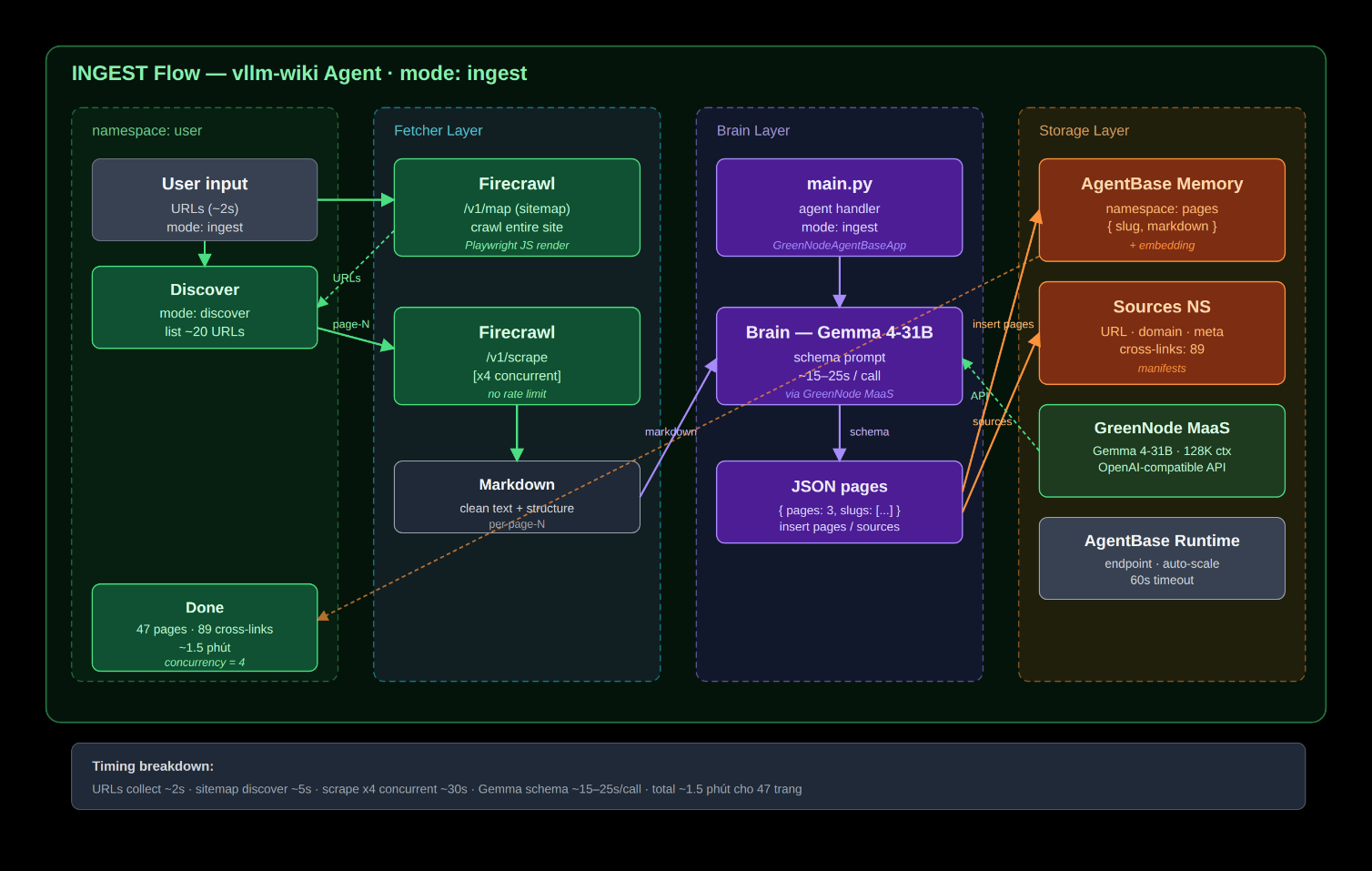
Figure 2: Ingest pipeline — two phases: discover (1 call) → ingest (N parallel calls, concurrency=4)
Safety note: each ingest call takes around 15–25 seconds, which stays under the 60-second timeout. With four parallel workers, throughput increases 4×. Crawling 20 URLs drops from 7 minutes (serial) to 1.5 minutes.
Flow 2 — Query (answers with citations)
Going from a natural-language question to an answer with citations like [[slug]] takes only a few seconds. Gemma 4-31B only needs to synthesize—there is no need to fetch the web again.
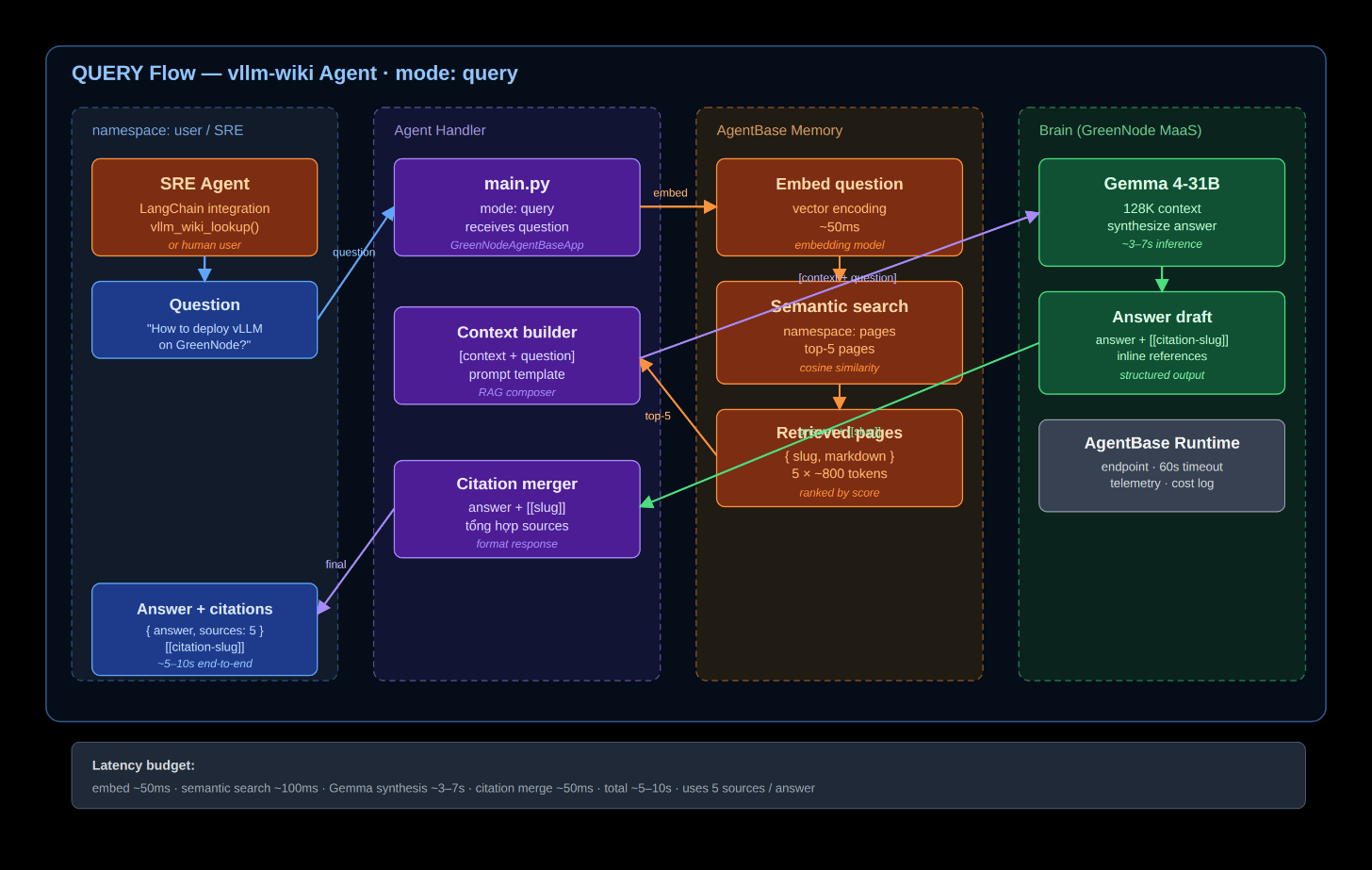
Figure 3: Query pipeline — vector search → context injection → Gemma synthesis → answer + citation
Tool integration: the SRE Agent calls vllm_wiki_lookup() as a LangChain tool. It follows the same flow, and the response is returned as a string for the agent to continue using.
Flow 3 — Lint (detecting stale content and contradictions)
This runs on a weekly schedule. It detects wiki pages with outdated information, orphan pages that no one links to, and contradictions between pages.
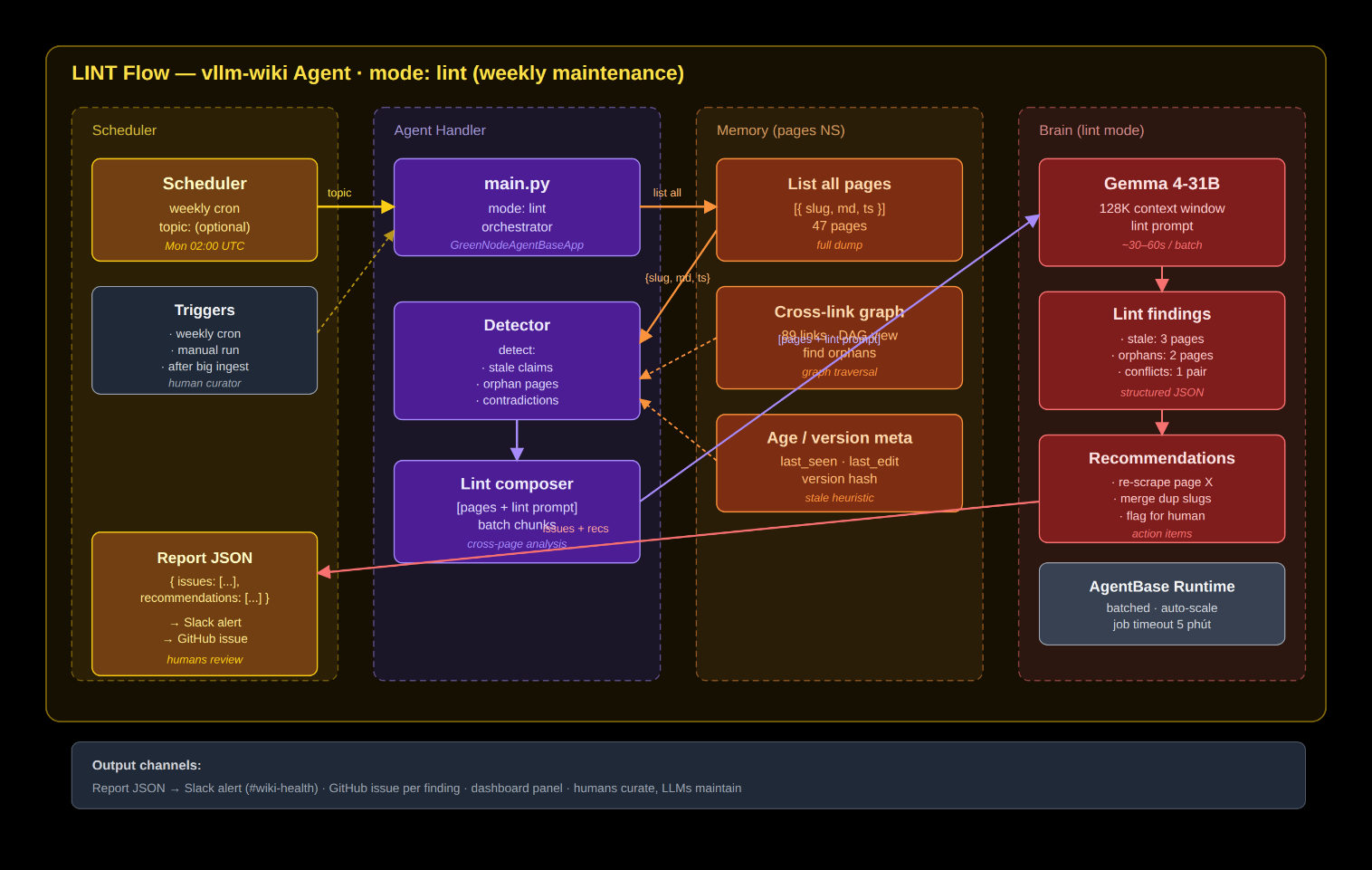
Figure 4: Lint pipeline — automatic detection of stale claims, orphan pages, and contradictions
Lint mode is not included in v1.0 yet—it is on the roadmap for v1.1. Right now, it runs manually by calling mode: lint through the API.
Step-by-step guide
Step 1 — Scaffold the project
The project structure is intentionally minimal. I deliberately kept it small: just five files before adding more features.
mkdir vllm-wiki-agent && cd vllm-wiki-agent
python -m venv venv && venv/Scripts/Activate.ps1 # Windows
pip install greennode-agentbase langchain langchain-openai httpx python-dotenv
vllm-wiki-agent/
├── main.py            # entrypoint - GreenNodeAgentBaseApp handler
├── webui.py           # local UI server (stdlib only, no Node required)
├── requirements.txt
├── Dockerfile
└── .env.example
.dockerignore must include .env, .greennode.json, and venv/. Do not leak secrets into the image.
Step 2 — Configure credentials
I explain each variable—where to get it and why it is needed—instead of just listing them out.
# .env
GREENNODE_CLIENT_ID=        # auto-injected when deployed to Runtime
GREENNODE_CLIENT_SECRET=
LLM_API_KEY=vn-xxx          # from aiplatform.console.vngcloud.vn
LLM_BASE_URL=https://maas-llm-aiplatform-hcm.api.vngcloud.vn/v1
LLM_MODEL=google/gemma-4-31b-it   # free tier, 128K context
MEMORY_ID=memory-xxxxxxxx         # created through the AgentBase console
# Optional - much cleaner content when ingesting URLs
FIRECRAWL_API_KEY=fc-xxx
FIRECRAWL_URL=http://firecrawl.your-cluster/
When deployed to AgentBase Runtime, GREENNODE_CLIENT_ID and GREENNODE_CLIENT_SECRET are injected automatically by the runtime—do not hardcode them into .env for production.
Step 3 — Core handler following the LLM Wiki pattern
There are three main modes, with one independent function for each. This separation matters because it lets you test each mode individually without running the entire stack.
from greennode_agentbase import GreenNodeAgentBaseApp, RequestContext
from langchain_openai import ChatOpenAI
app = GreenNodeAgentBaseApp()
llm = ChatOpenAI(
    model=os.environ["LLM_MODEL"],
    base_url=os.environ["LLM_BASE_URL"],
    api_key=os.environ["LLM_API_KEY"],
    temperature=0.2,
    max_tokens=5000,
    timeout=55,
)
@app.entrypoint
def handler(payload: dict, ctx: RequestContext) -> dict:
    mode = payload.get("mode", "query")
    if mode == "ingest":
        text = _fetch_url(payload["url"]) if payload.get("url") else payload["text"]
        return _ingest(text, source_label=payload.get("url"))
    if mode == "query":
        return _query(payload["question"])
    if mode == "lint":
        return _lint(payload.get("topic"))
The ingest flow has five sequential steps:
- Semantically search the top 5 related pages in the pages namespace, so the LLM understands the current state of the wiki.
- Call the LLM with the system prompt as the schema and the user prompt as the source plus related pages.
- The LLM returns JSON: {summary, pages: [{slug, markdown}], notes}.
- Insert each page into the pages namespace in Memory.
- Insert a manifest {label, timestamp, summary, pages} into manifests so the Sources tab can list it.
A memorable bug: MemoryClient.insert_memory_records_directly() expects a dict like {"memoryRecords": [text]}, not a plain list [text]. If you pass the wrong format, the TypeError is not very clear—so check your SDK version.
Step 4 — Detailed page schema
The quality of the wiki depends on using the system prompt to force the LLM into a strict structure. If the schema changes—for example, by adding a Trade-offs section—you only need to edit the prompt, not recompile anything.
## [[slug]]
**TL;DR:** 1--2 sentences summarizing the core idea
### Overview
### Key details
### How it works
### Use cases
### Related
- [[related-slug-1]]
- [[related-slug-2]]
### Sources
- https://nguon.url
The old prompt only said “produce pages,” so the LLM often merged two sub-sources into a single page. The fix was to emphasize: “if the source contains === Page: URL === blocks, produce at least one wiki page per block.” Crawl 5 URLs → 8–12 distinct wiki pages.
Step 5 — Sitemap discovery with /v1/map
When I tested Firecrawl on docs.vngcloud.vn/vng-cloud-document/vn/ai-platform, I compared two endpoints:
- /v1/crawl → 0 URLs (because onlyMainContent stripped out the sidebar navigation)
- /v1/map → 50 URLs in 1.87 seconds, including ai-platform/notebook-instance, model-registry, ai-gateway/*, and more
So use /v1/map for sitemap discovery and /v1/scrape for content extraction. If you self-host Firecrawl on K8s, the speed is comparable to the cloud version and you avoid rate limits.
Step 6 — Async crawling + parallel ingest
AgentBase invocation gateway has a hard timeout of 60 seconds. Crawling 20 URLs × 20 seconds of LLM processing per page = 400 seconds, which clearly does not fit. The solution is a two-layer approach:
- Discover phase (~2s): the UI calls mode: "discover" → the backend hits /v1/map → returns the list of URLs immediately.
- Ingest phase (N parallel calls): the UI loops through N URLs with concurrency=4 — each call takes 15–25 seconds, which stays under the 60-second timeout.
async function worker() {
  while (cursor < urls.length) {
    const i = cursor++;
    inflight.add(urls[i]);
    renderProgress();
    const r = await api({mode:'ingest', url: urls[i]});
    results[i] = r;
    inflight.delete(urls[i]);
    done++;
    renderProgress();
  }
}
await Promise.all(Array.from({length: 4}, worker));
The result: crawling 20 URLs drops from 7 minutes to about 1.5 minutes—a 4× throughput gain.
Step 7 — Deploy to the GreenNode AgentBase Portal
The entire agent runs on GreenNode AgentBase Runtime, a managed platform, so you do not need to manage Kubernetes yourself or worry about scaling. There are two deployment options, both pointing to an image stored in vCR:
- Via the Portal UI (no CLI required): open aiplatform.console.vngcloud.vn/runtime → Create Runtime → choose the vCR image → flavor 2x4-general → enter env vars → Create. A public endpoint is generated automatically, and IAM credentials are injected by the Portal.
- Via the CLI (reproducible, CI/CD-friendly): build + push + call the runtime API as shown below.
# Login to vCR
echo $VCR_PASSWORD | docker login vcr.vngcloud.vn -u $VCR_USER --password-stdin
# Build & push
docker build --platform linux/amd64 -t vcr.vngcloud.vn/$REPO/vllm-wiki:latest .
docker push vcr.vngcloud.vn/$REPO/vllm-wiki:latest
# Deploy runtime
bash runtime.sh create \
  --name vllm-wiki \
  --image vcr.vngcloud.vn/$REPO/vllm-wiki:latest \
  --flavor 2x4-general \
  --env-file .env \
  --min-replicas 1 --max-replicas 2 \
  --cpu-scale 50 --mem-scale 50
# Verify
# Endpoint: https://invocation-agentbase.api.vngcloud.vn/runtime/endpoint-xxx
After you change the code, update it by rebuilding and pushing with the same :latest tag, then click Update in the Portal (or run runtime.sh update). AgentBase handles the rolling restart automatically (UPDATING → ACTIVE in about 60 seconds, with zero downtime). Logs, metrics, and scaling are all managed directly in the GreenNode AgentBase Portal.
Ingest pipeline — From URL to wiki page
User ──┐
       │ URL / file / text
       ▼
┌─── DISCOVER ───┐
│ /v1/map returns the URL list immediately (1 call, ~2s)
│
│──────────────▶
└────────────────┘
       │ N URLs
       ▼ (concurrency = 4)
┌─── SCRAPE ─────┐
│ /v1/scrape returns clean Markdown, strips nav/JS
│ Firecrawl
│──────────────▶
└────────────────┘
       │ clean markdown
       ▼
┌─── STRUCTURE ──┐
│ Gemma 4-31B
│ 3--10 wiki pages / source
│ Brain LLM
│──────────────▶
└────────────────┘
       │ JSON { slug, markdown }
       ▼
┌─── STORE ──────┐
│ AgentBase persistent, searchable
│ Memory
│──────────────▶
└────────────────┘
       │ ✅ indexed
       ▼
QUERY: User asks → vector search → Gemma synthesizes → answer + citation [[slug]]
Figure 2: Ingest & Query pipeline — 4 stages
Stage 2 (SCRAPE) is where the biggest improvement happened. Initially, I used httpx.get().text and dumped 480KB of HTML into the LLM. Gemma ended up reading 90% CSS and navigation, so generation quality was poor. Switching to Firecrawl with onlyMainContent=true reduced the input from 480KB down to 4KB of useful content.
Stage 4 (STORE) requires truncation before insert. AgentBase Memory rejects records larger than 10KB. Capping each record at 8,000 characters is enough for a 700-word page with some safety buffer.
Case study: Ingesting the full VKS docs in 5 minutes
Here is the real second-by-second timeline:
T+0s Submit ingest — crawl=true, limit=20.
T+2s Discovery complete — the sitemap returns 20 URLs: vks-la-gi, mo-hinh-hoat-dong, getting-started/create-public-cluster (+ variants), multi-az-cluster, private-cluster, terraform, release-notes.
T+5s → T+90s Parallel ingest — 4 workers run in parallel. The UI shows “ingested 12/20 · 4 in flight” in real time. Each page generates 2–4 wiki pages.
T+95s Completed — 47 new wiki pages and 89 cross-links [[slug]]. The Graph tab shows the vks cluster with 12+ incoming edges—a clear hub.
T+96s Test query — “Compare public cluster vs private cluster in VKS” → a three-paragraph answer citing [[public-cluster]], [[private-cluster]], [[node-group]], and [[networking-cni]]. Sources: 5.
Integrating with other agents — Turning the wiki into a tool
Once the wiki became rich enough, I started wondering: what if the sre-agent could look things up on its own instead of asking me every time? vllm-wiki already exposes a public HTTP endpoint, so the only thing left to do was wrap it as a LangChain tool. It took our team exactly 20 minutes to paste the code below into sre-agent main.py, rebuild, and push. From that moment on, sre-agent knew how to “read the docs” before replying to an alert.
from langchain_core.tools import tool
import httpx
VLLM_WIKI = "https://invocation-agentbase.api.vngcloud.vn/runtime/endpoint-xxx"
@tool
def vllm_wiki_lookup(question: str) -> str:
    """Look up VNG Cloud / vLLM / VKS / AI Platform docs. Use for questions about infrastructure and runbooks."""
    r = httpx.post(
        f"{VLLM_WIKI}/invocations",
        json={"mode": "query", "question": question},
        timeout=60.0
    ).json()
    return r.get("answer", r.get("error", "lookup failed"))
agent = create_agent(llm, tools=[*existing_tools, vllm_wiki_lookup])
A real incident from this week: at 3 AM, our team’s sre-agent received a CrashLoopBackOff alert on the production cluster. Instead of waking me up, the agent called vllm_wiki_lookup("How does VKS handle pod crash loop") on its own. The wiki returned an answer with runbook steps, the SRE ran kubectl describe pod to confirm the pod state, and then sent a complete report to Teams with a step-by-step runbook attached. By the time I woke up, the alert had already been handled—I only needed to review and approve it. That was the moment I realized the wiki was not just for humans. It had become shared memory for the entire agent system.
Testing & Troubleshooting
Verify that the system is working
After the first deployment, I usually paste the commands below into the terminal to smoke-test the three main modes. If all three return 200 OK in under 30 seconds, the agent is almost certainly ready for team use.
# Test ingest
curl -X POST https://<endpoint>/invocations \
  -H 'Content-Type: application/json' \
  -d '{"mode":"ingest","url":"https://docs.vngcloud.vn/vks"}'
# Test query
curl -X POST https://<endpoint>/invocations \
  -H 'Content-Type: application/json' \
  -d '{"mode":"query","question":"VKS multi-AZ vs private cluster?"}'
# View logs
bash runtime.sh logs $RUNTIME_ID --limit 100 --order desc
Common issues
| Symptom | Actual cause | Fix |
|---|---|---|
| UnicodeDecodeError with Vietnamese text | Content-Type is missing charset=utf-8 | Make sure the header includes charset=utf-8. Browser FileReader.text() is fine; the issue usually appears with curl from Windows Git Bash. |
| Gateway 504 timeout | Synchronous crawling exceeds 60s | Switch to separate discover + ingest phases (Step 6). Keep each call under 60 seconds. |
| Thin pages, repetitive self-citations like [[X]] | HTML source contains too much noise | Re-ingest through Firecrawl with onlyMainContent=true and strengthen the prompt so it produces more pages. |
| 400 when creating the runtime | The description uses an en-dash (-) | Use a regular hyphen (-) instead. This is a Helm encoding issue. |
| Memory record reject 500 | Page exceeds 10KB | Truncate: text[:8000] + "[truncated]". |
| /v1/crawl → 0 URLs | onlyMainContent strips the sidebar | Use /v1/map — it is sitemap-based and does not strip sidebar links. |
Results & next steps
Measured results
| Metric | Before | After vllm-wiki Agent v1.0 |
|---|---|---|
| Time-to-info when asking documentation questions | ~15 minutes | ~30 seconds |
| How often old doc pages need to be reopened | Every session | Close to zero — wiki queries replace it |
| Incident response with specific citations | Inconsistent | 100% with citations like [[slug]] |
| Hallucination when no runbook is available | High | Close to zero with a complete knowledge base |
| Time spent maintaining the wiki after each docs update | 30–60 minutes each time | Automatic re-ingestion |
The 3 most important takeaways
1. Quality depends on the schema, not the model size. I used to think I needed GPT-4o to get a “good” wiki. But once I locked down the schema and let Firecrawl handle content cleaning, Gemma 4-31B was more than enough. In some cases, it was even more stable because its output was concise and did not try to over-explain. If you are still deciding which model to use, my advice is simple: lock the schema first, upgrade the model later.
2. /v1/map is what really makes the difference. I spent almost an entire afternoon debugging why crawl kept returning 0 URLs on the AI Platform docs before realizing that /v1/crawl was losing the sidebar due to onlyMainContent stripping. I switched to /v1/map—and suddenly got 50 URLs back in 1.87 seconds. If you take only one technical lesson from this article, let it be this: if the docs site has a sidebar, always prefer /v1/map.
3. humans curate, LLMs maintain is the right pattern. You are still the one who decides which sources are trustworthy, which questions matter, and how the wiki should evolve. The “boring” LLM work—cross-referencing, updating summaries, flagging contradictions—should be handled by the agent. Once I clearly separated those two roles, both the agent and I worked better: I spent less time on manual bookkeeping, and the agent spent less time trying to “sound smart” in areas where it did not need to.
Next steps
- Automatic lint mode — I plan to have it run every Monday morning, scan the entire wiki, and send Slack DMs for outdated pages (for example, pages still mentioning “vLLM 0.5” even though 0.8 is already out). I’m working on it now; it should be done next week.
- Slack ingest bot — our team is prototyping a bot that watches the #knowledge channel, automatically calls ingest when someone pastes a docs link, and reacts when it finishes. The goal is for the wiki to “grow itself” without anyone needing to open the WebUI.
- Memex export — I never want the wiki to be locked into a single platform. The plan is to add an endpoint that exports the entire wiki as an Obsidian vault (Markdown files + graph view), so you can take it anywhere.
- Custom embeddings for Vietnamese — I am currently using the default BGE-M3, but semantic search in pure Vietnamese still misses sometimes. I am planning to test a few Vietnamese-specific models next (for example, multilingual-e5 fine-tuned) and compare the results.
Source code + Dockerfile + Helm chart: github.com/[your-org]/vllm-wiki-agent
If you still have the energy to read more, I highly recommend Memex (1945) by Vannevar Bush—the original vision of a personal knowledge store connected through associative trails. Bush wrote that essay before the Internet even existed, and it took nearly 80 years for LLMs to become capable of handling the bookkeeping work he imagined. Once you read it, you will realize that vllm-wiki is not a new idea—it is simply a tool that finally makes an old idea practical.
Small postscript: the first draft of this article was actually written inside vllm-wiki itself—I pasted in a few docs tabs, ingested them, and then asked the agent to “summarize the build process.” It is a little meta, but honestly that was the first use case where I felt confident saying: this agent is genuinely worth using—to document the process of building itself.
